Pick tonight's game with a five step data plan for small streamers
Pick tonight's game with a five step data plan for small streamers

Pick for opportunity, not raw popularity, and test it tonight. Compare a category's current viewers against its live channel count at the exact hour you plan to go live, using something like TwitchTracker's median viewership data as your baseline. If the ratio favours discovery over saturation and the format suits your style, shortlist it, run a short test stream, and let the numbers tell you whether to commit.
*> TL;DR:
>
> - Focus on categories with a viewer-to-channel ratio above 50:1 at your streaming time, as they present genuine opportunities for smaller channels without high saturation.
> - Use median viewership data over multiple days instead of peak hours to accurately assess how a game's demand aligns with your specific streaming slot.
> - Run at least three comparable test streams with consistent variables to reliably evaluate a game's performance against your baseline metrics.
> - Prioritize games that naturally support viewer interaction, such as co-op, story-driven, or reaction-based titles, to foster chat engagement and growth.
> - Incorporate audience voting tools like PickThe.Games to involve viewers in game selection, reducing debate while strengthening community connection.
*Table of Contents
- How do you choose which game to play next?
- How do you read demand versus saturation?
- What's the best way to test-run a candidate game?
- Which game formats create the strongest chat hooks?
- When should you time a stream around a launch or event?
- How does PickThe.Games help you pick and test a game?
- Why consistency beats chasing every trending title
- Try PickThe.Games before your next stream
- Sources
- FAQ
How do you choose which game to play next?
You don't need a spreadsheet degree to pick well. You need a repeatable process that turns a vague hunch ("maybe I'll try that new co-op game?") into a shortlist you can actually test. This is roughly the same logic StreamGist uses when it explains how game recommendations get built for creators: shortlist, verify, time it right, fit your format, then test before you commit.
Here's the five-step version that works whether you've got 40 followers or 4,000.
1. Shortlist games you genuinely enjoy and could stream for weeks, not days. Chasing every trending title burns you out fast, and viewers can tell when you're not into what's on-screen. Write down three to five candidates you'd happily play even if nobody watched.
2. Check live metrics at your actual planned streaming hour, not whenever you happen to be browsing Twitch. A category that looks dead at 2pm might be booming at 9pm, and vice versa. Pull up the category page and note two numbers: current viewers and current live channels.
3. Find a timing hook. Games spike around patches, DLC drops, seasonal events, or a wave of "how do I beat this boss" questions flooding chat and search. A hook doesn't have to be huge. Even a modest content update can nudge a category's viewer to channel ratio in your favour for a week or two.
4. Confirm format fit before you commit a whole evening to it. Ask yourself honestly: does this game let viewers talk to you, vote on decisions, or react to what's happening on screen, or is it the kind of title where you're heads down and silent for long stretches? Define three specific interaction loops you'll use, things like chat votes on which route to take, or a "name the horse" moment, before you go live.
5. Run a short, controlled test stream and compare it against your usual numbers. Same start time, same title format, same promotion effort. If average viewers, chat activity, and follows hold up (or beat your baseline), you've found a keeper. If they tank, you've lost an evening, not a month.
The order matters here. Streamers who skip straight to step two, chasing whatever category shows the biggest raw viewer count, often end up buried on page four of a category with 800 other channels live. Streamers who skip step four end up playing something popular but wrong for their personality, which shows on camera within about ten minutes.
Pro Tip: Keep a running note (a spreadsheet, a Notion page, whatever) of every game you've shortlisted and its viewer to channel numbers at your streaming hour. Six months from now, that log becomes a personal database more useful to you than any general "best games to stream" list, because it's calibrated to your exact time slot and region.If you're building this shortlist with friends or your Discord community rather than alone, a swipe-based tool like Pickthe can cut the "what should we try next" debate down from twenty minutes of chat scrolling to about five.
How do you read demand versus saturation?
Total viewer count on its own is close to useless for a small or mid-size channel. A category with 40,000 viewers sounds enormous, but if 3,000 channels are live inside it, you're one face in a crowd nobody's actively searching through. The number that actually predicts whether you'll get found is the relationship between the two.
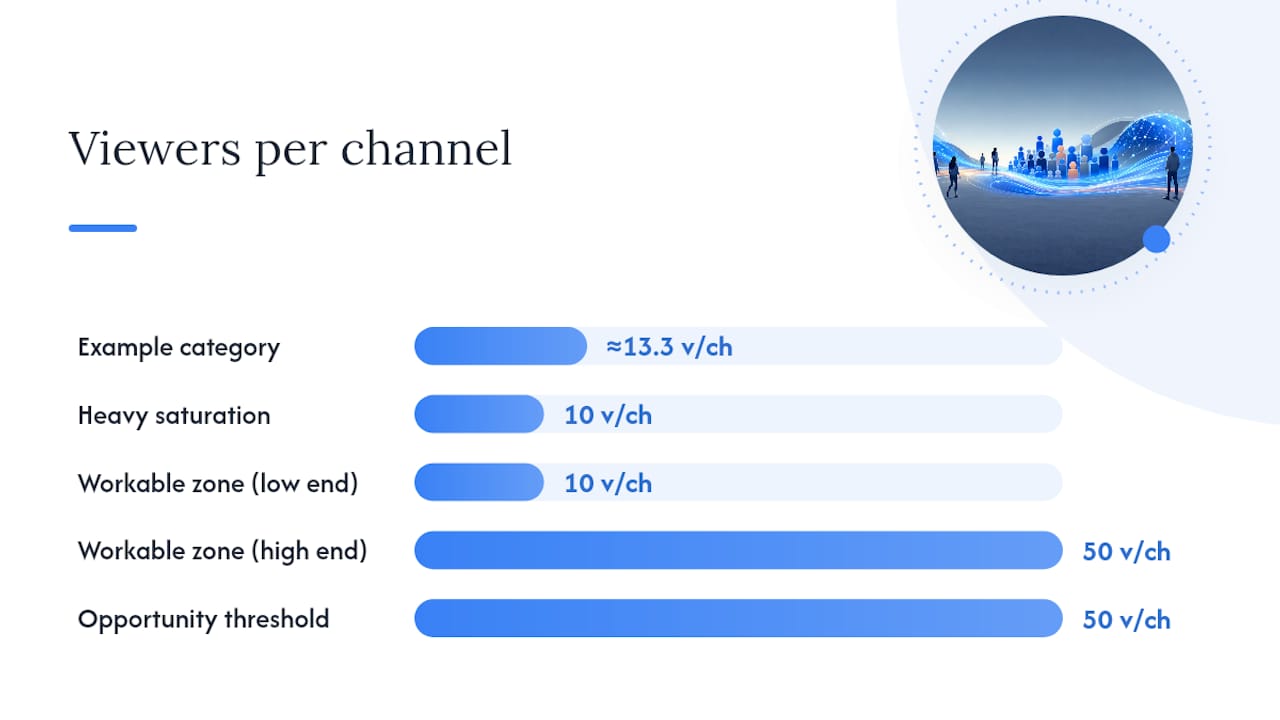 Median viewership over median live channels is your saturation ratio, and it beats a single peak-hour snapshot because streaming numbers swing wildly by hour, weekday, and region. TwitchTracker's "games to stream" report uses seven-day median viewership rather than a one-off spike precisely because a single Saturday night peak tells you almost nothing about a random Tuesday afternoon.
Here's the quick version of how to read the ratio:
- Below roughly 10:1 (viewers to live channels) usually signals heavy saturation. Getting noticed here means out-producing or out-personality-ing hundreds of rivals.
- Somewhere between 10:1 and 50:1 tends to sit in a workable zone, enough audience interest to matter, not so many channels that you vanish instantly.
- Above 50:1 often flags genuine opportunity, though it can also mean the category is niche or short-lived, so check it holds across a few days before you build a series around it.
> Quick check: does the math actually work for your slot? Open the category at your planned start time on three or four different days. If viewers consistently outnumber channels by a healthy margin at your hour specifically, and not just at the global peak, you've found a real opening rather than a lucky screenshot.
Checking across multiple days matters because Tuesday-afternoon numbers and Friday-night numbers for the same game can differ by a factor of five or more. Check your specific slot, not the category's best hour of the week.
If a category comes back genuinely crowded, don't abandon it outright. Scroll through the top page of live channels and look at what's actually succeeding there. When those top slots are dominated by high-production, low-interaction streams (someone quietly grinding with no camera, minimal chat engagement), there's often room for a smaller, chattier, more reactive channel to carve out a niche inside the same category rather than leaving it entirely.
What's the best way to test-run a candidate game?
Treat every new game like an experiment, not a gamble. The point isn't to "try it and see", which is how streamers end up with a graveyard of one-off VODs and no real data. The point is a controlled comparison you can actually learn from, similar to the A/B-style methodology recommendation engines use to test which content performs best for a given audience.
1. Lock your variables before you start. Same start time, same title format, roughly the same stream length, and the same promotion effort (don't blast this one on five Discord servers if you never do that for your regular game).
2. Pick your KPIs in advance and write them down. Average concurrent viewers, unique chatters, follower conversion during the stream, watch time or retention through the session, and whether anything got clipped.
3. Run at least three to six comparable sessions, not one. A single stream can spike or flop for reasons that have nothing to do with the game itself, a raid, a lucky Twitch algorithm moment, a bad internet day. StreamHub's guidance on data-driven game selection flags this single-event bias as one of the most common mistakes streamers make when judging a new title too quickly.
4. Log the results next to your baseline numbers, the same KPIs from your usual go-to game over a similar stretch. Averages, not just your best night.
5. Decide with a threshold, not a feeling. If the new game beats or matches your baseline across most KPIs after your test window, keep it in rotation. If it consistently underperforms, park it and try the next candidate on your shortlist.
Pro Tip: Chatters, not viewers, are usually the better early signal. A stream with fewer total viewers but a noticeably higher chat-to-viewer ratio often converts to loyal followers faster than a bigger, quieter crowd.Which game formats create the strongest chat hooks?
Not every genre gives viewers a reason to talk. Games built around choices, reactions, or shared tension tend to outperform quiet, heads-down genres for smaller channels, because indie, co-op, party, horror, and story-first playthroughs naturally hand viewers something to react to.
- Co-op and party games let chat vote on strategy, name characters, or heckle your teammate in real time. If you're gathering a group to test one, a crossplay compatibility checker saves the usual mess of discovering halfway through setup that half the group is on the wrong platform.
- Indie or story-first playthroughs work well because "first reaction" content is inherently rewatchable; a jump scare or plot twist clip travels further than routine ranked gameplay.
- Horror is almost engineered for chat interaction. Viewers love shouting warnings you'll ignore for comic effect, and clip-worthy jump-scare moments are a built-in growth mechanic.
- Ranked or esports titles carry real demand but brutal competition; you're up against streamers with years of mechanical polish, and the format itself (focused, often silent, high concentration) leaves less room for chat banter.
- Just Chatting rewards personality over any game skill at all, but it also depends heavily on an audience you've already built elsewhere.
Whatever format you pick, design three specific interaction hooks before you go live: a decision point chat votes on, a role or nickname chat assigns to an NPC, and one moment planned for a clip. A useful ideas roundup for interactive stream mechanics is worth a scan if you're short on concrete examples.
One more trick worth borrowing: use a "bridge game", something adjacent to your main content that lets you experiment without confusing your regular audience about what your channel actually is.
When should you time a stream around a launch or event?
Launch day looks tempting. Everyone's talking about the new release, search interest is spiking, and it feels like the obvious moment to jump in. It's also usually the worst time for a small channel, because every other creator on the platform had the identical idea.
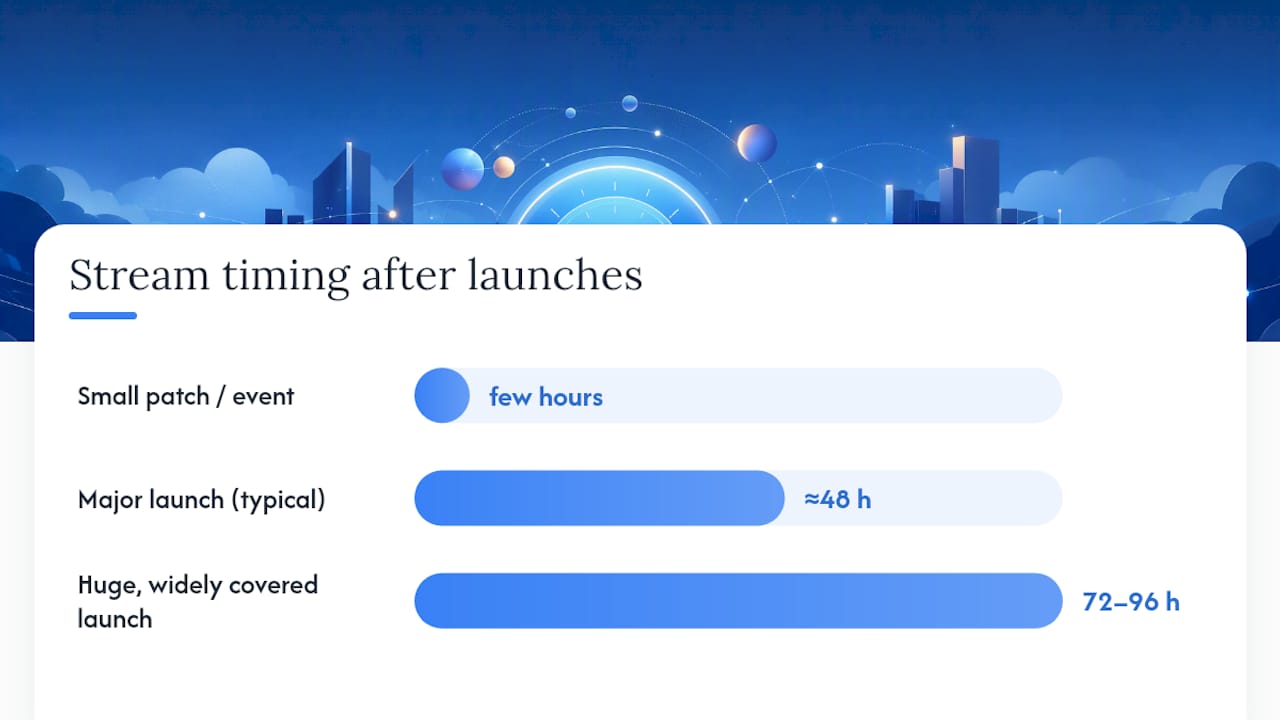
Waiting roughly 48 hours after a major launch often works better for smaller creators. The initial flood of channels thins out fast once the novelty wears off for bigger streamers, while search interest and "how do I beat this part" viewer questions are usually still climbing. That gap, between peak launch chaos and the point where genuine viewer questions pile up, is where a smaller channel gets found.
Practical scheduling around this:
- Mark major patch dates, DLC drops, and community events on a calendar a week ahead, so you're choosing your slot deliberately rather than reacting.
- If it's a huge, widely covered launch, deliberately skip day one and target day three or four instead.
- If it's a smaller patch or event, going live within a few hours can still work, since the crowd never gets big enough to bury you.
- Stack one stream across platforms: the same session gives you Twitch's live browse exposure, a searchable YouTube VOD that keeps earning views for months, and a shot at Kick's noticeably thinner catalogue, where the same content faces far less competition.
Optimise the title slightly differently for each platform rather than copy-pasting one line everywhere; Twitch rewards category-specific tags, YouTube rewards search-friendly phrasing.
How does PickThe.Games help you pick and test a game?
Deciding alone is one thing. Deciding with your Discord community or your regular viewers is a different problem entirely, and it's usually where the real debate (and the real delay) happens.
PickThe.Games works through swipe boards: you build a board of six or so candidate games, invite your group, and everyone swipes on what they'd actually want to watch or play. Real-time voting shows results as they come in, a veto system lets someone flag a game the group genuinely can't run, and Discord integration means the whole thing happens inside the server you already use, no separate app required.
For streaming specifically, Streamer Mode extends that same mechanic to your audience. Here's a working version of the operational flow:
1. Build a six-game board from your shortlist.
2. Share the vote link in chat or Discord and let it run for five minutes.
3. Embed the live leaderboard in OBS so viewers watch the vote happen in real time.
4. Go live with the winner as your test stream, then measure it against the KPIs from your controlled test protocol above.
It turns a subjective "what should I play" guess into a piece of shared, visible group decision-making, which is itself a chat hook before the game even starts.
Why consistency beats chasing every trending title
The five-step process above isn't really about finding a magic game. It's about protecting your evenings from wasted effort while still leaving room to experiment. Streamers who chase every viral title lose the one asset that actually retains viewers: a recognisable personality attached to a recognisable schedule, something Twitch's own guidance on consistent broadcasting treats as central to long-term growth.
Data should decide your entry point into a category. It shouldn't decide who you are on camera.
This week, I'd run one controlled test on a bridge game with genuine timing opportunity, log the numbers honestly, and resist the urge to declare victory or defeat after a single session.
> — PickThe
Try PickThe.Games before your next stream
A swipe-based game selection tool can speed up the decision process described in this guide, reducing back-and-forth in chat about which game to watch. A free streamer mode lets you build a board, share a vote link, and have your audience decide live with a leaderboard showing in OBS.

There's no ad-supported catch here beyond the optional ad-free upgrade for anyone who wants it, and no paywall blocking the core voting and swiping features from your community. Run a five-minute vote before your next session using the game voting app, and if the winner leans multiplayer, browse action, party, or MMO titles in the catalogue to seed your next board. It's a five-minute decision instead of a twenty-minute Discord argument, and your viewers get a say in what they're about to watch.
Sources
- What Games to Stream · TwitchTracker
- How recommendations work · StreamGist
- How to use data‑driven insights to choose your next streaming game · StreamHub
- Tips for applying to the partner programme · Twitch Help
FAQ
How do you choose which game to play next?
Compare the category's viewer count against its live channel count at your planned streaming hour, then confirm the format actually suits how you interact with chat. Games with a favourable viewer to channel ratio and a natural chat hook, votes, reactions, shared decisions, tend to outperform raw popularity for smaller channels.
How many viewers do you need on Twitch to make $1,000 a month?
There's no fixed viewer count tied to a specific dollar figure, since income depends on subs, bits, sponsorships, and ad revenue rather than viewers alone. Twitch's own Partner guidance focuses on consistent broadcast quality and a steady schedule as the real drivers of sustainable channel growth, which is what ultimately supports monetisation.
What's the best game to stream right now?
There isn't a single universal answer, because the best game for you depends on your streaming hour, your format, and the current viewer to channel ratio in that category at that moment. Checking current median viewership against live channel counts for your shortlist, at your actual time slot, gives a far more useful answer than any generic "top games" list.
What is the 40 second rule of gaming?
The 40 second rule is a game design pacing concept, not a Twitch streaming guideline, and it isn't something you need to apply to your broadcast schedule. If you've seen it mentioned alongside streaming advice, it's likely being confused with general engagement pacing rather than any official platform rule.
How do I know if a game is oversaturated for my channel size?
Check whether the ratio of viewers to live channels sits below roughly 10:1 at your planned streaming hour; that generally signals heavy competition for a small channel. If it does, look at whether the top-page channels are quiet, high-production streams, since that often leaves room for a smaller, more interactive channel inside the same category.