Interactive stream game ideas that actually grow your channel
Interactive stream game ideas that actually grow your channel
The best interactive stream game ideas fall into four buckets: chat-controlled games (viewers type commands to affect the action), play-in games (viewers join the match itself), audience voting (chat decides what happens next), and creative collabs (chat builds or draws something together). Each one shifts your audience from watching to playing, which is the single biggest lever for retention on any platform.
If you run a small channel, start cheap and low-tech: chat-command games and simple polls need no extensions, no donations, and almost no setup. If you run a larger channel, extensions and browser-join lobbies are worth the extra configuration because they can handle more simultaneous participants without the chat log turning into noise.
Here are eight ideas worth trying on your very next stream:
- Let chat vote on your next game with a shareable voting link and live leaderboard.
- Run a chat-controlled survival round where typing commands spawns enemies or changes the weather.
- Host a 64-player brawler where viewers type
!jointo spawn straight into the match. - Try a chat-controlled mini-golf round using aim and rotation commands.
- Run a mini-game compilation night where chat picks which game to play next.
- Set up a TikTok gift-powered race where gifts push a lane forward.
- Open a creative collab round where chat votes on what you draw or build.
- Use channel points or a simple overlay to reward viewers who participate most.
Key Takeaways
Interactive stream game ideas work best when the barrier to participation is a single typed command or clicked link, not a donation or download.
| Point | Details |
| --- | --- |
| Pick one format first | Choose chat-control, play-in, or voting based on your chat size, not what looks flashiest. |
| Test before going live | Run a private test with a few friends spamming commands to catch rate-limit issues early. |
| Set cooldowns from day one | Apply per-user cooldowns to every command, especially disruptive ones, before your first real round. |
| Run tight 30-minute sessions | Keep interactive segments short and alternate them with regular content to avoid burnout. |
| Use PickThe.Games for voting | Streamer Mode gives you a shareable, OBS-ready leaderboard for fair audience votes in minutes. |
Table of Contents
- Interactive stream game ideas grouped by how viewers join in
- Named games and platforms built for stream chat games with chat
- What tools do you need to set up interactive stream games?
- How do you keep interactive games running smoothly?
- Which interactive format actually fits your channel?
- Copy-ready templates for your next interactive stream
- How Streamer Mode makes audience voting effortless
- What actually keeps viewers coming back to interactive streams
- Run your next audience vote without the guesswork
- Frequently asked questions about interactive stream game ideas
- Sources
Interactive stream game ideas grouped by how viewers join in
Not every audience wants the same kind of chaos. A quiet Tuesday-night chat of 12 regulars behaves nothing like a raid-fuelled crowd of 400, so it helps to sort ideas by participation method before picking one.
Chat-control games (viewers type commands, nothing else required):- Spawn enemies or shift weather with typed commands. Setup hint: connect a chat-reading integration and set a viewer threshold before launch.
- Send disruptive effects like flashbangs or control-reversals at the streamer. Setup hint: pair this with strict cooldowns from the start, not after things go wrong.
- Aim and swing in a golf-style game using
!aimand!hitsyntax. Setup hint: enable auto-rotation so the round keeps moving even when chat goes quiet.
- A large-lobby brawler where typing
!joinspawns your name into the fight. Setup hint: cap lobby size and cycle rounds every few minutes to avoid drop-off. - A mini-game compilation where chat joins individual rounds with a keyword. Setup hint: rotate through games so no single format overstays its welcome.
- Audience picks the next game from a shortlist via a shareable link. Setup hint: display the live leaderboard on stream so votes feel visible and fair.
- Chat votes on map, difficulty, or boss fight before a run begins. Setup hint: close voting with a visible countdown so latecomers don't complain.
- Chat votes on what you sketch, live, panel by panel. Setup hint: use a simple polling overlay and keep rounds under three minutes.
- Community-built Minecraft or sandbox projects where chat submits ideas by command. Setup hint: assign a moderator to filter submissions before they hit the build queue.
- Chat-submitted challenges or dares between game rounds.
- A scavenger hunt where viewers spot hidden items on screen and call them out.
Chat-control and voting ideas are the lowest-friction entry point for smaller channels. Play-in games and creative collabs need more moderation bandwidth, which matters once your chat is too fast to read line by line.
Named games and platforms built for stream chat games with chat
A handful of games are built specifically around chat participation rather than treating it as an afterthought. Here's what each one actually does once you launch it.
1. Streamer Survival. Chat spawns enemies and changes the weather in real time through native integration with Twitch, YouTube, and Kick, and viewers participate purely by typing commands, with no donations involved. Setup runs: enable the native chat reader in-game, set your viewer threshold and difficulty, then start a round and watch commands populate immediately. It supports all three major platforms out of the box. Pro Tip: Set the viewer threshold higher than you think you need on your first run. A sudden raid can flood the chat feed and spawn far more enemies than you intended.
2. Streamer vs. Chat. This one leans harder into chaos: chat sends disruptive commands like flashbangs, movement slowdowns, or sensitivity changes, and can even spawn playable characters that work against the streamer directly. Setup runs: install the Twitch integration, configure which chaos commands are enabled, then test a short round privately before going live. Cost is a one-off purchase, and it's Twitch-native. Pro Tip: Cap the frequency of the most disruptive commands from day one. Once chat learns a command can trigger motion-sickness-inducing effects, coordinated spamming becomes a real risk without a rate limit.
3. BitSlaps. Viewers type !join to spawn directly into the match, with their username displayed above their character. It supports up to 64 players at once across Twitch, YouTube, and Kick, and it's free to play. Setup runs: launch a lobby, share the join command in chat or your panel, then let viewers stream in as the match fills. Pro Tip: Announce the !join command at the start of every segment, not just once. New viewers arriving mid-stream won't know how to jump in otherwise, and that's where the visible-username design pays off most, since it rewards people who just joined with instant recognition.
4. Janky Golf with Stream. Chat controls shots using commands like !rot, !aim, and !hit, or viewers can use an optional Twitch interactive extension for drag-and-click aiming instead. Setup runs: link your Twitch account, choose between command-only or extension mode, then enable auto-rotation for unattended stretches. It's free to play and works well as a low-key background activity between bigger segments.
5. Kukoro. A compilation of over 20 mini-games where chat types a join command, earns XP, and works through missions cooperatively or competitively. Setup runs: pick a mini-game from the rotation, share the !Kukoro-style join command, then let subscriber perks layer on top for winners. Pro Tip: Rotate mini-games every 10 to 15 minutes rather than letting one run the whole stream. Variety keeps chat engaged instead of drifting to a single dominant clique of regulars.
Beyond named games, Crowd Control deserves a mention as a broader effects ecosystem: it lets viewers send disruptive effects into almost any game you're already playing, using curated packs rather than requiring a purpose-built title. It's worth trying if you want interactivity without switching your entire game library.
What tools do you need to set up interactive stream games?
Every format above needs a handful of technical pieces underneath it, and getting them right the first time saves you from firefighting live on air.
The core toolkit looks like this:
1. OBS with a browser source for any overlay, leaderboard, or voting widget. Most interactive tools generate a URL you paste directly into a browser source layer.
2. A chat bot or reading integration such as tmi.js-based bots or a built-in native reader, which listens to chat without needing moderator-level access to your account.
3. Platform extensions or SDKs where relevant. Twitch extensions handle mouse-based interactions; TikTok's Live platform uses a Bridge SDK to read gift events for gift-powered games.
4. Browser-join lobbies for play-in formats, which need a stable URL viewers can click without installing anything.
5. An overlay builder or your streaming software's native text/image layers for scoreboards, join prompts, and winner screens.
To get a typical chat-controlled game running for the first time:
1. Connect the game or bot to your chat feed using its built-in integration or a read-only connection.
2. Configure your commands (join, vote, action) and set cooldowns before you test anything live.
3. Run a private or unlisted test stream to confirm commands register and the overlay displays correctly.
4. Add the overlay as a browser source in OBS and position it where it won't block key gameplay.
5. Go live and announce the commands clearly in your first few minutes on air.
Pro Tip: Before your first real run, ask two or three friends to spam the join or vote command simultaneously in a private chat. This surfaces rate-limit problems and overlay lag long before a real audience finds them for you.Cross-platform differences matter more than they first appear. Twitch has the deepest native support for chat-command games and interactive extensions. YouTube and Kick integrations tend to lag slightly behind on feature parity but are catching up fast. TikTok Live works differently again: interactivity there is largely gift-powered rather than command-powered, so gifts map to game actions like lanes in a race rather than typed text.
How do you keep interactive games running smoothly?
Rules and pacing decide whether an interactive segment feels exciting or feels like herding cats. A few checks before you open the floor to chat save you from most of the chaos that gives these formats a bad reputation.
- State join and command syntax clearly at the start of every round, not just once at the top of the stream.
- Set a cooldown on every command, even ones that feel harmless, since unrestricted commands are the fastest route to a chat-spam spiral.
- Keep entry windows short, ideally under two minutes, and announce when voting or joining closes.
- Alternate interactive segments with regular gameplay so chat doesn't burn out from constant participation demands.
- Use bot filters, a blacklist of banned words, and rate limits to keep known bot accounts and spam commands out of the round.
- Reward participation with something proportional to your channel size: chat kudos and shout-outs work for small channels, while channel points, custom overlays, or small digital codes suit bigger ones.
Pacing tends to work best in 10 to 20 minute blocks. Anything longer and even engaged viewers start to disengage, because the novelty of typing a command wears off once it stops feeling special.
Which interactive format actually fits your channel?
Choosing the right format comes down to six honest questions: how big is your chat, which platform do you stream on, how much setup time do you have before going live, how much chaos can you tolerate, how much moderation capacity you actually have, and what you can realistically offer as a prize.
A chat of 15 regulars can handle a slower-paced voting round with no rate-limiting drama. A chat of 2,000 raiders needs strict cooldowns and probably a dedicated moderator watching the command feed, or a chat-control game becomes unmanageable within minutes.
| Format | Best for | Setup complexity | Viewer entry method | Cost | Platform support |
| --- | --- | --- | --- | --- | --- |
| Chat-control games | Small to mid chats wanting low-friction chaos | Low to moderate | Typed chat commands | Free to one-off purchase | Twitch, YouTube, Kick |
| Play-in games | Mid to large chats wanting direct participation | Moderate | !join-style commands or browser link | Free | Twitch, YouTube, Kick |
| Voting/polls | Any channel size, especially decision-heavy streams | Low | Shareable link, no account needed | Free | Cross-platform |
| Party-pack style games | Small groups or featured guest segments | Moderate to high | Browser join or extension | One-off purchase | Mostly PC, cross-platform via browser |
| Creative collabs | Communities with an active regular base | Low | Chat commands or poll votes | Free | Cross-platform |
Voting formats win on simplicity because they need no per-viewer account, no download, and almost no moderation beyond closing the poll on time. That's exactly why it's usually the easiest starting point if you've never run an interactive segment before.
Copy-ready templates for your next interactive stream
Nothing kills momentum faster than fumbling for the right command mid-stream. Keep this run order and these snippets open in a second window.
A 30-minute interactive run order:1. Minutes 0 to 3: Announce the format and post the join or vote command in chat and your panel.
2. Minutes 3 to 5: Open entries; remind chat of the command every 60 seconds.
3. Minutes 5 to 20: Run the game or rounds, closing and reopening entry windows every 3 to 5 minutes.
4. Minutes 20 to 25: Announce results or the winning vote and display the leaderboard overlay.
5. Minutes 25 to 30: Thank participants, tease the next round, and transition back to regular content.
Sample chat commands and bot snippets:!join— spawns the viewer into a play-in match or lobby.!vote 1to!vote 4— casts a vote for one of up to four options in a poll.!boss— triggers a chat-voted boss encounter or difficulty spike.- Set a 10 to 15 second cooldown per user on any command that affects gameplay directly, and a longer cooldown on anything disruptive.
- Lobby screen: "Type
!joinnow to enter the next round!" - Scoreboard: "Live Leaderboard: Updated Every Round"
- Winner screen: "Round Winner: [Username] — Thanks for Playing!"
These labels drop straight into most OBS text or browser-source layers without further editing.
How Streamer Mode makes audience voting effortless
Voting formats only work if the result feels fair and visible, and that's the exact gap PickThe.Games Streamer Mode was built to close. The workflow takes minutes, not a stream-day of configuration.
- Create a poll or board inside Streamer Mode with the games or options you want chat to choose between.
- Generate the shareable, OBS-ready voting link the tool produces automatically.
- Drop the link in your chat, panel, or bot announcement so viewers can click straight in without an account.
- Watch votes roll in on a live leaderboard you can display directly on stream via an OBS browser source.
- Announce the winner once voting closes, with the result already visible to everyone watching.
Typical use cases include a game-night vote where chat picks tonight's title, a map pick before a competitive session, or a "what's next" challenge selection between segments. Because the leaderboard updates live, viewers can watch their vote move the needle in real time rather than wondering if it counted at all.
The Streamer Mode link also plays well with Discord, so you can cross-promote a vote to your community server before you even go live, and the underlying platform's crossplay and compatibility checking means the games on offer are ones your specific group can actually play together, not just ones that sound good on a list.
 Pro Tip: Post the voting link in Discord an hour before you go live, not just in chat once the stream starts. Early votes give you a leaderboard with real momentum the moment your OBS overlay appears on screen.
What actually keeps viewers coming back to interactive streams
The pattern that holds up across formats: participation that shifts a viewer from spectator to active participant beats participation that just watches a number tick up. Chat spawning an enemy feels different to chat watching a donation goal fill, even though both are technically "interactive."
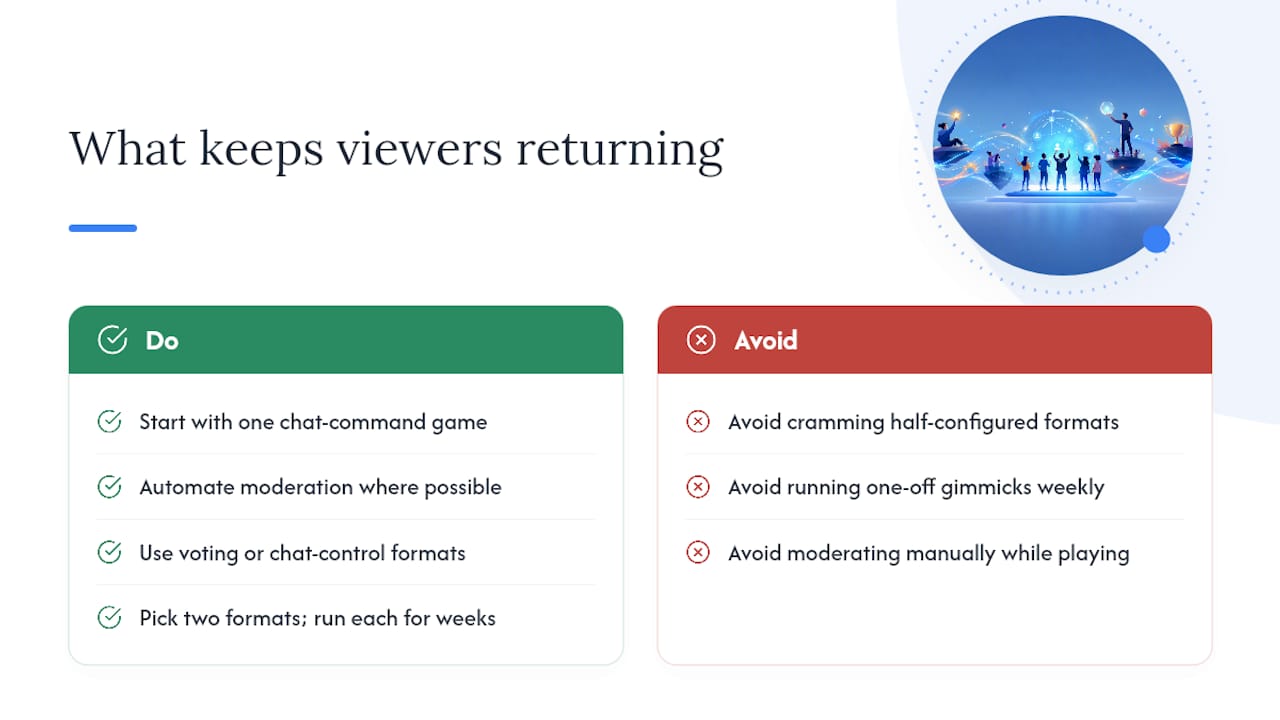
Start smaller than feels necessary. A single chat-command game run cleanly for 15 minutes builds more trust with your audience than three half-configured formats crammed into one stream. Moderation should be automated wherever possible, because manually policing rate limits while also playing a game is a recipe for missing both jobs.
Voting and chat-control formats tend to produce the strongest repeat viewership, because regulars learn the rhythm and show up specifically for it. Play-in games and one-off gimmicks generate a bigger single-night spike but fade faster once the novelty wears off, so treat them as occasional events rather than a weekly staple.
The practical move is to pick two formats, run them for a few weeks each, and let the results tell you which one your specific audience actually wants. A voting round through PickThe.Games costs you almost nothing to test, which makes it a sensible first experiment before you commit to anything requiring an extension or a purchase.
Run your next audience vote without the guesswork
Setting up chat commands, cooldowns, and overlays takes real effort, but deciding what to actually play shouldn't. Streamer Mode gives you a fair, OBS-ready way to let your audience pick the game, the map, or the next challenge, with results your whole chat can see update live on screen.

Getting started takes less time than configuring a single chat bot: build a board with the game voting app, generate your shareable link, and drop it into chat before your next stream starts. If your community spans consoles and PC, run your options through the crossplay compatibility checker first so nobody votes for something half your viewers can't actually join. It's free to use, works with Discord for pre-stream hype, and takes one link to get a working leaderboard on screen.
Frequently asked questions about interactive stream game ideas
What's the easiest interactive stream game idea for a brand-new streamer?Audience voting is the simplest starting point, since it needs no extension, no download, and no per-viewer account. A shareable link and a live leaderboard cover most of what you need.
Do I need Twitch specifically to run chat-controlled games?No. Games like Streamer Survival and BitSlaps support native integration across Twitch, YouTube, and Kick, so the format isn't locked to one platform.
How do I stop chat-controlled games from turning into spam?Set per-user cooldowns on every command from the start, use a blacklist for disruptive spam terms, and give a moderator the ability to bypass or pause commands if a round gets out of hand.
Can I run interactive games on TikTok Live?Yes, though the mechanic differs: TikTok interactivity is largely gift-powered, with gifts mapping to game actions like lanes in a race, rather than typed chat commands.
How long should an interactive segment run?Ten to twenty minutes tends to work best. Longer segments risk fatigue, so alternating interactive rounds with regular gameplay keeps the pacing feeling fresh.
Sources
These official pages back up the setup steps and game profiles covered above, and each one is worth bookmarking before your next stream.