Twitch Game Night: Copyable 10–15/45–60 Minute Plan + Live Picker
Twitch Game Night: Copyable 10–15/45–60 Minute Plan + Live Picker
The fastest way to run a good game night on Twitch is to pair a chat-friendly warm-up with one centrepiece table or party game, then protect it with a secure broadcast window and run selection through a live voting tool. That combination keeps early viewers busy while you fill seats, gives the stream a clear main event, and stops lobby codes leaking into chat. Get those three pieces right and everything else, from pacing to moderation, tends to fall into place.
*> TL;DR:
>
> - Small channels can effectively start game nights with chat-only ranking or guessing games that require no setup from viewers.
> - Mid-sized channels should prioritize social deduction or card-based party games that support six to ten players and maximize community engagement.
> - Larger channels or skill-focused nights benefit from co-op or competitive games that encourage practice, the formation of teams, or mini-tournaments, especially during big community events.
> - Proper planning involves announcing the format in advance, using Streamer Mode and private links to prevent leaks, and testing overlay and voting tools before streaming.
> - Using a quick voting platform with veto options and seamless overlay integration simplifies game selection, reduces conflicts, and speeds up the process.
*Table of Contents
- Which games work best for a game night on Twitch?
- How do you shape and time a Twitch game night?
- Setting up OBS, streamer mode and chat commands for game night
- Which game category fits your stream, and why
- Tools that make game night run smoother
- How do you stop stream-sniping and keep chat civil?
- A copyable game night schedule
- What running these nights actually teaches you
- Try a faster way to pick your next game night title
- Sources
- FAQ
Which games work best for a game night on Twitch?
Your channel size should decide the shape of the night, not the other way round. A ten-viewer channel and a thousand-viewer channel need different centrepieces, even if the warm-up stays similar.
For small and growing channels, chat-only games are the safest opener because everyone can join with zero setup:
- Tier Battle style ranking games, where chat votes on placements in real time
- Drawing or guessing formats (chat submits answers, you read them aloud)
- Simple polls or "would you rather" rounds to warm the room before seats open
For mid-size channels running a proper centrepiece, table and party packs are the main attraction:
- Card-based party games that support 6 to 10 players per lobby
- Social deduction titles where viewers rotate in as suspects or detectives
- Drawing-and-guessing party packs built for streaming, with spectator-friendly UI
For larger channels or skill-focused nights, co-op and competitive picks reward practice and structure:
- Small-team co-op titles where a rotating squad of viewers joins you each round
- Competitive brackets or mini-tournaments, especially effective around bigger community events like TwitchCon, where alternative arcade and casual-quest formats show how far a scaled-up format can go
If you're short on inspiration, this list of interactive stream game ideas is a good place to start browsing by category.
How do you shape and time a Twitch game night?
Decide first whether the night is chat-only, table-based, or hybrid, and say so in your announcement. Community organisers consistently find that naming the format in advance reduces confusion and improves turnout, because viewers know upfront whether they can play or just watch.
A simple three-phase structure covers most streams:
1. Warm-up (10 to 15 minutes): low-barrier, chat-only games while viewers trickle in and seats fill.
2. Centrepiece (45 to 60 minutes): your main table or party game, run in rounds with a visible seat queue.
3. Rotation and wind-down (15 to 20 minutes): swap tired players for waiting viewers, then close with a lighter chat game.
Post your seat queue rules in Discord and pin them on stream so nobody has to ask "how do I get in?" mid-round. A short checklist covering the schedule, the join link, and the rules keeps mods answering the same question once instead of fifty times.
Pro Tip: Pin the seat queue and join instructions in your Discord announcements channel before you go live, not after. Late pins get missed by exactly the viewers who need them most.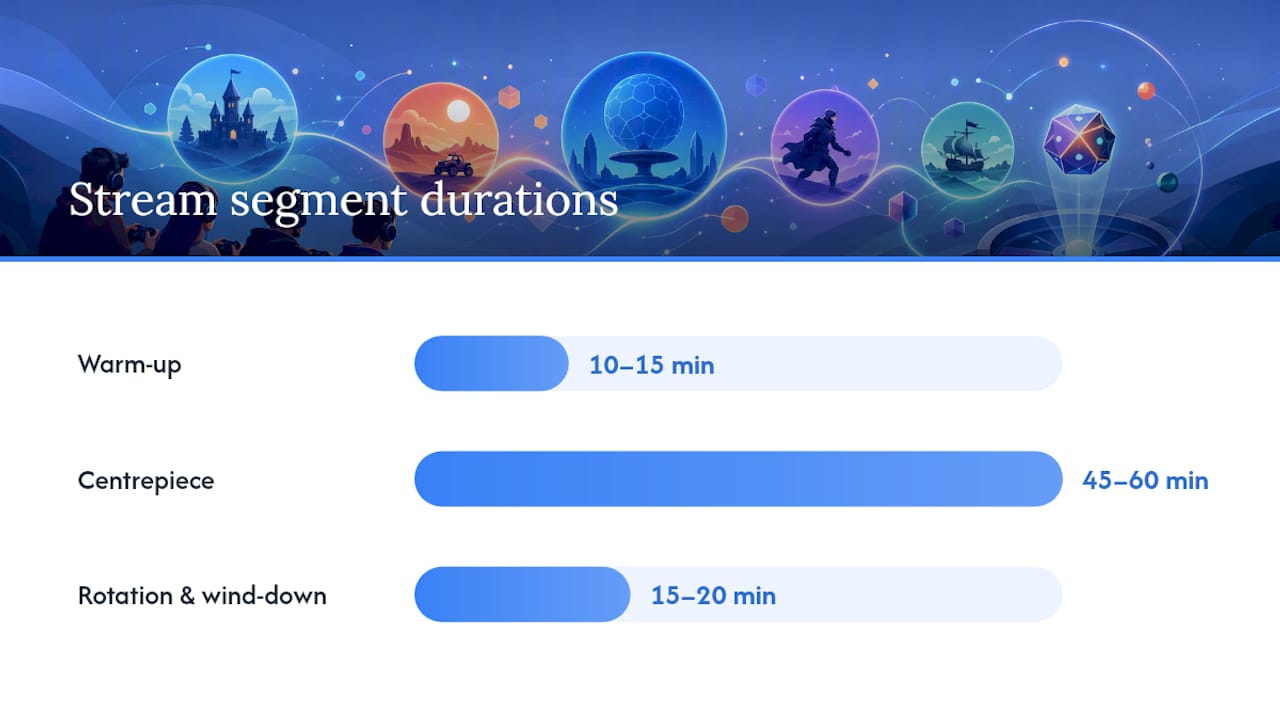
Setting up OBS, streamer mode and chat commands for game night
Most games built for streaming open a broadcast window, a dedicated pop-up showing the lobby, scores, and a timer. Capture that window directly in OBS and crop it so the scoreboard and timer stay visible without wasting canvas space on menus nobody needs to see.
Turn on Streamer Mode (or the equivalent broadcast setting) before you go live. This hides room codes on screen and lets you distribute join links privately through Discord instead, which is standard practice for protecting lobbies while still showing viewers exactly what's happening in the game.
A few practical points worth checking early:
- Most chat-command voting runs through the game's own bot or overlay, so extra software often isn't needed.
- Mobile viewers on shaky connections do better with lower-resolution capture settings and a simplified overlay.
- Test your voting overlay as a browser source before you rely on it live.
Which game category fits your stream, and why
Each category asks something different of your audience, and picking the wrong one for your channel size is the single most common reason a game night stalls.
Chat-only games need nothing from viewers but a working keyboard: everyone votes or answers directly in chat, no invite required. They're the easiest to run and the hardest to make feel special twice in a row. Table or seat games need a handful of viewers to hold private links, usually distributed through Discord once they're picked from a queue. The trade-off is real: a table game raises engagement and community feeling but does very little for raw discoverability. TwitchTracker's viewership data shows Just Chatting and major multiplayer titles consistently pull the largest viewer hours, well ahead of any single niche party game, and TwitchMetrics tells the same story. Run table games for your community, not for the category page. Co-op and competitive formats sit somewhere in between, rewarding skill and giving spectators something dramatic to watch even without playing. Viewers-as-players setups, where chat itself becomes a rotating character or contestant, tend to produce the highest per-viewer engagement of any format, at the cost of needing the tightest moderation.Keep accessibility in mind throughout: cross-platform titles let mobile, console, and PC viewers join the same lobby, and checking crossplay compatibility before you announce a game saves an awkward "sorry, you can't join" moment mid-stream.
Tools that make game night run smoother
A decent voting tool needs four things: real-time votes, a veto option so one bad pick doesn't derail the night, crossplay checks, and a way to push results onto an overlay. Without a veto system, one determined voting bloc can hijack the whole selection process, which is exactly the kind of friction a good tool exists to remove.
Once a game's picked, push the result into OBS as a browser source overlay rather than a static graphic, and use Discord to hand out seat invites so lobby links never touch public chat.
Pickthe fits this workflow directly: swipe-based real-time voting settles the pick in minutes, its veto system stops deadlocks, and its Discord bot and Streamer Mode integration send seats and vote overlays straight to viewers without extra setup. The platform's database currently covers more than 6,000 titles, which matters when your regulars have already played through the obvious party-game shortlist.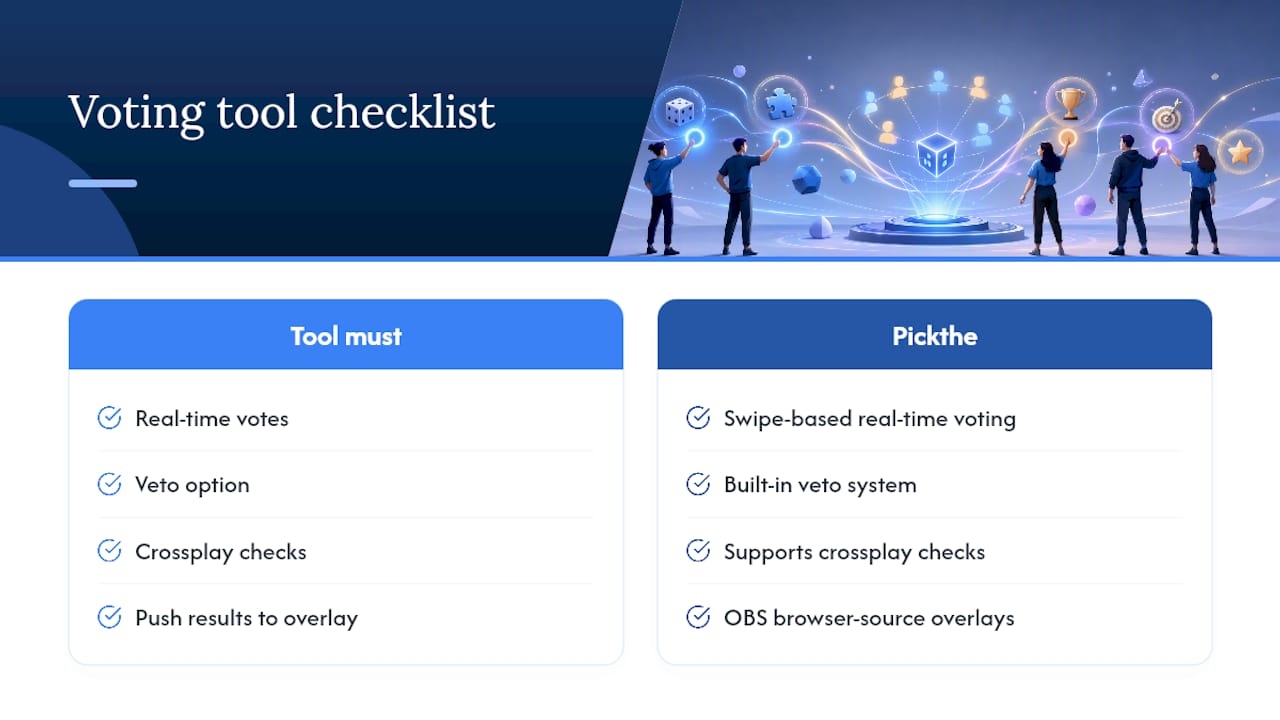
How do you stop stream-sniping and keep chat civil?
Private invite links distributed through Discord, combined with Streamer Mode hiding codes on screen, are the two controls that stop lobby scraping before it starts. Beyond that, standard chat tools do most of the remaining work: follower-only mode and slow mode slow down brigading attempts, and a mod with clear timeout authority handles the rest.
- Share join links only in a Discord channel visible to verified members
- Switch to follower-only or slow mode the moment voting opens
- Reset the lobby and reissue links fast if a code leaks, rather than trying to police it in place
A copyable game night schedule
1. Early segment: pre-show and welcome, seats opening
2. Warm-up segment: chat-only game
3. Main segment: table game, rotating seats periodically
4. Closing segment: wind-down and thank-yous
For a 60-minute slot, drop the warm-up to five minutes; for two-hour-plus streams, add a second rotation block. More on pacing full sessions is in this guide to games to play on stream.
What running these nights actually teaches you
Two things trip up almost every host early on: pacing the warm-up too long so the centrepiece feels rushed, and chat not understanding how to queue for a seat. Test the broadcast window capture, the Streamer Mode link flow, and the overlay before you're live. A rehearsal that checks all four moving parts catches most problems that would otherwise surface mid-show.
> — PickThe
Try a faster way to pick your next game night title
Spending twenty minutes arguing in Discord about what to play is the one part of game night nobody misses once it's gone. PickThe.Games fixes that specific bottleneck: your group swipes through a shared board, votes settle in minutes rather than message threads, and the veto system means nobody gets stuck with a game half the lobby hates.

Start with the game-night picker to run your next selection live, or use the crossplay compatibility checker if your viewers join from a mix of console, PC and mobile. Both are free to use, work directly inside Discord through the bot integration, and connect straight into Streamer Mode so viewers vote through a sharable link while the results appear on your OBS overlay. If your group leans towards a specific genre, the best crossplay games list is worth bookmarking too. Open a board before your next stream and see how fast the group actually agrees.
Sources
- How to host a community game night on Twitch — GameBuddies
- Most watched games on Twitch · TwitchTracker
- The most watched games on Twitch · TwitchMetrics
FAQ
How many Twitch viewers do you need to earn $5,000 a month?
There's no fixed viewer figure tied to a set income, since Twitch earnings depend on subscriptions, ad revenue, bits, and sponsorships together rather than viewer count alone. Streamers with a smaller but highly engaged audience running regular game nights often out-earn larger, passive channels.
Are Thursday night games a regular thing on Twitch?
Thursday isn't a platform-wide fixture, but many communities and organised events, including formats seen around TwitchCon, do run recurring weekly game nights, and Thursday is a popular slot because it sits ahead of the weekend rush.
How many viewers do you need to make $1,000 a month on Twitch?
Again, there's no single viewer threshold, because it depends on conversion to subscribers and bits rather than raw viewer numbers. A smaller channel with strong, consistent game night attendance and a loyal Discord tends to convert better than a larger, one-off audience.
What are the most popular games on Twitch right now?
Just Chatting and major multiplayer titles consistently dominate viewer hours according to TwitchTracker's rankings, which matters more for discoverability than for community-night engagement. A niche party game will rarely top the charts, but it can still deliver stronger per-viewer engagement for your regulars.
Do I need special software to run chat voting on game night?
Usually not. Most games built for streaming include their own chat-command voting through an in-game overlay, and a tool such as PickThe.Games handles the game-selection vote itself without extra installs.