Best games to play on stream: a streamer's guide
Best games to play on stream: a streamer's guide
The two-pronged approach that works best: pair a chat-interactive party title (Marbles on Stream, Gartic Phone, or Turbo Live) with a steady "home" game you return to every week (Stardew Valley, Factorio, or Planet Zoo). That combination drives viewer participation on big nights and builds a loyal audience between them. Not sure which to pick right now? Pickthe's 60-second picker gives your chat a live vote in under a minute.
Quick shortlist to start streaming today:- Marbles on Stream — viewers type
!playto enter a marble race; works from your very first stream - Gartic Phone — a telephone-style drawing game your chat joins directly via browser link
- ACT IT OUT XL! — charades with a Live Show mode where viewers guess in chat
- Turbo Live — free-to-play, chat commands save or crush pedestrians, zero setup friction
- Stardew Valley — a cosy farming sim that sustains long sessions and calm, friendly chat
- Factorio — factory-building that rewards viewer "backseat engineering" and repeat visits
Key takeaways
Pairing a chat-interactive title with a steady cosy or simulator game is the most reliable approach for growing a Twitch channel, and Pickthe's Streamer Mode lets your audience make that choice live in under 60 seconds.
| Point | Details |
| --- | --- |
| Start with interactive games | Marbles on Stream, Gartic Phone, and Turbo Live work from your very first stream with minimal setup. |
| Keep a home game | A cosy or sim title (Stardew Valley, Factorio) builds loyal regulars between event nights. |
| Use TwitchTracker for data | Check median viewers and active channel count weekly to find discoverable titles before they saturate. |
| Cloud gaming removes hardware limits | GeForce Now and Xbox Game Pass cloud options let you broadcast demanding titles without a high-end GPU. |
| Use Pickthe for fast decisions | Pickthe's Streamer Mode lets chat vote on what to play next, with a live OBS overlay and a 6,000+ game database. |
Table of Contents
- Which games to play on stream are trending right now?
- Chat-interactive games that put your viewers in control
- Cosy and simulator games that build community over long streams
- Competitive games that help you reach niche audiences
- How to stream demanding titles without high-end hardware
- How to pick the right game for your channel
- Pickthe helps you find a game in 60 seconds
- Quick technical and moderation checklist for interactive streams
- Keeping your stream compliant with content ratings and community guidelines
- Why we favour interactive games paired with a steady home title
- Pickthe's Streamer Mode: pick your next game with your audience
- Sources
Which games to play on stream are trending right now?
Discoverability on Twitch is not random. TwitchTracker's games-to-stream list ranks titles by median viewership, active channel count, and hours watched, giving you a practical signal for which games give smaller channels a realistic chance of being found. A game with a high median viewer count but very few active channels is often the sweet spot: enough audience interest to attract clicks, but not so saturated that your stream disappears on page 40.
The table below illustrates the kind of contrast you will find when you check the data yourself. Figures shift weekly, so treat this as a framework rather than a fixed ranking.
| Game | Why it helps discoverability | Typical audience fit |
| --- | --- | --- |
| Marbles on Stream | Low channel count, loyal niche | Small to mid-sized channels |
| Gartic Phone | Spikes during group events | Any size; great for debut streams |
| Stardew Valley | Steady long-tail search traffic | Cosy/lifestyle audience |
| Factorio | Dedicated niche, high session length | Mid-sized, strategy-focused |
| Planet Zoo | Visual appeal drives clips | Any size |
| ACT IT OUT XL! | Party night spikes | Small to mid-sized channels |
| Turbo Live | Very low competition, free | New streamers |
| American Truck Simulator | Calm niche, loyal regulars | Chill/ambient streams |
Check TwitchTracker weekly. A game that looks saturated today can open up after a major title drops and pulls viewers away.
Chat-interactive games that put your viewers in control
These are the titles where your audience stops watching and starts playing. That shift in dynamic is what turns a passive viewer into a regular.
Marbles on Stream is the easiest entry point. Viewers type a single chat command to drop a marble into a physics race, and the streamer controls the track. It works with five viewers or five hundred, and the setup is a Twitch extension install plus one OBS browser source. No companion app, no accounts for viewers. Gartic Phone runs entirely in a browser. You create a private room, share the link in chat, and viewers join as players. It scales well up to around 30 participants before rounds get unwieldy. The drawing-and-guessing format generates natural clip moments. ACT IT OUT XL! takes a different approach: its Live Show mode lets viewers type guesses directly into Twitch chat, and correct answers appear on an in-game leaderboard. With around 3,000 secret phrases across categories, it holds up across multiple sessions without repeating itself. No companion app needed. Games for Stream! and Raisin's Wordsearch use coordinate-style chat commands (viewers type grid references to mark squares) with live leaderboards and support for Twitch, TikTok, and YouTube simultaneously. Keep the command list visible on screen at all times; new viewers arriving mid-stream should never have to ask how to play. Turbo Live is free-to-play and connects to Twitch in seconds. Chat commands let viewers vote to save or crush pedestrians in a chaotic city scenario. It is deliberately low-friction: rules are on screen, the Twitch link is a single click, and it suits channels with 20–100 active chatters. The 100-Player Twitch Chat Party Pack is built for larger channels. Games like Splat Chat and Bombertown let up to 100 viewers control characters via chat. The pack includes an AFK mode that keeps chat engaged even when viewers go quiet, which matters for longer streams. If your active chat is regularly below 50, start with Marbles or Turbo Live first and return to this pack once your audience grows. Play On Stream sits in a category of its own: a free browser-based overlay platform with mini-games including a Tier List Maker, Bracket Builder, and Pac-Man overlay. No login, no download. Add the browser source to OBS and you are live in under five minutes. It is the lowest-friction way to test whether your audience responds to interactivity before you commit to a full chat-game setup. Pro Tip: Set up a chat bot (Nightbot or StreamElements) to whitelist interactive commands before you go live. Without a whitelist, spam and off-topic commands can flood the game's input queue and break the experience for everyone.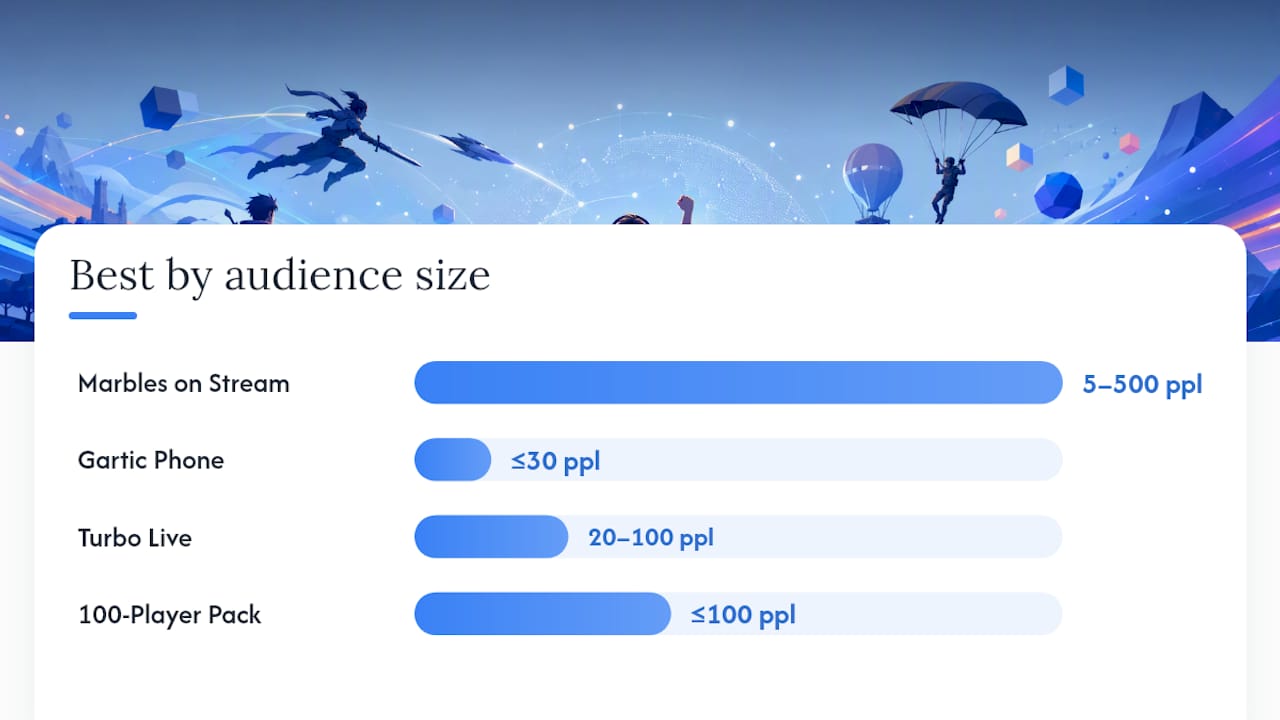
Cosy and simulator games that build community over long streams
Not every stream needs to be a party. Some of the most loyal audiences on Twitch gather around a streamer who just plays something calm and talks to chat.
Stardew Valley is the benchmark here. Its seasonal structure gives you natural episode arcs ("we're finishing the Community Centre this month"), and viewers feel invested in the farm's progress. Chat naturally fills with advice, requests, and debate about crop rotations. Sessions of two to four hours feel effortless. Farming Simulator and American Truck Simulator attract a specific kind of viewer: someone who wants ambient, low-stress content. These streams often run long and generate strong regulars because the pace invites conversation rather than demanding attention. They are also genuinely low-hardware titles, which matters if you are streaming on a mid-range PC. Factorio rewards "backseat engineering." Viewers who know the game will offer factory layouts, efficiency tips, and warnings about spaghetti belts. That back-and-forth creates a collaborative atmosphere that keeps chat active even during quiet building phases. House Flipper and Planet Zoo are strong visual picks. House Flipper generates chat votes on design choices ("should we go for the open-plan kitchen?"), while Planet Zoo's animal enclosures produce natural clip moments. Both suit a streamer who wants to narrate decisions and involve chat without the pressure of competitive play. Super Mario Maker 2 adds a viewer-participation layer: chat can submit level codes, vote on which to attempt next, or watch you suffer through their deliberately cruel creations. It is one of the few single-player titles where chat directly shapes the content. Pro Tip: Structure long sessions in 45-minute segments with a clear goal for each one ("we're building the wheat field today"). Announce the goal at the start of each segment so viewers who join mid-stream immediately understand what they are watching.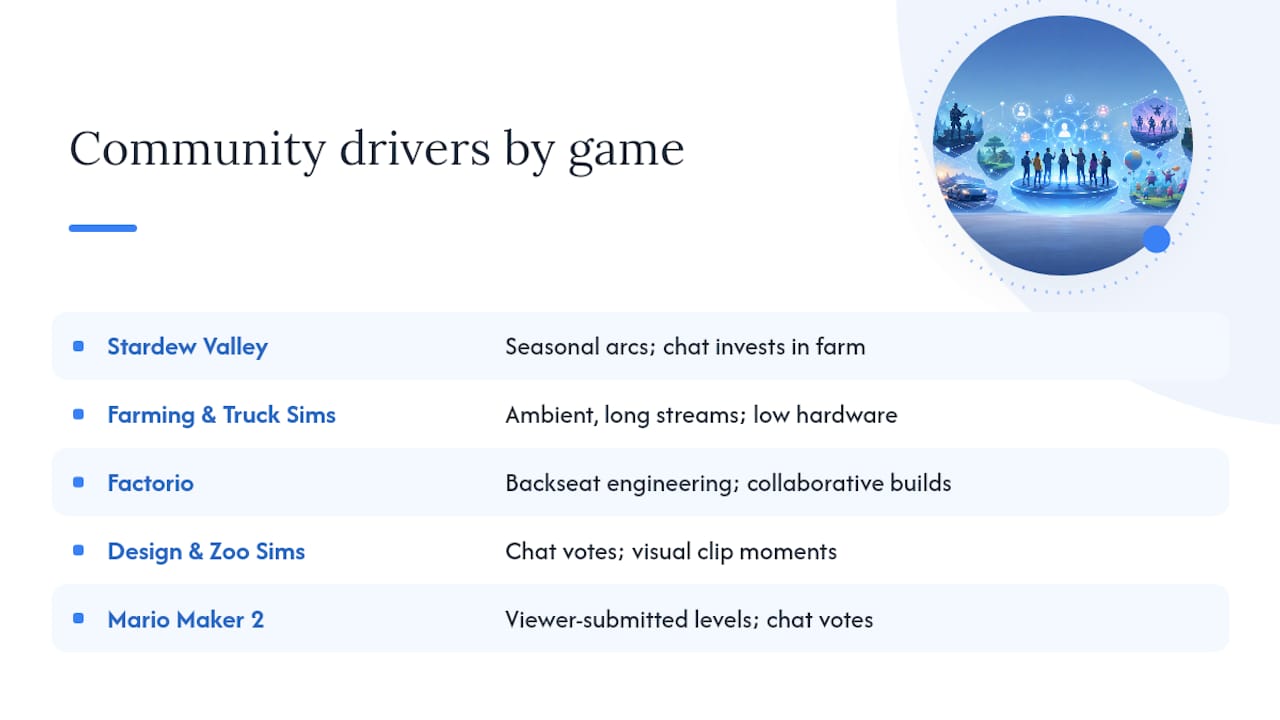
Competitive games that help you reach niche audiences
Competitive titles carry a different risk-reward profile. The audiences are larger and more passionate, but the channels are also far more numerous, which makes discoverability harder for new streamers.
If you have genuine skill in a competitive title, that skill becomes your content. A ranked climb in a fighting game or a high-level strategy match gives viewers a reason to watch you specifically rather than any other channel. The key is consistency: competitive audiences return for the player, not just the game.
For streamers without a strong competitive background, the better approach is to find a competitive game with a smaller active channel count. Niche esports titles, older competitive games, or regional scenes often have dedicated audiences and far less competition for front-page placement. Check TwitchTracker before committing: if a game has thousands of active channels, the discoverability maths are against you until you have an established audience.
Tournament hosting is a third path. Running a community bracket in a fighting game or a racing title gives you a structured event format that draws viewers from multiple communities at once.
How to stream demanding titles without high-end hardware
Hardware limits should not stop you from broadcasting visually impressive games. Two services make this practical.
NVIDIA GeForce Now gives you cloud access to a large library of PC games with RTX-enabled performance. You stream the game from NVIDIA's servers to your machine, then capture and broadcast that window via OBS. For single-player visual showcases, this works well. The practical requirement is a reliable upload speed: if your connection is inconsistent, cloud gaming introduces visible artefacts that hurt stream quality more than a modest local GPU would. Xbox Game Pass Ultimate includes cloud gaming alongside its full game library. PCMag's review rates it as a top subscription option for breadth of access, covering hundreds of titles plus EA Play. For streamers, the cloud component means you can broadcast console-first titles without owning the console.When capturing a cloud gaming session, lock the frame rate inside the cloud client before you start OBS. Capture the client window directly rather than using game capture mode, and run a private test stream first to measure input latency. Controller delay that feels minor in casual play becomes noticeable in competitive titles, so test before you commit to a live session.
Cloud gaming suits single-player showcases and cosy titles best. For fast-paced competitive play where input timing matters, local capture on even modest hardware is usually preferable.
How to pick the right game for your channel
The fastest way to choose is to answer four questions: Who is your current audience? How much do you want chat involved? What can your hardware run? And will you still enjoy this game in three months?
A simple three-step framework:
1. Test — run two or three short streams (60–90 minutes each) with different game types. One chat-interactive title, one cosy sim, one competitive pick. Note which generates the most chat activity and the highest average viewer retention.
2. Measure — after two weeks, check your Twitch dashboard for average viewers, chat messages per minute, and follow rate per stream. The game with the best combination of those three metrics is your primary pick.
3. Iterate — swap out underperformers every four to six weeks. Audiences and trends shift; a game that felt stale in January can resurface after a content update or a viral clip.
Selection criteria at a glance:- Audience fit — does the game match the age, taste, and platform of your current viewers?
- Interaction potential — can chat participate directly, or are they passive observers?
- Discoverability — check TwitchTracker for median viewers and active channel count before choosing
- Hardware — can your PC run it at a stable 60fps at 1080p without dropping frames?
- Schedule — does the game suit your stream length (party games for 90-minute slots, sims for three-hour sessions)?
Pickthe helps you find a game in 60 seconds
Choosing what to play should not take longer than the stream itself. Pickthe's Streamer Mode lets your viewers vote on what to play next via a shareable link, with a live leaderboard that feeds directly into OBS as a browser source overlay.
Key features for streamers:- Real-time swiping and voting — your group or chat swipes through games and votes simultaneously; results update live
- Veto system — one viewer (or you) can block a title that does not suit the session
- Crossplay compatibility checker — confirms which titles work across PC, Xbox, and other platforms before you commit
- Streamer Mode with OBS overlay — the voting leaderboard appears as a browser source; no third-party widget needed
- Discord bot integration — run the picker inside a Discord server and carry the result straight into your stream
1. Go to Pickthe and create a board, then activate Streamer Mode from the dashboard.
2. Copy the OBS browser source URL and add it as a new browser source in OBS at your preferred overlay position.
3. Share the voting link in your Twitch chat. Viewers swipe and vote; the leaderboard updates in real time on your stream.
Pickthe draws from a database of over 6,000 games, so the picker surfaces titles your audience may not have considered. It is free to use, with no paywall on the core features.
Quick technical and moderation checklist for interactive streams
Before you go live with a chat-interactive game, run through this list:
- OBS scene — add the game as a window capture source; add any interactive overlay (Marbles extension, Play On Stream browser source) as a separate layer above it
- Chat bot — configure Nightbot or StreamElements to whitelist interactive commands and block duplicates; map commands to the game's input format
- Twitch extension permissions — for extensions like Marbles on Stream, grant the extension overlay and bits permissions in your Twitch dashboard before streaming
- Slow mode — enable slow mode (3–5 seconds between messages) during high-traffic interactive games to prevent command floods
- Mod list — brief at least one moderator on the game's rules before you start so they can handle rule questions in chat
- AFK safeguard — for packs like the 100-Player Twitch Chat Party Pack, enable AFK mode so inactive viewers do not block active participants
- Bitrate — party minigames and 2D titles stream cleanly at 3,500–4,500 kbps at 1080p60; visually demanding AAA titles need 6,000 kbps or above if your upload allows
For a broader set of overlay and bot alternatives, Pickthe's StreamElements alternatives guide covers the main options with setup notes.
Pro Tip: Use a bot to auto-timeout viewers who spam commands outside the active game window. Set the timeout to 60 seconds rather than a permanent ban — most spam is accidental, and a short timeout corrects the behaviour without losing a viewer.Keeping your stream compliant with content ratings and community guidelines
A stream ban is the fastest way to lose momentum, and most bans are avoidable with a few straightforward checks before you go live.
Check the game's PEGI or ESRB rating against your channel's content classification. Twitch requires you to mark your stream as "Mature Content" if the game you are playing carries a rating of 18+ (PEGI 18 or ESRB M/AO). Failing to do so is a terms-of-service violation, not just a courtesy issue. Set the mature content flag in your stream settings before going live, not after. Music is the most common accidental violation. In-game soundtracks are generally covered by the game's licence, but playing a personal playlist or leaving a radio stream audible in the background can trigger a DMCA mute or a strike. Use royalty-free music services (Pretzel Rocks, Epidemic Sound) for background audio, or mute non-game audio entirely. Chat-interactive games introduce a moderation layer you control. When viewers can type freely into a game, they can also type slurs, spoilers, or harassment. Configure AutoMod in your Twitch settings to its highest practical level for interactive sessions, and use a bot to block specific phrases before they reach the game's input queue. Sponsored content requires disclosure. If a game publisher has paid for placement (as happens with Pickthe's sponsored game slots), Twitch's guidelines require you to mark the stream as containing paid promotion. This applies whether the payment is cash, a free key, or any other consideration.Review Twitch's Community Guidelines and the PEGI rating for any new title before your first session. A five-minute check prevents a situation that could take days to resolve.
Why we favour interactive games paired with a steady home title
The conventional streaming advice is to pick one game and stick with it. That works for established channels with an existing audience, but for a growing streamer, it creates a fragile dependency on a single title's popularity.
The combination we recommend, a chat-interactive party game for event nights and a cosy or simulator title for regular sessions, solves two different problems at once. The interactive game drives discoverability spikes and clip moments. The home game builds the habit of returning: viewers know that on Tuesday evenings, you are on Stardew Valley, and they can drop in, catch up, and feel part of something ongoing.
Pickthe's database and Streamer Mode exist precisely because this two-game approach requires a fast, audience-aware way to decide which title to run on any given night. The picker removes the friction of that decision and puts the choice in chat's hands, which itself becomes a moment of engagement before the stream even starts.
One note on transparency: Pickthe operates a freemium model where game publishers can pay for sponsored placements in the swiping feed. Sponsored titles are labelled as such. The core picker, voting, and Streamer Mode features are free.
Pickthe's Streamer Mode: pick your next game with your audience
Deciding what to play is easier when your audience helps. Pickthe gives streamers a free, audience-driven picker with over 6,000 games in its database, real-time voting, and an OBS-ready leaderboard overlay — no paywall on the features that matter most.

Browse party multiplayer games or PC multiplayer titles to build your board, then activate Streamer Mode and share the voting link in chat. Your viewers swipe, vote, and veto in real time; the result appears live on your stream. The crossplay checker confirms which titles work across your group's platforms before anyone downloads anything.
Head to Pickthe and start your first board now — your next stream's game is one vote away.
Sources
A short list of resources worth bookmarking:
- Games to Stream | TwitchTracker
- GeForce Now — NVIDIA
- Play On Stream | Interactive Mini-Games for Live Streamers
- The best game streaming services — PCMag