Merge Votes for Streamers: Map Discord, Twitch and Web into One Tally
Merge Votes for Streamers: Map Discord, Twitch and Web into One Tally

The fastest reliable way to merge votes across platforms is to route every vote (Discord, Twitch chat, web link, mobile) into one server-side aggregator, then display results through a live overlay or shared page. This keeps things fair, deduplicated and visible in real time. For most groups, building that yourself isn't necessary: PickThe.Games already does it, using Streamer Mode and Discord integration to collect votes wherever your people are and merge them into one result.
*> TL;DR:
>
> - Using a server-side aggregator that combines web links, chat commands, and platform polls ensures fair, deduplicated, and real-time voting results across all viewers.
> - Short voting windows of around five minutes with visible countdowns significantly boost participation and reduce viewer fatigue.
> - Implementing session tokens, rate limiting, and IP heuristics are essential for preventing multiple votes by the same person across different channels.
> - Ready tools like PickThe.Games offer quick setup with live overlays, veto options, and easy Discord or Twitch integration, making them ideal for casual streams.
> - Building a custom aggregator is primarily beneficial for large events with complex rules, while smaller groups benefit from immediate, ready-made solutions.
*Table of Contents
- What are the main ways to merge votes across platforms?
- How do you set up merged voting for your group or stream?
- How do you keep merged votes fair and viewers engaged?
- How does PickThe.Games merge votes for game nights and streams?
- Should you build a custom vote aggregator or use a ready tool?
- Pick your game in minutes, not with a spreadsheet
- Sources
- FAQ
What are the main ways to merge votes across platforms?
There are three basic capture methods, and most groups end up blending them.
Native platform polls are the easiest starting point. Discord has built-in polls, Twitch has channel points predictions, and both work fine for a quick temperature check. The problem is that they're siloed. A Discord poll only counts Discord voters, a Twitch prediction only counts Twitch viewers, and nobody's combining the two into a single tally. Chat-command parsing solves part of that. A bot watches Twitch or Discord chat for a command like!vote 2, tallies the responses, and gives you a live count. Moo shows this pattern well: viewers type a vote, the bot counts it, and you get results without leaving the stream. It's fast and it feels native to chat culture, but it only captures people who are actually in chat at that moment.
Shareable web and mobile links widen the net. A link or QR code lets anyone vote, whether they're a Discord lurker, a mobile viewer, or someone watching a VOD hours later. VoteGenerator's no-login voting tool is built exactly for this: no account needed, results update live, and you can pop it into OBS as a browser source.
The robust answer, and the one that scales past a single Discord server or a single Twitch stream, is server-side aggregation: a hybrid setup where webhooks, chat listeners and web links all feed into one backend that merges the results.
- Native polls: quick, but locked to one platform
- Chat commands: fast and familiar, but chat-only
- Web/mobile links: broad reach, ideal for VOD and mobile
- Server-side aggregation: combines all of the above into one number
Community projects like joystick demonstrate this hybrid approach in practice, using Discord webhooks alongside game-lookup APIs to build simple group suggestion systems.
How do you set up merged voting for your group or stream?
Getting this right takes a bit of planning before you touch any code or configuration. Here's the sequence that actually holds up under pressure, live, with people watching.
1. Set your rules first. Decide the voting window (five minutes is usually plenty), whether it's strictly one vote per person, whether anyone gets a veto, and how you'll break a tie before the vote even opens.
2. Configure your capture points. Set up a Discord webhook or bot interaction to catch in-server votes, a Twitch chat listener to parse !vote commands, and a shareable web link for everyone else.
3. Normalise the options. Make sure "Overcooked," "overcooked 2," and "OC2" all map to the same game ID server-side, or your tally will be a mess.
4. Deduplicate by user. Tie each vote to a session token or account ID rather than a raw message, so the same person can't vote twice through two different channels.
5. Apply your weighting or veto logic. If someone has veto power, this is where it fires, before the final count locks in.
6. Store every vote with a timestamp. You'll want this later for auditing and for spotting suspicious spikes.
7. Publish the results. A simple results page or WebSocket endpoint, dropped into OBS as a browser source, keeps everyone watching the count update live.
A practical architecture looks like this: Discord bot + Twitch chat listener → central aggregator → results API → OBS overlay. Tumulte, an open-source project, shows this exact pattern working across multiple Twitch chats simultaneously, pushing merged results out through WebSocket-driven overlays.
Pro Tip: Keep your voting window short and clearly announced. A five-minute window with a visible countdown on screen gets far higher participation than an open-ended poll nobody remembers to check.Build in retries for dropped chat messages and log every capture event. Vote counts that mysteriously change after the fact will cost you trust faster than almost anything else.
How do you keep merged votes fair and viewers engaged?
Fairness lives or dies on deduplication. Session cookies, OAuth tokens, and basic IP heuristics all help catch the same person voting through Discord, then again through your web link, then again through Twitch chat. None of these methods are perfect alone, so most working setups stack two or three.
Chat-based votes need rate limiting too. Without it, a single viewer spamming !vote 3 fifty times in a row can skew results before you notice.
A few habits separate polls that feel meaningful from ones that get ignored:
- Keep options short and instantly clear, no essay-length descriptions mid-vote
- Make results actionable the moment the window closes, don't sit on them
- Log every vote for a simple audit trail, so disputes have an answer
- Offer a link or QR code so mobile viewers and VOD watchers aren't shut out
There's a real engagement payoff for getting this right. Industry commentary on audience engagement notes that letting viewers genuinely influence what happens next drives real engagement, provided creators stay transparent about how those votes actually shape the outcome. Polls that never seem to matter train people to stop clicking. Streamers who explain their tie-breaking process openly tend to build steadier long-term trust with their audience than those who just post a winner and move on.
Treating every poll like a small event, rather than a constant background prompt, also protects against fatigue. Guidance on audience polls suggests auditing past polls occasionally to see what worked, and making sure the outcome is something you'll genuinely act on.
How does PickThe.Games merge votes for game nights and streams?
This is where the manual setup above gets a shortcut. PickThe.Games handles capture, aggregation and display without you writing a line of webhook code.
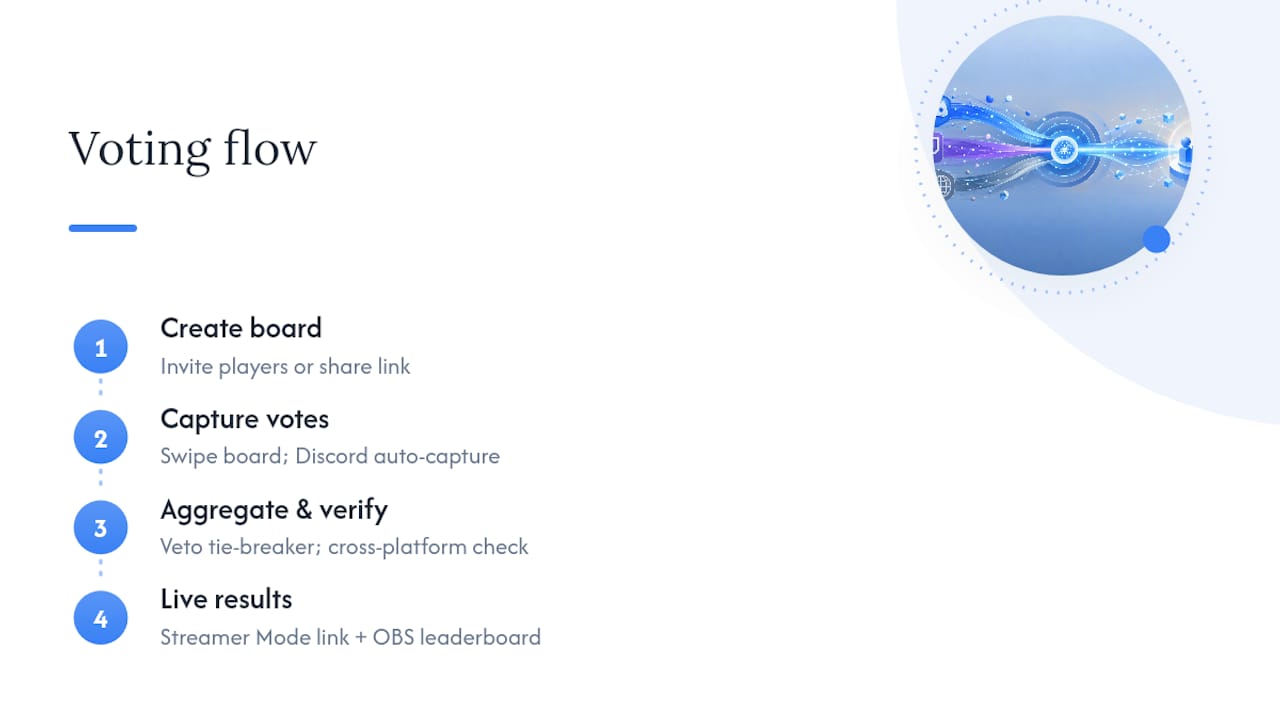
Real-time voting replaces the chat-parsing and web-link juggling with one swipe-based board everyone joins, whether they're on Discord, mobile or a browser tab. The veto system covers the tie-breaker logic you'd otherwise have to build by hand. Discord integration means your server becomes a capture point automatically, no bot configuration required. Streamer Mode extends that same board to your Twitch audience through a sharable link, with a live OBS leaderboard so results update on screen exactly the way a custom WebSocket overlay would.Cross-platform compatibility checking runs alongside the vote, so the game your group picks is actually playable across everyone's setup before the tally even finishes.
Getting started takes minutes: create a board, invite your players or drop the Streamer Mode link, and let people swipe. For a wider look at how the swiping mechanic works for groups generally, the multiplayer game voting guide covers the basics.
Should you build a custom vote aggregator or use a ready tool?
Build your own when you're running a large event, need custom weighting logic, or want a specific integration nothing else offers, projects like Tumulte prove it's doable. For everyone else, a ready tool wins on time. Built-in overlays, moderation and deduplication already work, and you're picking a game in minutes rather than maintaining a webhook pipeline between sessions.
> — PickThe
Pick your game in minutes, not with a spreadsheet
Building your own vote aggregator is a genuinely good option for a big event with custom rules, but for the average Discord server or Twitch stream deciding what to play tonight, it's a lot of engineering for a five-minute decision. There are tools that offer real-time swipe voting, a built-in veto system, Discord integration, and Streamer Mode with a live OBS leaderboard, often available for free without premium tiers.

If your group keeps landing on games half of you can't actually play together, run a check first with the crossplay compatibility checker, then open the Game Voting App and create a board. Invite your players, share the Streamer Mode link with your Twitch chat if you're going live, and let the swiping sort out the rest.
Sources
- Free Poll Maker for Twitch Streamers — No Login to Vote
- How to Host Game Voting Events on Twitch
- Why engagement capabilities will define the future of media and entertainment
FAQ
What's the simplest way to merge votes from Discord and Twitch?
Route both into one server-side aggregator, either your own webhook and chat-listener setup or a ready tool like Pickthe, which captures both without separate bots. This avoids the siloed results you get from native polls on each platform.
Can VOD viewers or mobile users vote too?
Yes, a shareable web link or QR code lets anyone vote regardless of when they're watching or what device they're on. No-login voting links are built specifically to include VOD and mobile audiences that chat-only polls miss.
How do you stop people voting twice across platforms?
Tie every vote to a session token or account ID server-side rather than counting raw messages, and add rate limits on chat commands to catch spam. Combining session checks with basic IP heuristics catches most duplicate attempts without blocking genuine voters.
Does PickThe.Games support streamer voting on Twitch?
Yes, Streamer Mode gives you a shareable voting link for your Twitch audience plus a live OBS leaderboard, so viewer votes merge with your Discord and web votes into one board. Check the Streamer Mode launch details for setup specifics.
What happens if two options are tied?
Set your tie-breaker rule before the vote opens, whether that's a runoff, a veto, or a coin flip, and announce it upfront so nobody disputes the result afterwards. PickThe.Games' built-in veto system handles this automatically within a board, removing the need for a manual decision mid-stream.