Multiplayer game voting: pick a game your group can play fast
Multiplayer game voting: pick a game your group can play fast

Multiplayer game voting is the process a group uses to choose which title to play together, using a structured method rather than an open-ended chat debate. The fastest way to run one is a time-boxed vote paired with a quick crossplay check, so nobody wins a vote for a game half the group can't actually launch. You don't need a spreadsheet or a 40-message Discord thread. Pick one of these three right now and you'll have a game locked in within minutes:
- Swipe board — everyone swipes through a shared list; matches surface fastest.
- Single-question poll — one message, a handful of options, a five-minute timer.
- Ranked vote — best when opinions are split and you need a genuine consensus pick.
Key Takeaways
Structured, time-boxed voting with a crossplay check resolves group game selection faster and more fairly than open discussion.
| Point | Details |
| --- | --- |
| Pick a workflow first | Swipe boards suit fast unanimous picks; polls suit low-stakes decisions; ranked votes suit split groups. |
| Check crossplay before voting | Confirm platforms, invites, version parity, and server region so the winner is actually playable. |
| Set a veto threshold | Agree in advance on a veto rule to handle objections, and fall back to the runner-up automatically. |
| Keep Discord tidy | One pinned channel, clear vote instructions, and a rotating host role reduce weekly setup friction. |
| Use a dedicated tool | PickThe.Games combines swipe boards, a Discord bot, veto rules, and crossplay filtering in one free board. |
Table of Contents
- Why structured multiplayer game preferences beat freeform chat
- How do you run a multiplayer game vote step by step?
- Does your group's crossplay actually work?
- How do you run voting inside Discord or on stream?
- What are the ground rules for a fair vote?
- What actually fixes group indecision?
- Run your next vote on PickThe.Games
- Sources
Why structured multiplayer game preferences beat freeform chat
Ask a Discord server "what do you all want to play?" and watch what happens. Someone suggests a game. Someone else says they're not on that platform. A third person goes quiet. Ten minutes later, nobody has decided anything, and the group's energy has drained before the session has even started.
This isn't a discipline problem. It's a coordination problem, and it's well documented. Research on group decision-making in games shows that formal voting mechanisms cut coordination friction and get groups to a decision faster than open discussion, because a structured process removes the need for everyone to negotiate in real time.
The usual blockers are predictable once you name them:
- Platform mismatch (half the group is on console, half on PC).
- Mismatched time budgets (one person wants a 20-minute match, another wants a three-hour raid).
- Skill imbalance that makes competitive picks feel unfair before anyone's queued.
Structured voting doesn't remove these tensions, but it surfaces them before launch instead of mid-session, which is where most wasted evenings actually come from.
How do you run a multiplayer game vote step by step?
Different situations call for different formats. Here's how to run all three of the workflows worth knowing.
1. Swipe/vote board. Set up a shared board, invite the group with a link, and have everyone swipe through the options in under two minutes. Matches (games everyone likes) rise automatically. If the top result isn't unanimous, let the host apply one veto and move to the runner-up. This works best for groups of four to eight who want zero discussion.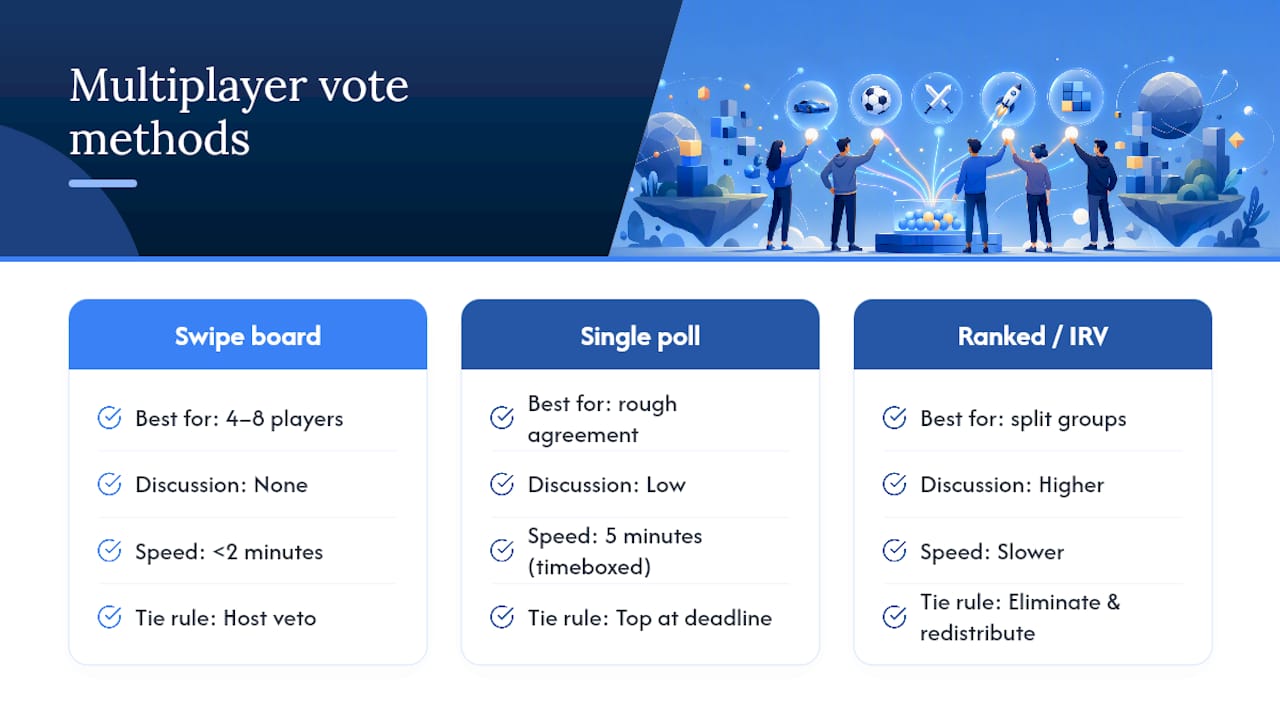 2. Single-question poll. Post one message with four or five game options, timebox it to five minutes, and confirm whichever option leads when the timer ends. Good for quick, low-stakes picks where the group already roughly agrees on genre.
3. Ranked or instant-runoff vote. Have each player rank their top three choices instead of picking one. If no game gets a majority outright, eliminate the lowest and redistribute votes. This is the format to reach for when the group is genuinely split, because a framework for collaborative decision-making shows that weighted and ranked methods produce fairer outcomes than simple majority when preferences are scattered across several options.
2. Single-question poll. Post one message with four or five game options, timebox it to five minutes, and confirm whichever option leads when the timer ends. Good for quick, low-stakes picks where the group already roughly agrees on genre.
3. Ranked or instant-runoff vote. Have each player rank their top three choices instead of picking one. If no game gets a majority outright, eliminate the lowest and redistribute votes. This is the format to reach for when the group is genuinely split, because a framework for collaborative decision-making shows that weighted and ranked methods produce fairer outcomes than simple majority when preferences are scattered across several options.
Announce it plainly: "Vote closes in five minutes, top pick wins, one veto allowed." That single sentence, pinned or posted, does most of the coordination work for you.
Pro Tip: Set the timer before you post the poll, not after. A vote with no visible deadline drifts, and drift is what kills game nights.Does your group's crossplay actually work?
A vote is worthless if the winning game can't be played by half the group. Run this two-minute check before anyone casts a vote, not after:
- Confirm which platforms are represented (PC, PS5, Xbox, Switch).
- Check that friend invites work across those platforms for the specific title.
- Verify version parity — some games split crossplay by patch or edition.
- Confirm everyone's on the same server region, since cross-region play isn't always supported even when crossplay is.
Filtering candidate games against this checklist before the vote saves you from the classic scenario: the group votes enthusiastically for a game, then discovers half of them can't join. A crossplay compatibility checker does this filtering automatically, cutting library-ownership guesswork out of the vote entirely.
Set fallback rules in advance too. If the winning game turns out unplayable, the runner-up from the same vote becomes the automatic backup, no re-vote needed. A simple veto threshold (say, two vetoes kill a pick outright) stops one disgruntled player from derailing things, while still giving genuine platform issues a way to surface.
Pro Tip: Record who owns what once, at the top of your pinned channel message, rather than asking every session. It turns a five-minute ownership check into a five-second glance.How do you run voting inside Discord or on stream?
Discord is where most groups already argue about what to play, so put the vote there instead of a separate app tab.
Inside a server, you've got three realistic options:
1. Message buttons or reaction polls for quick, low-friction votes on a handful of options.
2. A lightweight bot that posts the poll, collects reactions, and announces a winner automatically.
3. A pinned voting channel with the current workflow instructions, so nobody has to ask "how does this work again?" every week.
Recent research into pre-game decisions notes that this conversation is a genuine social moment, and groups that manage it well inside Discord tend to stick together longer than groups that let it sprawl across DMs and voice channels.
For streamers, the challenge is different: you need viewer input without flooding chat. A shareable vote link lets viewers pick from outside the chat window entirely, and an OBS-connected leaderboard shows live standings on stream so nobody has to scroll back through messages to see what's winning. Pair that with a multiplayer games viewers can join live list and the whole segment runs itself.
Keep server hygiene simple: one dedicated channel, pinned instructions, and a rotating host role so the same person isn't running setup every single night; these are key gaming community best practices for strong group management.
What are the ground rules for a fair vote?
Three rules cover almost every dispute:
- Timebox it. Five minutes is plenty for most decisions; anything longer invites second-guessing.
- Equal input. Everyone gets the same number of votes or swipes, no exceptions for whoever suggested a game.
- One brief veto, with a reason. "Can't run it" is valid. "Don't feel like it" isn't, and saying so out loud keeps vetoes rare.
When things go wrong, the fixes are usually fast. Low participation? Shorten the timer and post the vote in the channel people actually read. Noisy voice channel drowning out the poll? Post it as text, not a verbal call. Ownership mismatch discovered after the vote? Fall back to the runner-up immediately rather than re-running the whole process. A rapid recovery path, agreed in advance, is what separates a five-minute hiccup from a wasted evening.
What actually fixes group indecision?
We built PickThe.Games because "what do you want to play?" is a conversation most groups have badly, repeatedly, for years. The database now runs past 6,000 titles, curated and updated continuously, so a swipe board rarely runs dry even for groups with wildly different tastes. Every workflow in this article maps directly onto a feature: swiping onto the board, veto onto the veto system, Discord chat onto the Discord bot. If your group has a vote to run this week, that's the moment to try a board rather than the next time indecision drags a session past 40 minutes of "I dunno, what do you want to play?"
> — PickThe
Run your next vote on PickThe.Games
PickThe.Games is built for exactly the workflows above: a shared swipe board, a built-in Discord bot, a veto system, and a crossplay checker that filters out anything half the group can't join. Instead of piecing together a poll bot, a separate crossplay lookup, and a manually pinned rule set, you get all three in one board that takes minutes to set up and costs nothing to use. Streamers get the same setup with shareable viewer links and a live OBS leaderboard on top, so audience votes never clutter the chat.

Head to Find Multiplayer Games for Your Group to start a board with your friends tonight, or browse the full multiplayer games library across PC, PS5, Xbox, and Switch before you invite anyone. There's no paywall blocking the core vote, just an optional ad-free tier if you want it later.