Stop Duplicate Votes: Stream Poll Moderation for Streamers & Mods
Stop Duplicate Votes: Stream Poll Moderation for Streamers & Mods
Enable enforce_unique_vote and restrict poll creation to trusted roles before you do anything else. That single change stops the two most common failure modes in stream polls: duplicate ballots and random hijacking your options list. Layer AI filtering on incoming suggestions, route anything borderline to a human moderator, and subscribe your overlay to real-time poll.state events instead of static message data.
*> TL;DR:
>
> - Enabling enforce_unique_vote is essential to prevent repeated votes and block hijacking, especially during raids or coordinated manipulation attempts.
> - Restrict poll creation and management permissions to trusted roles like streamers and moderators to avoid accidental or malicious abuse.
> - Layer AI moderation with human review for suggested options, ensuring toxic or spammy content is flagged and handled swiftly without delaying the poll process.
> - Subscribing overlays directly to poll.state ensures live updates and prevents outdated or desynchronized vote counts during busy segments.
> - Use clear, concise poll questions with limited options, and set reasonable durations to maximize accessibility and minimize confusion among viewers.
*Table of Contents
- What is stream chat poll moderation and why does it matter?
- Essential poll settings every stream should configure
- Who should be allowed to create, update and close polls?
- How do you stop poll spam and vote manipulation?
- How does hybrid AI and human moderation work for polls?
- Developer notes: handling poll state without desync
- Keeping your on-stream poll overlay accurate
- Managing the poll lifecycle from creation to archive
- Building a reporting and review queue for flagged options
- How should you handle disputes over poll results?
- How do you write poll questions that actually work?
- Which third-party moderation tools work alongside stream polls?
- Troubleshooting stuck polls and inconsistent vote counts
- How can you make polls accessible to every viewer?
- How should you notify moderators and viewers about poll changes?
- PickThe's perspective: what actually reduces poll conflict
- Let PickThe.Games handle your live audience vote
- Sources
- FAQ
What is stream chat poll moderation and why does it matter?
Stream chat poll moderation is the set of controls, permissions, and review steps you use to stop live polls from being spammed, gamed, or derailed while viewers vote in real time. It sits somewhere between ordinary chat moderation and product engineering. You are not just deleting rude messages. You are protecting a live data set (the vote count) that your audience can see updating in front of them.
Over 70% of streamers report facing harassment or abuse in livestream chat, and polls are one of the easiest surfaces to exploit. A poll invites participation from anyone watching, which is exactly what makes it fun and exactly what makes it a target. Someone suggests an offensive "user option." A raid bot floods votes for a joke answer, or the same three viewers vote five times each to tank a result. None of that is hypothetical. It happens on channels of every size, and it usually happens in the thirty seconds after you open the poll.
The fix isn't complicated, but it is specific. Most poll platforms, including Stream's Polls API, expose granular fields for exactly this purpose. The rest of this guide walks through those controls, who should hold which permission, and how to build a review workflow that catches problems without slowing your show down.
Essential poll settings every stream should configure
Your poll's behaviour is defined by a handful of fields, and getting the defaults right before you go live saves you from firefighting mid-segment.
enforce_unique_vote stops a single account from casting more than one ballot on a poll. Without it, anyone can vote repeatedly and skew results, particularly during a raid or a coordinated pile-on. Turn this on for every public poll. There is rarely a good reason to leave it off. voting_visibility decides whether votes are public or anonymous. Public voting adds social proof and can drive more participation, but it also exposes individual viewers to pile-on harassment if their vote is unpopular. Anonymous voting protects viewers and tends to produce more honest results on sensitive or opinion-based questions. max_votes_allowed caps how many options a single viewer can select. For most live audiences, one or two votes per person keeps results readable. Higher caps work for "rank your top five" formats but slow down how fast a poll settles. allow_user_suggested_options lets viewers propose their own answers rather than choosing from a fixed list. It's a great engagement tool, and a genuine risk if left wide open. According to Stream's own documentation, enabling suggested options interacts directly with CastVote permissions, meaning anyone who can vote may also be able to add an option unless you tighten the permission separately. is_closed locks the poll at the end of a segment so no further votes count while you read out results on stream.A sensible default configuration for most streams:
- Unique vote enforcement: on, always
- Voting visibility: anonymous for opinion polls, public for lighthearted "what should I play" polls
- Max votes allowed: one, unless running a ranked-choice format
- User-suggested options: off by default, enabled only with moderator approval gating
- Poll closure: manual, triggered by a moderator or streamer at segment end
Who should be allowed to create, update and close polls?
Poll abuse usually traces back to permissions that were never tightened after setup. Stream's poll system separates control into distinct actions, and mapping each to a role stops both viewer abuse and accidental damage from over-trusted helpers.
1. SendPoll governs who can create a new poll. Reserve this for the streamer and any co-hosts who run segments independently.
2. CastVote governs who can vote and, when suggested options are enabled, who can add an option. Give this to your general audience but pair it with the suggestion gating mentioned above.
3. UpdatePoll governs who can edit poll settings mid-flight, such as tightening max votes or switching visibility. Trusted moderators and co-hosts should hold this.
4. DeletePoll governs who can remove a poll entirely, useful when a question was mistyped or a segment gets cut short. Keep this restricted to the streamer and senior moderators only.
A workable role split looks like this: the streamer holds full control across all four actions. Co-hosts or channel editors get SendPoll and UpdatePoll so they can run their own segments without waiting on you. General moderators get CastVote management (approving suggested options, removing individual votes if your platform allows it) and flag-handling authority, but not the power to delete a poll outright.
For guest-hosted streams or collaborations, grant temporary editor privileges rather than permanent roles. Revoke them the moment the segment or collab ends. This keeps your permanent moderator list clean and auditable, which matters when you're reviewing who did what after an incident.
How do you stop poll spam and vote manipulation?
Vote manipulation rarely looks dramatic. It's usually a slow trickle of duplicate votes, or a sudden burst timed to coincide with a raid. Both are preventable with settings you configure once and forget about.
Rate limits and slow mode reduce how fast any single account (or a swarm of new accounts) can interact with chat and cast votes in quick succession. This blunts bot-driven spikes without punishing genuine viewers, who rarely need to vote more than once every few seconds anyway.
enforce_unique_vote does double duty here. Rather than simply blocking a second vote, most implementations replace the prior ballot with the new one, so a viewer who changes their mind isn't penalised, but they still can't stack votes.Blocklists and regex filters applied to suggested option text catch the obvious stuff: slurs, phone numbers, URLs, and phrases designed to bait a reaction. Stream's own moderation documentation recommends layering limits, blocklists, user actions, and AI moderation as a practical structure rather than relying on any single filter.
Where a poll result carries real weight (deciding a charity donation split, a giveaway winner, or anything with a financial outcome) tie participation to authenticated, established accounts rather than anonymous or brand-new ones. Off-stream verification, even something as simple as requiring a linked Discord account, filters out throwaway manipulation attempts.
- Enable rate limits and slow mode during high-traffic segments
- Let enforce_unique_vote replace, not stack, duplicate votes
- Filter suggested options with blocklists and regex before they go live
- Require authenticated or verified accounts for high-stakes polls
How does hybrid AI and human moderation work for polls?
Manual review alone can't keep pace with a fast-moving poll during a raid, and pure automation misses context a human catches instantly. The workable answer is a tiered system: AI handles volume and speed, humans handle judgement calls.
AI moderation scans incoming poll options and related chat messages in real time, flagging toxic language, spam patterns, and known bad actors before they reach the poll list. Professional moderation setups typically use this tier for high-volume detection, then pass anything ambiguous to a person.
Flagged items should land in a human review queue carrying real context, not just the offending text in isolation. AWS's reference architecture for generative AI moderation shows a production pattern for this: a scalable pipeline where flagged content arrives with a message ID, timestamp, and surrounding chat lines, so a reviewer can make a fast, informed call rather than guessing at intent.
> AI does the heavy lifting on speed and scale, but nuance still needs a person. A viewer's suggested option might read as sarcastic to a bot and genuinely hostile to someone who's seen that user's history in your channel. Community trust holds up better when moderation stays transparent about what got removed and why.
- AI flags toxic or spammy content the instant it's submitted
- Flagged items route to a queue with message ID, timestamp, and nearby chat context
- Moderators act, and where feasible, the affected user gets a brief explanation
- Every action gets logged for appeals and for spotting repeat offenders
Keep an audit log of every removal, warning, and ban tied to poll activity. Beyond fairness, it protects you if a viewer disputes a decision later and gives you the evidence to act faster on repeat offenders.
Developer notes: handling poll state without desync
The single most common bug in poll implementations is reading stale data. Message composer seed data looks like poll state, but it isn't live, and treating it as live is how overlays end up showing a result that's thirty seconds old during your biggest moment.
1. Subscribe to the poll.state object directly rather than reading props off the original chat message. Stream's SDK documentation is explicit on this point: message data is a snapshot at send time, not a live feed.
2. Listen for the actual lifecycle events: poll.vote_casted, poll.vote_changed, and poll.closed. Each carries the delta you need without forcing a full re-fetch of the poll object.
3. Handle race conditions explicitly when a poll closes during a traffic spike. A vote submitted in the same millisecond as closure should either be rejected cleanly or logged for manual reconciliation, never silently dropped.
4. Keep option text short. SDK guidance recommends concise labels specifically to avoid layout shifts and overflow on overlays and chat widgets alike.
Roughly 70% of streamers deal with chat harassment at some point, and a meaningful share of that abuse shows up first as poll manipulation attempts, because a poll is the one chat feature that visibly changes based on what viewers do. A moderator UI that surfaces recent poll actions (who voted, who suggested what, what got removed) turns a five-minute investigation into a ten-second glance.
Keeping your on-stream poll overlay accurate
Your overlay is only as trustworthy as its connection to live poll data. A browser source or lightweight overlay service that subscribes directly to poll.state will update the instant a vote lands, rather than on a fixed timer that can drift out of sync during a busy segment.
Set your refresh cadence deliberately. Too fast, and the overlay flickers distractingly on every single vote. Too slow, and viewers notice the lag between casting a vote and seeing it reflected. Something in the one to two second range balances both.
Build in a fallback. If the poll connection drops, hide the overlay or show a clear "reconnecting" state rather than leaving a frozen, increasingly wrong result on screen. Nothing undermines trust in your poll faster than viewers noticing the numbers stopped moving an hour ago.
For viewers who can't use native chat, whether they're watching on a platform without a chat client or joining from a shared link, a browser-based voting overlay or an embedded Streamer Mode link lets them vote without needing chat access at all.
- Subscribe your overlay directly to poll.state, not a polling timer
- Refresh every one to two seconds for a balance of freshness and stability
- Hide or flag the overlay clearly if the live connection drops
- Offer a shareable link for viewers without native chat access
Managing the poll lifecycle from creation to archive
A poll moves through four distinct stages, and most moderation headaches trace back to skipping or rushing one of them.
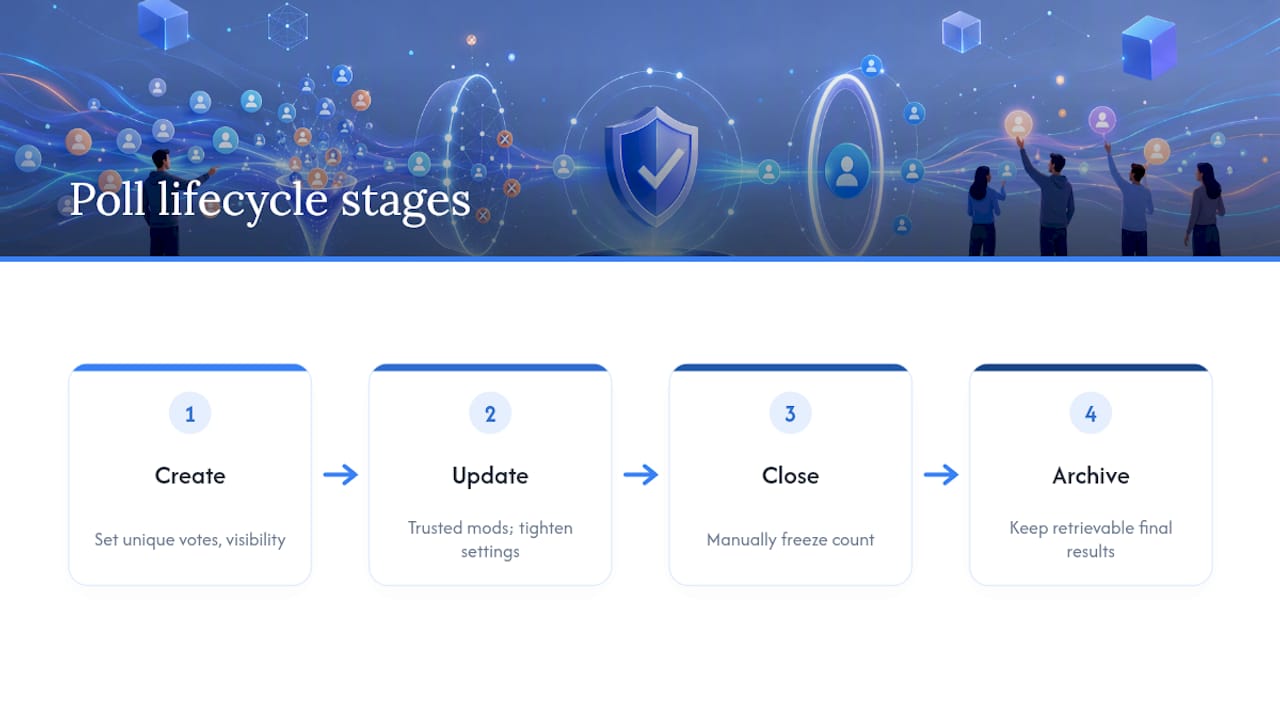 Create is where your settings matter most. Lock in enforce_unique_vote, visibility, and max votes before the poll goes live, not after votes start rolling in. Changing rules mid-poll confuses viewers and can invalidate early votes.
Update covers any mid-flight adjustments, tightening a setting because you're seeing abuse, extending a deadline, or removing a suggested option that slipped past your filters. Reserve UpdatePoll access for trusted co-hosts and moderators, since a badly timed change can reset viewer trust in the result.
Close uses is_closed to freeze the vote count. Close manually at a clear moment (end of segment, end of stream) rather than on an automatic timer whenever possible, so viewers see a deliberate result rather than an arbitrary cutoff.
Archive is where most streamers drop the ball. A closed poll should stay retrievable for review, disputes, and content clips, not vanish from your dashboard. Keep archived poll data, including the final vote breakdown and any flagged-and-removed options, for at least as long as your standard chat log retention period.
Create is where your settings matter most. Lock in enforce_unique_vote, visibility, and max votes before the poll goes live, not after votes start rolling in. Changing rules mid-poll confuses viewers and can invalidate early votes.
Update covers any mid-flight adjustments, tightening a setting because you're seeing abuse, extending a deadline, or removing a suggested option that slipped past your filters. Reserve UpdatePoll access for trusted co-hosts and moderators, since a badly timed change can reset viewer trust in the result.
Close uses is_closed to freeze the vote count. Close manually at a clear moment (end of segment, end of stream) rather than on an automatic timer whenever possible, so viewers see a deliberate result rather than an arbitrary cutoff.
Archive is where most streamers drop the ball. A closed poll should stay retrievable for review, disputes, and content clips, not vanish from your dashboard. Keep archived poll data, including the final vote breakdown and any flagged-and-removed options, for at least as long as your standard chat log retention period.
Votes cast in the split second before closure deserve a clear policy. Decide in advance whether a vote submitted during the close event counts or gets discarded, and apply that rule consistently. Viewers notice inconsistency far more than they notice a strict-but-fair rule.
Building a reporting and review queue for flagged options
Every poll that accepts user-suggested options needs a formal path for viewers to flag something before a moderator ever sees it manually. Relying on a moderator happening to spot a bad option is not a system, it's luck.
A basic review queue needs three things: the flagged content itself, who flagged it (or which AI filter caught it), and enough surrounding context to make a fast decision. That context should include the message ID, the timestamp, and a few lines of nearby chat, the same operational minimum recommended for live moderation generally.
Prioritise the queue by severity, not by arrival time. A suggested option containing a slur or targeted harassment needs action in seconds. A borderline joke that a couple of viewers reported can wait a minute without real harm.
Give moderators a clear set of actions for each queue item: approve, reject, reject and warn the submitter, or reject and escalate to the streamer for a ban decision. Vague or missing actions lead to queue items sitting unresolved, which is worse than no queue at all, because viewers see the offending option still listed while it waits.
Track resolution time as a rough health metric for your moderation setup. If flagged options are consistently sitting for several minutes before anyone acts, either your queue needs more moderator coverage during that time slot or your AI pre-filter needs tuning to catch more before it ever reaches a human.
How should you handle disputes over poll results?
Someone will eventually claim a poll was rigged, miscounted, or unfairly closed early. How you respond at that moment shapes whether your audience trusts the next poll you run.
Start with the audit log. If you've been logging votes, closures, and moderator actions as recommended earlier, you can usually answer a dispute with a factual timeline rather than a defensive argument. "The poll closed at 9:42 because is_closed was triggered manually, here's the vote count at that timestamp" ends most disagreements immediately.
Not every dispute is bad faith. Sometimes a viewer genuinely didn't see their vote register because of a connection hiccup, or the overlay showed a stale number due to a desync issue covered earlier. Treat the first report as information, not an accusation, and check your own systems before assuming the viewer is wrong.
For disputes involving account bans or vote removal tied to a poll incident, a documented appeals path matters. Services built specifically for handling ban appeals show how a structured, transparent review process reduces repeat disputes because viewers know exactly how to contest a decision rather than arguing in chat.
Set a public, simple policy before you ever need it: how close counts are calculated, what happens to votes cast in the final second, and what qualifies as grounds for a re-run. A policy written after the first dispute always looks reactive, even when it's fair.
How do you write poll questions that actually work?
A confusing poll question generates more moderation work than almost anything else on this list, because ambiguous wording produces "wrong" answers that viewers then argue about.
Keep the question itself under roughly ten words wherever you can. "Which game should we play next?" beats a paragraph explaining three caveats about platform and time constraints. Put constraints in your own spoken introduction, not in the poll text.
Limit visible options to four or five. Beyond that, viewers skim rather than read, and your overlay starts fighting for space. If you genuinely need more choices, run a first-round poll to narrow the field, then a second poll to decide between finalists.
Avoid overlapping or ambiguous options. "More horror games" and "spooky games" on the same poll will split a vote that should have gone to one option, and viewers will (correctly) call that a design flaw rather than a fair result. Test your option list by reading it aloud. If two options could describe the same answer, merge them.
For game-selection polls specifically, concise, non-overlapping option lists paired with a clear veto mechanic consistently produce faster, less contested results than open-ended suggestion polls, because viewers are choosing between clear alternatives rather than guessing what a written-in option even means.
Which third-party moderation tools work alongside stream polls?
Native poll settings handle a lot, but most established streamers layer at least one dedicated moderation tool on top rather than relying on platform defaults alone.
Chat moderation bots that already run your channel (handling timeouts, blocklists, and raid detection) should extend that same rule set to poll-suggested options wherever the integration allows it. There's little value in a bot that filters slurs from chat but lets the identical text through as a suggested poll option.
For channels running generative AI moderation, the architecture pattern published by AWS demonstrates how a WebSocket-based real-time pipeline with a human review queue scales without introducing noticeable lag, which matters when your poll's whole appeal is that it feels instant to viewers.
Discord integration deserves specific attention if you run polls or pre-stream voting through a server. Coordinating decisions through Discord works well when the integration respects the same role permissions you've set for your stream, rather than treating Discord as a separate, unmoderated channel where anyone can trigger a vote.
Whatever combination you choose, avoid stacking so many separate tools that a flagged item has to pass through three different dashboards before a human sees it. Every extra handoff is a place where context gets lost and response time slows down.
Troubleshooting stuck polls and inconsistent vote counts
A poll that won't close, or a vote count that doesn't match what viewers report seeing, is almost always one of a few specific problems.
Stuck polls that won't close usually trace back to a permission gap. If UpdatePoll and the closure trigger aren't held by the same role, or a co-host tries to close a poll they only have partial rights to, the close request can silently fail. Check that whoever is triggering closure actually holds the right permission before assuming it's a platform bug. Vote counts that don't match viewer expectations are frequently a client desync issue rather than an actual data problem, exactly the failure mode covered in the developer notes section above. If your overlay or chat client is reading old message-seed data instead of subscribing to live poll.state events, viewers will see numbers that look "wrong" even though the underlying data is fine. Duplicate-looking votes after enforce_unique_vote is enabled usually mean a viewer voted, the platform correctly replaced their prior vote, and someone misread that as two separate votes being counted. Check your logs before assuming the setting has failed. Suggested options that vanish or reappear point to a race condition between your blocklist filter and the display layer, particularly under heavy traffic. Ensure your filter runs before the option is rendered to any viewer, not as a parallel process that occasionally loses the race.When in doubt, the audit log is your fastest diagnostic tool. Nearly every "the poll is broken" report resolves once you check the actual sequence of events against what a viewer thinks they saw.
How can you make polls accessible to every viewer?
A poll that only works for viewers with fast reflexes and perfect eyesight is excluding a chunk of your audience without meaning to.
Give polls a reasonable duration. Thirty seconds might feel snappy to you, but it's genuinely difficult for viewers using screen readers or those navigating chat with limited mobility to read the options and respond in time. A minute or more costs you little in pacing and includes far more of your audience.
Use plain, high-contrast text in your overlay design, and avoid relying on colour alone to distinguish options. Colour-blind viewers make up a meaningful share of any audience, and a poll where "green wins" only makes sense if you can see green clearly.
Where your platform supports it, offer a text-based voting method alongside any click-to-vote overlay feature, since not every viewer can interact with an on-screen button in real time. A shareable link that works from a phone or a basic browser widens participation for viewers watching on unconventional setups.
Keep language in poll questions and options genuinely simple. Wordplay and inside jokes are fun for regulars but exclude newer viewers who don't have the context yet, particularly in polls that decide something meaningful, like a charity outcome or a giveaway.
How should you notify moderators and viewers about poll changes?
Silent poll changes create confusion, and confusion is what turns a minor issue into a chat argument.
Moderators need immediate, low-friction alerts when a poll gets flagged content, hits a suspicious voting pattern, or approaches closure. A dashboard notification or a dedicated moderator-only alert channel works better than expecting someone to notice a queue count change on their own.
Viewers benefit from a clear on-screen or in-chat announcement whenever a poll opens, is about to close, or has just closed. "Poll closing in 10 seconds" prevents the near-universal complaint of "I didn't get to vote," which is often less about timing and more about viewers not realising the poll existed until it ended.
For suggested-option approvals or rejections, a brief automated response to the submitter (even a simple "your suggestion wasn't approved" without a lengthy explanation) reduces repeat disputes far more than silence does. Viewers who get no feedback assume the worst about why their submission vanished.
PickThe's perspective: what actually reduces poll conflict
Running real-time voting for game night decisions taught us something that applies directly to stream polls: most conflict doesn't come from bad actors, it comes from vague options. A tight, concise list with a clear veto resolves disagreement faster than any moderation rule ever will, because viewers are choosing between things they can actually picture rather than debating what a written-in suggestion even meant.
The other lesson is speed. Decisions people can see happening in real time, rather than waiting on a delayed reveal, generate far less second-guessing about whether the result was fair.
> — PickThe
Let PickThe.Games handle your live audience vote
Building your own poll moderation stack from scratch, permissions, blocklists, overlay syncing, and all, is a genuinely worthwhile project if you have the development time to spare. If you'd rather your audience start voting tonight, There are off-the-shelf alternatives that skip the build entirely.
 Streamer Mode lets your viewers vote on what you play next through a sharable link, no chat client required, with results feeding a live leaderboard you can drop straight into OBS. Because the game list itself is vetted rather than open to arbitrary text suggestions, you sidestep most of the spam and blocklist work covered above before it ever becomes a problem. The veto system also means a single bad-faith winner never gets forced through, which cuts down the dispute-handling work your moderators would otherwise carry.
It plugs into Discord for pre-stream voting too, so your community can settle on tonight's game before you're even live. Head to the game voting app to set up your first board and see how fast a group actually agrees on something when the options are clear and the vote is visible.
Sources
- Live stream chat moderation: 5 ways to create a safe & enjoyable video experience
- Guidance for live chat content moderation with generative AI on AWS
FAQ
How do you moderate Twitch chat during a poll?
Combine Twitch's native AutoMod and role permissions with poll-specific controls like enforce_unique_vote, and route any flagged suggested options to a moderator queue with timestamp and context before they go live.
How do you moderate live chat on YouTube during polls?
Use YouTube's built-in moderator roles alongside a blocklist for suggested poll text, and close polls manually rather than on an automatic timer so a moderator can confirm the result before it's announced.
How much does chat moderation pay?
Rates vary widely by channel size and whether the role is volunteer or paid, and no single industry-standard figure applies across platforms, so check individual streamer or agency listings for current rates.
Is chat moderation a legitimate job?
Yes, professional and freelance chat moderation is a legitimate role for larger channels and organisations, though most moderators on small to mid-sized streams remain trusted volunteers rather than paid staff.
What is the fastest way to stop poll spam mid-stream?
Enable slow mode and rate limits immediately, then rely on enforce_unique_vote to replace duplicate ballots rather than stack them, which stops most bursts without needing to close the poll entirely.