What is a shared game preference tool?
What is a shared game preference tool?

A shared game preference tool is an app or feature that collects every group member's game preferences, checks cross-platform compatibility, and surfaces the titles everyone can actually play together. The immediate payoff: your group stops debating and starts playing in minutes rather than spending half the evening arguing about what to load up. Pickthe backs this with a database of over 6,000 games, real-time voting, and Discord integration, so the whole process fits inside your existing group chat.
*Table of Contents
- What does a shared game preference tool actually do for your group?
- Key features to look for in a shared game preference tool
- How a shared game preference session typically runs
- When is a shared game preference tool most useful?
- How to choose the right shared game preference tool
- Pickthe as a practical example of a shared game preference tool
- Quick start: run your first session in under five minutes
- Key takeaways
- Why this matters for UK gamers
- Try Pickthe tonight
- Useful sources and further reading
What does a shared game preference tool actually do for your group?
The core job is simple: gather what each person wants, filter out the games that won't work on everyone's platform, and rank what's left. In practice, that means four actions running in sequence.
- Preference collection — each member rates, swipes, or votes on candidate titles independently, so no one's voice gets drowned out.
- Platform compatibility check — the tool cross-references which games support crossplay across platforms, removing unplayable options before anyone wastes a vote on them.
- Ranking and voting — results aggregate in real time, giving the group a clear shortlist rather than a shouting match.
- Filtering by player count and genre — useful when your group of six needs a game that actually supports six players, not just two.
The outcome is faster decisions, more inclusive choices, and far fewer moments where someone says "oh, I don't have that on Switch."
Pro Tip: Use live voting when your whole group is online together in a voice chat. Switch to asynchronous collection — where members vote in their own time — when you're coordinating across time zones or busy schedules. *Key features to look for in a shared game preference tool
Not every tool in this space offers the same depth. Here's what a well-built solution should include.
- Preference input (swipes or ratings) — a swiping mechanic forces every member to engage with each title rather than defaulting to the loudest suggestion. Tools like GameTier use a 0–10 rating feed with friend-follow discovery, which suits more deliberate preference-building.
- Live voting and real-time results — votes should update instantly for all participants, keeping energy up during a session.
- Crossplay and platform verification — the tool should confirm whether a game is genuinely playable across your group's mix of PC, PS5, Xbox, and Switch before it even appears in the vote.
- Veto or opt-out system — one member should be able to hard-block a title (perhaps they've already completed it, or it triggers motion sickness) without derailing the whole vote.
- Discord and party integrations — running the tool inside your Discord server removes the friction of switching apps mid-session.
- Custom game lists — your group may own titles not in the default database, so the ability to add them matters.
> Pickthe's database covers over 6,000 games, each tagged with crossplay and platform data, so unplayable titles are filtered out before voting even begins.
A large, well-tagged database is what separates a genuinely useful tool from one that still leaves you Googling "does this support crossplay?" after the vote.
*
How a shared game preference session typically runs
The workflow is straightforward once you've done it once.
1. Gather the group and connect — share an invite link or connect via Discord. Everyone joins the same session; no separate accounts required for basic use.
2. Load your candidate games — pull from a curated list such as best crossplay games, browse the full multiplayer catalogue filtered by platform and genre, or add custom titles your group already owns.
3. Collect inputs — each member swipes or votes on the shortlist. The swiping mechanic ensures equal input; nobody can just sit back and accept whatever the group decides.
4. View live results and apply vetoes — the aggregated ranking updates in real time. Anyone can veto a title at this stage; the tool adjusts the shortlist accordingly.
5. Select and launch — the top-ranked, veto-free, crossplay-compatible title wins. Your group loads it up and plays.
Tools like Common Steam Games demonstrate how account-level library checks speed up step two for Steam-heavy groups, while still allowing custom entries for non-linked purchases.
Pro Tip: Set your platform filters before you invite the group. Filtering to crossplay-only results at the start means nobody votes on a title that half the group can't access.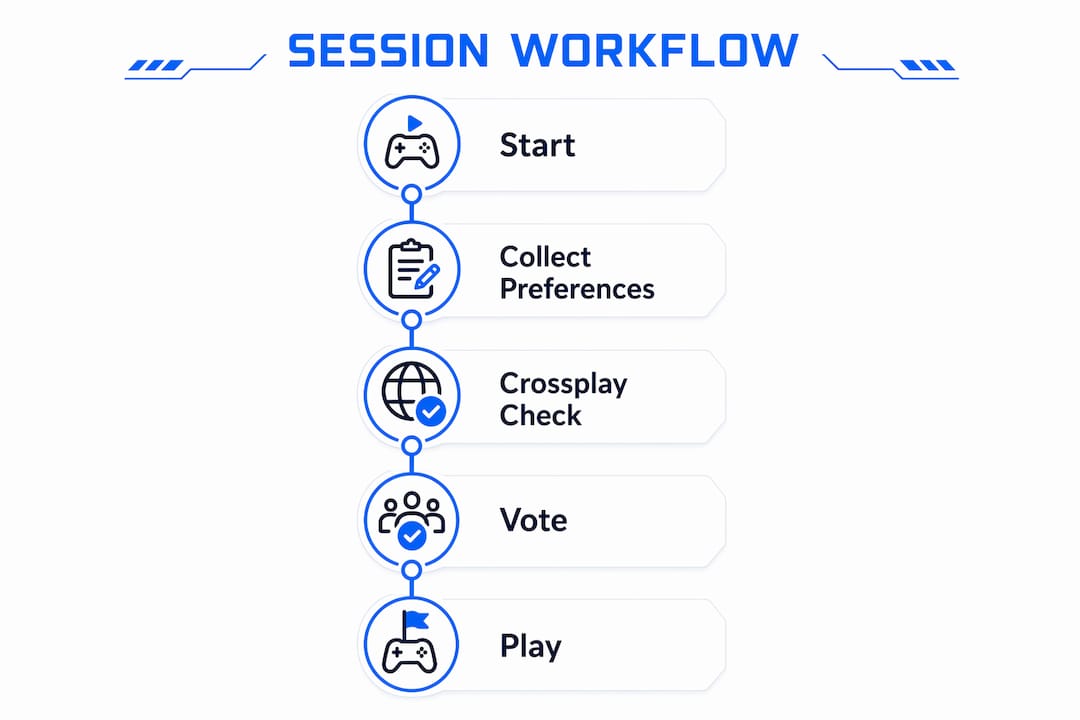 *
*
When is a shared game preference tool most useful?
Some situations call for this kind of tool more than others.
- Mixed-platform parties — when your group spans PC, Xbox, PS5, and Switch, manual compatibility checks take ages. A tool handles this instantly.
- Planned game nights — if your group meets regularly, a repeatable voting process is fairer than whoever shouts loudest each week.
- Large groups — six or more people in a voice chat rarely reach consensus through conversation alone. Structured voting cuts through the noise.
- Cross-timezone groups — asynchronous preference collection lets members vote before the session starts, so you're not waiting on stragglers when everyone finally gets online.
- Tabletop crossover nights — groups who mix digital and physical gaming (including tabletop sessions) can use the same preference logic to decide which format to run on a given night.
How to choose the right shared game preference tool
Run through this checklist before committing to any tool.
Criteria to check:- Does it verify crossplay compatibility, not just list games?
- How large is the database, and is it regularly updated?
- Does it support live voting, or only asynchronous collection?
- What are the privacy requirements — does it need linked accounts?
- Is the core functionality free, or does a paywall block the session mid-flow?
- Does it integrate with Discord or your group's existing communication setup?
- Can you add custom games your group owns outside the default catalogue?
1. Do we need anonymous votes, or are we comfortable with open results?
2. Do we want crossplay-only results, or are we happy to filter manually?
3. Are we comfortable linking Steam or other platform accounts?
4. How often do we play together — is a quick free tool enough, or do we want saved session history?
On pricing: most tools in this space offer a free tier that covers basic session creation and voting. Paywalls tend to appear around advanced features like session history, priority support, or expanded database access. Pickthe's basic use carries no paywall, which matters when you're trying to get a session running tonight rather than evaluating a subscription.
*Pickthe as a practical example of a shared game preference tool
Pickthe is the clearest ready-to-use example of this tool category for UK groups, and it maps directly to the criteria above.
- Real-time voting — votes update live for all participants via the game voting app, keeping the session moving.
- Veto system — any member can block a title without disrupting the rest of the vote.
- Discord integration — add Pickthe to your server and run the whole session without leaving your voice chat.
- Extensive game database — each title is tagged with platform and crossplay data, so the find-games flow filters unplayable options before voting starts.
- Swiping mechanic — every group member engages with each title individually, which increases perceived fairness and tends to reduce veto use.
- No paywall for basic use — your group can run a full session tonight without a subscription.
For groups who want to pick a multiplayer game everyone enjoys fast, this combination of features is hard to beat without paying for something more complex than the problem warrants.
*Quick start: run your first session in under five minutes
You don't need much prep. Here's the shortest path to a live session.
Before you start:- Know which platforms your group is on (PC, PS5, Xbox, Switch, or a mix).
- Have your Discord server open if you want integrated voting.
- Decide whether you want a curated seed list (e.g. best party games) or a manual shortlist.
1. Go to Pickthe and create a new session.
2. Share the invite link in your group chat or Discord.
3. Set platform filters to match your group's devices — crossplay-only is the safest default.
4. Let everyone swipe through the candidate list.
5. Review the live results, apply any vetoes, and confirm the top pick.
6. Load the game and play.
Pro Tip: If your group is already in a Discord voice channel, add Pickthe to Discord first. Running the vote inside the call keeps everyone engaged and cuts the back-and-forth of switching between apps. *Key takeaways
A shared game preference tool is the fastest way to align a mixed-platform group on a multiplayer game everyone can actually play, and Pickthe's free-to-use model with a large game database makes it the most practical starting point for UK groups.
| Point | Details |
| --- | --- |
| What the tool does | Collects preferences, checks crossplay compatibility, and ranks games the whole group can play. |
| When to use it | Any time your group spans multiple platforms or has more than four players debating what to load up. |
| Fastest way to start | Create a session on Pickthe, set platform filters, share the invite link, and collect swipes. |
| Features that matter most | Live voting, a veto system, crossplay verification, and a large updated game database. |
| Pickthe's key advantage | Over 6,000 tagged games, real-time voting, Discord integration, and no paywall for basic sessions. |
*Why this matters for UK gamers
UK gaming groups tend to be platform-diverse in a way that makes manual game selection genuinely painful. A typical Friday-night Discord server might have someone on PC, two on Xbox, one on PS5, and another on Switch — and the evening window is short. Nobody wants to spend the first thirty minutes Googling crossplay support for every suggestion.
Tools like Pickthe reduce that friction directly. The veto system also fits the social dynamics of UK group play well: it gives quieter members a formal mechanism to flag a game they'd rather skip, without having to argue their case in a voice channel. For groups who meet weekly or run club nights, the repeatable session structure means the decision process gets faster each time, not slower.
*Try Pickthe tonight

Pickthe is the quickest route from "what should we play?" to actually playing. Your group gets real-time voting, crossplay filtering across a browse hub of over 6,000 multiplayer games, a veto system, and Discord integration — all without a subscription. Head to the find multiplayer games flow, set your platforms, share the link, and you'll have a winner before the voice chat gets noisy. Basic sessions are free; no trial period, no paywall mid-vote.
*Useful sources and further reading
| Source | What it verifies |
| --- | --- |
| Pickthe — Find Multiplayer Games | Group find-games flow combining filters, voting, and launch-ready picks |
| Pickthe — Game Voting App | Live voting and session creation features |
| Pickthe — Crossplay Checker | Crossplay compatibility verification across platforms |
| Pickthe — Game Night Picker | 6,000+ game database and swiping mechanic details |
| Pickthe — Multiplayer Game Finder | No-paywall claim and selection friction reduction |
| GameTier | Rating-based preference capture and social discovery |
| Common Steam Games (GitHub) | Live session architecture and Steam account integration |