7 Fast Low Spec Crossplay Games for Groups With Weak PCs
7 Fast Low Spec Crossplay Games for Groups With Weak PCs

If your friend group has a mix of an ageing laptop, a mid-range gaming PC, and a console, your fastest crossplay wins are Terraria, Stardew Valley, Rocket League, Fortnite, and Left 4 Dead 2. Each one runs on genuinely weak hardware and lets people join from different platforms without a fuss. Scroll down for exact spec guidance, crossplay caveats, and tweaks to squeeze more performance out of whatever machine is holding your group back.
*> TL;DR:
>
> - Prioritize games like Terraria, Stardew Valley, and Left 4 Dead 2, which run on very modest hardware and support effective crossplay across multiple platforms.
> - Confirm true crossplay capabilities and session size limits before choosing a game, especially when hosting from a low-end device.
> - Use simple hardware tweaks such as lowering resolution and disabling effects to improve game performance on weak PCs.
> - Bump up RAM and switch to wired network connections to fix most performance issues without needing new graphics cards.
> - Use online tools to filter and vote on compatible multiplayer games quickly, saving time and avoiding arguments over specifications.
*Table of Contents
- Quick picks: the fastest low spec crossplay games to try tonight
- Curated picks: what actually runs and who it's for
- How to choose the right low spec crossplay game for your group
- Practical tweaks to make crossplay games run on low-end PCs
- Why this list holds up and how PickThe.Games speeds up the decision
- Cost-effective hardware upgrades that actually improve crossplay performance
- Fast picks beat perfect specs
- Let your group vote instead of arguing over specs
- Sources
- FAQ
Quick picks: the fastest low spec crossplay games to try tonight
You don't need a benchmark chart to start picking games. Here's the shortlist to open with, each one chosen because it plays fair with weak hardware and doesn't lock anyone out by platform.
- Terraria — PC, console, mobile crossplay within matching versions; cheap; great for small co-op groups who like building and exploring.
- Stardew Valley — Broad cross-platform multiplayer; low price; ideal for relaxed, casual co-op with 2-4 players.
- Rocket League — Full crossplay across PC, PlayStation, Xbox, and Switch; free-to-play; best for 4-8 players who want quick competitive matches.
- Fortnite — Native crossplay across nearly every platform; free-to-play; suited to bigger party sessions.
- Left 4 Dead 2 — Very light on hardware; cheap; strong pick for a dedicated 4-player co-op crew, though crossplay is more limited than the others.
- Don't Starve Together — Modest requirements; affordable; works well for small survival co-op groups.
- Portal 2 — Runs on ancient hardware by today's standards; low price; built specifically around 2-player co-op puzzles.
Two of those, Rocket League and Fortnite, cost nothing to try, so the whole group can test compatibility before spending a penny.
Curated picks: what actually runs and who it's for
Picking a game your group can all play is one problem. Picking one that won't chug on the weakest laptop in the room is another. Here's the detail on each, including where crossplay has limits worth knowing about before launch night.
Terraria is about as forgiving as multiplayer gaming gets. It's a 2D sandbox, so the GPU barely breaks a sweat, and PCGamingWiki's list of low-end games confirms titles like this routinely run on 1 to 2GB of RAM and basic integrated graphics. Crossplay works across PC, consoles, and mobile, provided everyone runs a compatible version. It's a very low resource pick, co-op focused, and cheap enough that nobody in the group needs convincing. Stardew Valley sits in the same bracket. It's a farming sim with pixel art visuals, which means the CPU does more work than the GPU, and neither has to work hard. PCWorld's rundown of games that don't need a graphics card singles out exactly this kind of indie title as the sweet spot for weak machines. Multiplayer supports cross-platform play on most storefronts, and the price rarely climbs above pocket change during a sale. Rocket League proves that low-spec friendly doesn't mean visually basic. On low settings it runs on genuinely dated GPUs, and it's one of the clearest crossplay success stories in gaming. Publisher confirmation and Epic Games Store's curated crossplay coverage back this up. It's PvP rather than co-op, best suited to four to eight players, and matches rarely run past five minutes, so a weak host isn't stuck in a long session if performance dips. Fortnite is the obvious pick when your group is large and scattered across platforms. It's free, crossplay is switched on by default, and Epic's own store pages document support across PC, console, and mobile. It's heavier than the others on this list, so "low spec" here means modest rather than very low. Still playable on integrated graphics at reduced settings. Left 4 Dead 2 deserves its reputation. It's over 15 years old, and its Steam page reflects requirements that any modern integrated GPU laughs at. The catch: crossplay between PC and current-generation consoles is patchy, so check per-platform before assuming your Xbox friend can drop into your PC lobby. Treat it as a PC-focused co-op pick for four players. Don't Starve Together and Portal 2 round out the list nicely. Don't Starve Together is a survival co-op title with modest requirements and a loyal community, frequently recommended on Steam's low system requirement curator lists. Portal 2 is ancient by GPU standards now, cheap, and purpose-built for two-player co-op puzzling, though it has no native crossplay beyond PC and Mac.- Very low friendliness: Terraria, Portal 2, Left 4 Dead 2
- Low friendliness: Stardew Valley, Don't Starve Together
- Modest friendliness: Rocket League, Fortnite
How to choose the right low spec crossplay game for your group
Start with the weakest machine in your group, not the strongest. That single decision avoids most of the frustration people run into with crossplay games for low end PCs.
1. Identify the least capable device in the group and check its specs against the game's minimum requirements, not the recommended ones.
2. Confirm true crossplay, meaning parties and matchmaking work across platforms, rather than cross-progression only, where saves sync but play doesn't.
3. Check session size limits and whether the game uses dedicated servers or peer hosting.
4. Favour free or cheap titles first, so nobody has to justify a purchase before a test run.
5. Run a short trial session before committing to a full game night.
Pro Tip: If one player will be hosting from a weak laptop, avoid peer-hosted games entirely. A host with a slow upload speed will lag out the whole party even if everyone else has a decent connection.Marketing pages often blur "cross-platform" and "crossplay" together, and that distinction genuinely matters. Cross-platform can just mean the game exists on multiple platforms. Crossplay means people on different platforms can actually play together in real time.
Practical tweaks to make crossplay games run on low-end PCs
Small changes make a bigger difference than most people expect. Lower resolution and disable post-processing effects first. Reducing texture quality helps less in most engines than cutting resolution and shadow detail, so start there before touching textures.
- Drop resolution before textures, and turn off motion blur, bloom, and ambient occlusion.
- Close background apps, browser tabs included, and switch Windows to the high-performance power plan.
- Update GPU drivers before every big multiplayer session, not just when something breaks.
- Use a wired connection where possible and pick the nearest available server region.
- Only install community low-res texture packs after checking they're compatible with the current game version.
Why this list holds up and how PickThe.Games speeds up the decision
Every pick here is checked against real low-end benchmarks and confirmed crossplay policies rather than guesswork. Pickthe lets your group filter by platform and vote in minutes, no spec-sheet arguments required.
Cost-effective hardware upgrades that actually improve crossplay performance
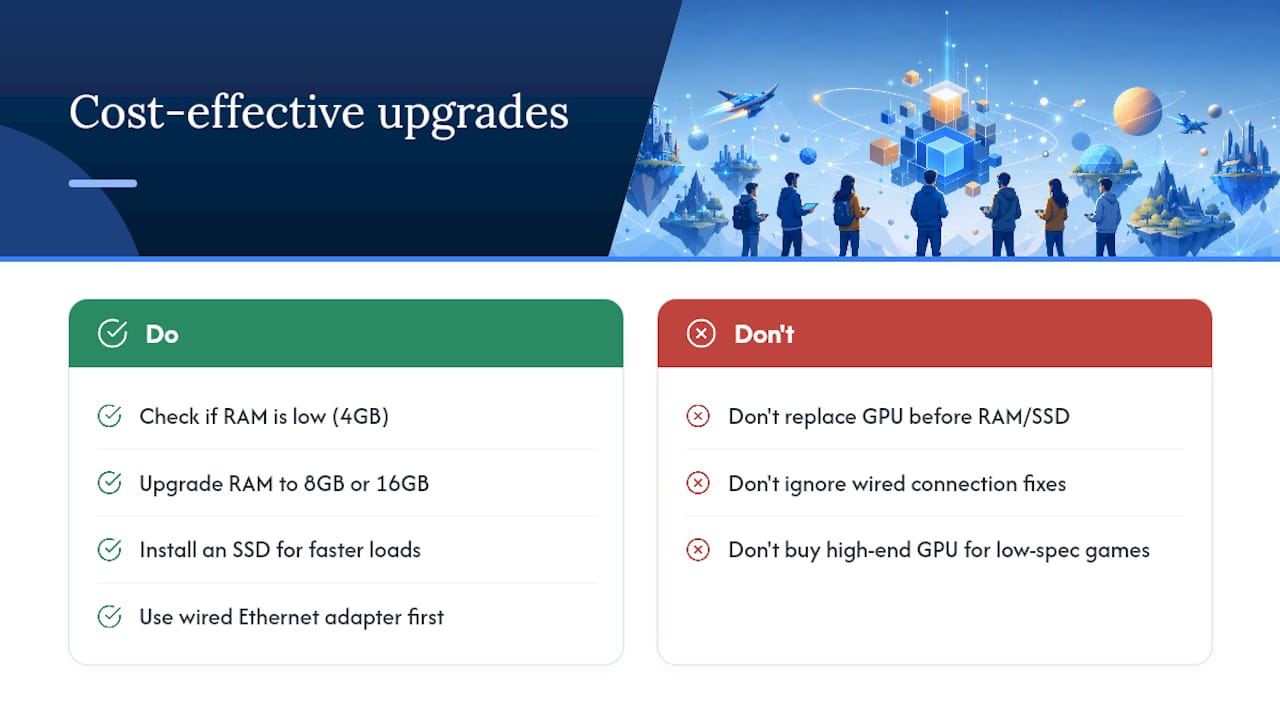
You don't need a new PC to fix most crossplay bottlenecks. Before spending anything, check whether your current machine is RAM-starved. Many older laptops ship with 4GB, and bumping to 8GB or 16GB is one of the cheapest upgrades available, often under £40 for a used or budget kit, and it fixes stuttering in almost every game on this list far more reliably than a GPU swap would.
If you're still on a mechanical hard drive, an SSD is the next upgrade worth making. Load times in games like Fortnite and Rocket League drop dramatically, and Windows itself feels less sluggish overall, which matters when you're alt-tabbing to Discord mid-match.
Only consider a graphics card upgrade if you're set on playing Fortnite or other modern titles at higher settings. For everything else on this list, from Terraria to Left 4 Dead 2 to Don't Starve Together, integrated graphics from the last several years are genuinely enough. A budget GPU in the £100 to £150 range will handle Rocket League and Fortnite comfortably on low to medium settings without needing a full system rebuild.
Network hardware is the upgrade people skip and shouldn't. A £20 to £30 ethernet adapter for a laptop without a wired port removes the single biggest cause of crossplay lag: a shaky WiFi connection competing with everyone else's devices. Before buying anything else, fix your connection first. It costs the least and fixes the most.
Fast picks beat perfect specs
The conventional advice on this topic spends too much time on benchmark charts and not enough on what actually breaks game nights: someone's PC can't run the shiny new release everyone else wants to play, and the whole session stalls before it starts.
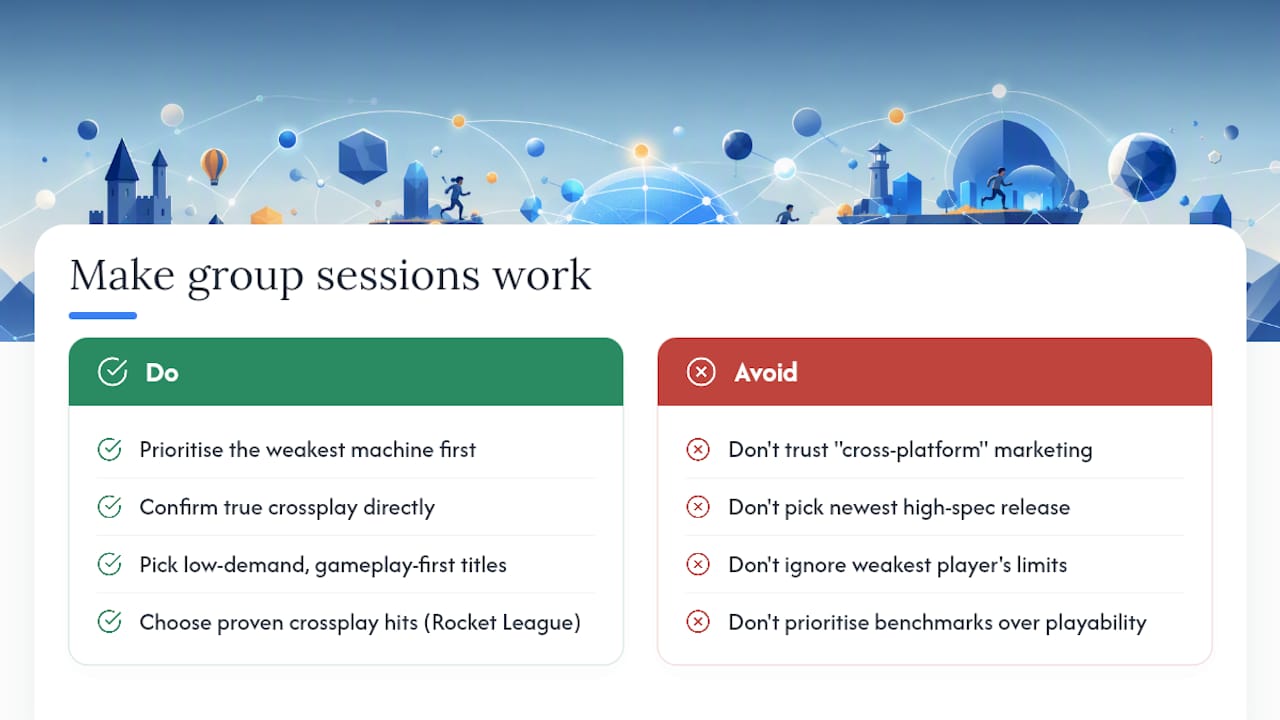
What the evidence here actually supports is simpler. Older, gameplay-first titles like Terraria, Stardew Valley, and Left 4 Dead 2 aren't compromises. They're often better crossplay choices than newer releases, because their low demands mean nobody gets left behind. Fortnite and Rocket League prove crossplay and playability aren't mutually exclusive even in more demanding titles.
Prioritise the weakest machine in your group first, always. Confirm crossplay directly rather than trusting a store page's marketing language, since "cross-platform" and true crossplay are not the same promise. Everything else, including which specific game you land on, is far less important than getting those two things right.
> — PickThe
Let your group vote instead of arguing over specs
Working out which games your group can actually play together shouldn't take longer than the game night itself. A free tool lets every gaming group filter a large multiplayer game database by platform and crossplay compatibility, then swipe and vote until everyone lands on something they're happy with, no paywalls, no ad interruptions, and no one person steamrolling the decision.

If your group is scattered across an old laptop, a console, and a proper gaming PC, start with the crossplay compatibility checker to confirm what actually works together before anyone commits to downloading anything. Or head straight to Find Multiplayer Games for Your Group, create a board, add your platforms, and let the swiping sort out the rest.
Sources
- List of low-end games | PCGamingWiki
- The best PC games of 2025 (that don't need a graphics card) | PCWorld
- Epic Games Store (curated articles and news)
FAQ
What are some cheap cross-platform games?
Stardew Valley, Terraria, and Don't Starve Together are all inexpensive and support cross-platform multiplayer, while Rocket League and Fortnite are free-to-play with full crossplay.
What are some low-spec multiplayer games?
Terraria, Stardew Valley, Left 4 Dead 2, and Portal 2 all run on very modest hardware, including older integrated graphics, according to PCGamingWiki's low-end games list.
What games are fully crossplay?
Rocket League and Fortnite offer the broadest crossplay support across PC, consoles, and mobile, while Terraria supports crossplay between matching versions on PC, console, and mobile.
What are some good low-spec games?
Terraria, Stardew Valley, and Don't Starve Together consistently top low-spec recommendations, as they prioritise gameplay over graphical demands, a pattern PCWorld highlights among modern indie titles. If your group wants more options tailored to your exact platform mix, Pickthe lets you filter a much larger crossplay catalogue in minutes.