Crossplay vs Cross Progression: Verify What Moves in 5 Steps
Crossplay vs Cross Progression: Verify What Moves in 5 Steps

Crossplay lets you play with friends on other hardware; cross-progression makes your account, saves and unlocks follow you between devices. They're separate features built and licensed independently, so a game can support one, both, or neither, and you need to check each one on its own before you buy anything.
*> TL;DR:
>
> - Crossplay allows players on different hardware to join the same game sessions, but its support varies from full to partial across titles and modes.
> - Cross-progression syncs account data like levels and cosmetics across platforms via publisher accounts, though some purchases and ranks may not transfer.
> - Verify both features separately on store pages and support sites before buying, especially if cross-save or progress retention across devices matter to you.
> - Platform pairing impacts crossplay support, with PC and Xbox more compatible, while PlayStation often limits crossplay options for competitive modes.
> - Using tools like a crossplay checker and linking publisher accounts early can prevent disappointment and ensure seamless multiplayer and progress sharing.
*Table of Contents
- Crossplay vs cross progression: what crossplay actually controls
- Cross-progression explained: what actually follows your account
- How they differ: a decision checklist before you buy
- How to check and enable crossplay and cross-progression
- Common caveats that catch players out
- Real examples of how these features actually pair up
- How Pickthe helps when your group's hardware doesn't match
- Which feature should you actually prioritise?
- Skip the compatibility guesswork with a crossplay checker
- Sources
Crossplay vs cross progression: what crossplay actually controls
Crossplay is a matchmaking feature. It pools players from different hardware, be it PC, PlayStation, Xbox or Switch, into the same lobbies and sessions so nobody's stuck waiting for a match because their console has a smaller player base. That's the whole job: it decides who you can meet, not what you keep.
Developers don't implement it as a single switch. Some games offer full crossplay across every platform, others run partial crossplay (say, PC and Xbox, but not PlayStation), and some restrict it to specific modes, leaving ranked or competitive playlists platform-locked. This is why one battle royale might feel completely open while another keeps console players separate during ranked seasons, as Gamesindustry.
Players usually get some say over this too:
- Disabling crossplay entirely in settings
- Filtering out PC opponents specifically in competitive queues
- Inviting friends across platforms via party systems regardless of matchmaking settings
Many competitive titles build in a toggle to remove PC players from console matchmaking, since input method and aim-assist debates run deep in shooter communities. The trade-off is real: bigger pools mean faster queues, but mixed input types can tilt matches if a game hasn't balanced for it.
Pro Tip: If a lobby feels unbalanced, check your settings before blaming the matchmaking. Most shooters with crossplay bury the PC-opponent toggle two or three menus deep.Cross-progression explained: what actually follows your account
Cross-progression is about data, not matchmaking. It's the system that keeps your level, unlocks, cosmetics, and save files synced no matter which device you log into, using a central publisher account rather than the platform's own storage.
The mechanics rely on a linked account, usually free to create, tied to the publisher rather than Sony, Microsoft or Valve. That account holds your progress in the cloud, and each platform pulls from it instead of storing an isolated local save. Cross-progression and crossplay are documented as distinct features precisely because one governs who you play with and the other governs what you keep.
Common limits worth knowing:
- Premium currency or DLC bought on one storefront often stays locked there
- Rank and competitive ladders sometimes don't sync even when levels and cosmetics do
- Syncing can be manual (you choose which save to keep) rather than automatic
How they differ: a decision checklist before you buy
Crossplay and cross-progression solve two different problems, and mixing them up is the single most common reason players end up disappointed after a purchase.
| What you're checking | Crossplay | Cross-progression |
|---|---|---|
| Controls | Matchmaking and lobbies | Save data and unlocks |
| What moves | Nothing, just who you can play with | Levels, saves, cosmetics, sometimes rank |
| Setup needed | Usually none, or a simple in-game toggle | Publisher account linking |
| Platform pairs | Varies by mode | Varies by storefront and DLC |
Publishers frequently list these as separate features on store pages and in support documents, and it's common for a title to offer one without the other.
To work out which matters more for you, run through this:
1. Ask what you actually need right now. If your goal is playing tonight with a friend on a different console, crossplay is the only thing that matters.
2. Ask what happens if you switch devices later. If you're buying a Steam Deck and want your PlayStation save to carry over, you need cross-progression specifically, not just crossplay.
3. Check the store page, official FAQ, and required account linking before paying for anything, since these three sources will tell you exactly what's supported and what isn't.
How to check and enable crossplay and cross-progression
Verifying support takes a few minutes if you know where to look, and it saves you from repurchasing content you already own.
1. Read the store page first. Steam, the Epic Games Store, and console storefronts increasingly list crossplay and cross-progression as separate bullet points, not a vague "cross-platform" tag.
2. Check the official support article or patch notes. These often clarify mode-specific limits that the store page glosses over, particularly for ranked or seasonal content.
3. Link your publisher account. Services like an Epic account, an Activision account, or Xbox's own sign-in handle this, and Xbox Play Anywhere titles will prompt you automatically on first launch.
4. Adjust in-game settings. Look for a matchmaking toggle, privacy or friend-list settings, and confirm party invites work across the platforms you actually use.
5. Test before you commit. Log in on the second platform and try a free mode or early level to confirm your save actually appears before you buy DLC or premium currency there.
A dedicated crossplay checker can save you a step by cataloguing platform-pair support directly, which is handy when you're not sure a title's crossplay claim covers your specific setup.
Pro Tip: Link accounts before you buy anything extra. If cross-progression fails silently, you'll find out after you've already spent money on a platform-locked purchase.Common caveats that catch players out
Most disappointment here comes from assuming account linking equals full cross-progression, when it often doesn't.
- Store purchases rarely transfer. Platform entitlements are typically bound to the storefront you bought from, so a skin bought on PlayStation may never appear on your Xbox account.
- Progress sync is often partial. Campaign saves might carry over while rank, premium currency or seasonal cosmetics stay behind.
- Linking accounts for friends lists isn't the same as cross-save. Some games let you add cross-platform friends without syncing any actual progress, so check the publisher's wording carefully.
- Anti-cheat and input differences shape crossplay decisions. Developers sometimes segregate ranked modes entirely to keep competitive integrity, even when casual modes are fully open.
Real examples of how these features actually pair up
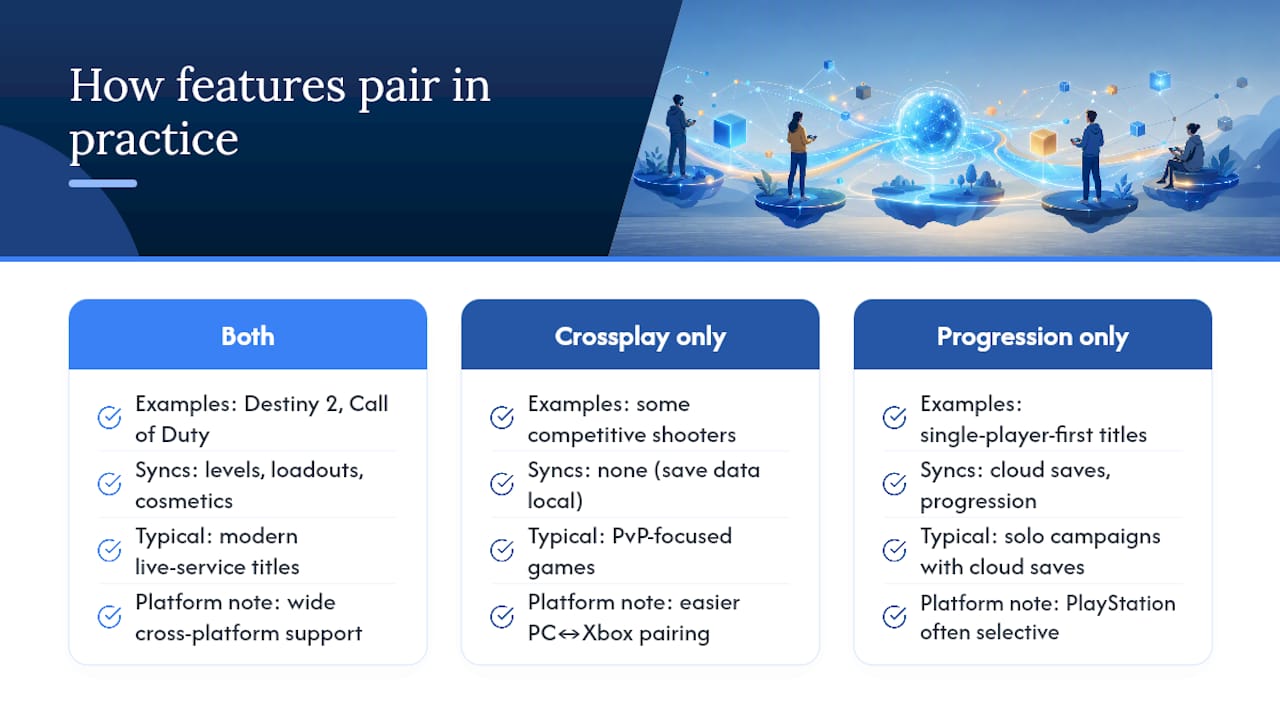
Destiny 2 and modern Call of Duty titles run both crossplay and cross-progression, syncing character levels, loadouts and cosmetics across every platform, as GamesRadar has documented. Other titles split the two: some competitive shooters offer full crossplay but keep save data platform-bound, while certain single-player-first games with light multiplayer support cross-progression through cloud saves but never bothered building crossplay at all.Platform pairs matter too. PC and Xbox tend to be the easiest combination thanks to shared publisher infrastructure, while PlayStation has historically been more selective about which titles get full crossplay. Our PC and Xbox crossplay list and broader best crossplay games roundup break down specific platform pairs in more depth.
How Pickthe helps when your group's hardware doesn't match
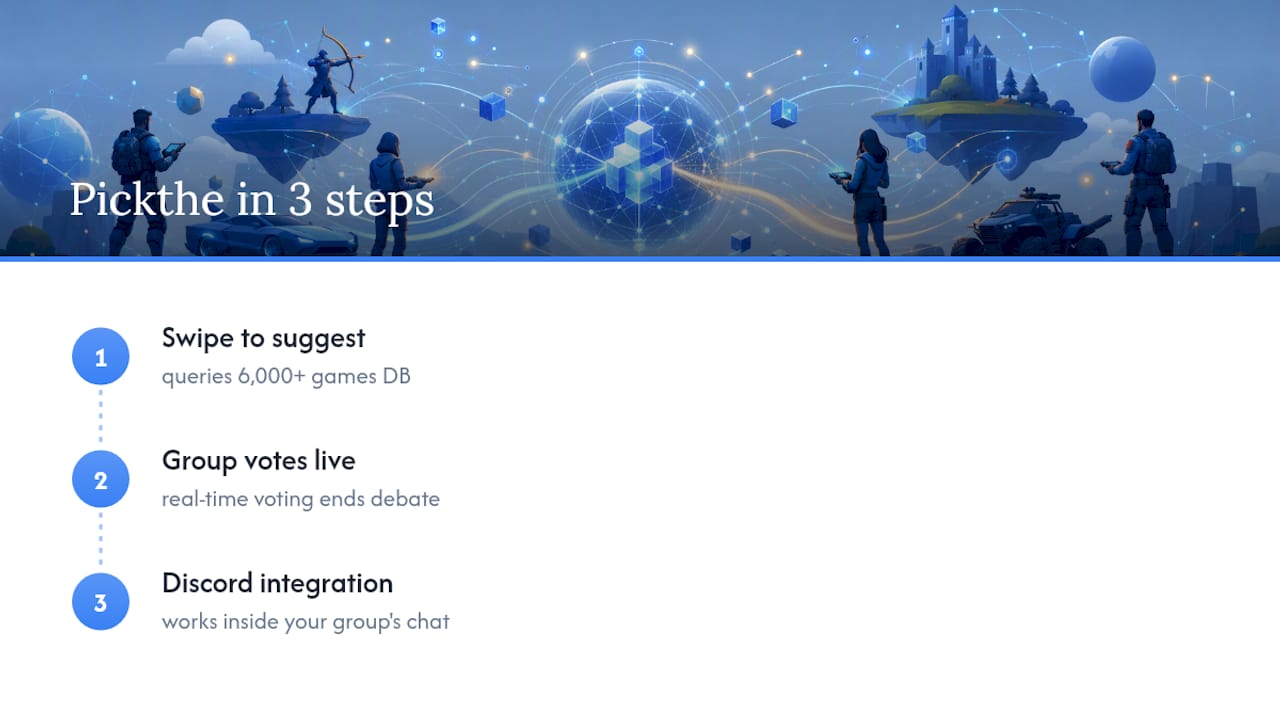
Working out whether your PlayStation friend and your PC friend can actually play the same game shouldn't take longer than the game session itself. Pickthe's swiping mechanic pulls from a continuously updated database of over 6,000 games, checking cross-platform compatibility while your group votes in real time, so the "can we even play together" conversation ends before it starts.
The Discord integration means this happens right where your group already talks, cutting out the usual back-and-forth of screenshotting store pages to prove a game supports crossplay..
Which feature should you actually prioritise?
If your priority is playing together tonight, verify crossplay and stop there. If your priority is protecting progress across devices you'll use over months, verify cross-progression and read the entitlements FAQ before spending on anything extra. Link the publisher account and test with a free mode first. It takes five minutes and it's the difference between a smooth switch and a lost save file.
> — PickThe
Skip the compatibility guesswork with a crossplay checker
Pickthe is the practical shortcut for the exact problem this article just walked through: figuring out, in seconds rather than a Reddit deep-dive, whether your group's mixed consoles and PCs can actually share a lobby. The crossplay compatibility checker checks platform support directly, so you're not relying on store-page fine print or a friend's half-remembered patch notes.

Pair it with the voting app and Discord integration, and your group swipes through options together, with incompatible picks filtered out before anyone gets attached to a game the others can't join. For a solid multiplayer starting point with strong crossplay support across the board, browse platformer multiplayer games or head straight to the Discord bot and let the next game night sort itself out. For wider community habits around account linking and matchmaking etiquette, this player guide on multiplayer best practice is worth a read too.
Sources
- Cross-play vs cross-progression: what each feature really does
- 35 best cross-platform games
- List of video games that support cross-platform play