The best low-end PC multiplayer games for weak or modest rigs
The best low-end PC multiplayer games for weak or modest rigs
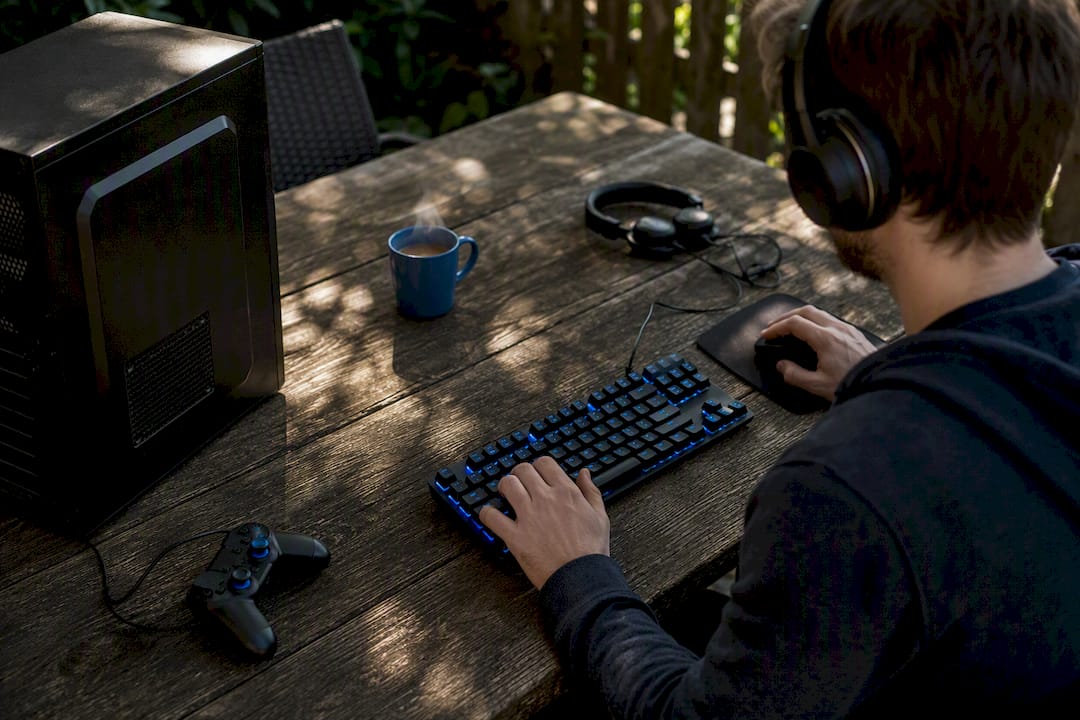
If your graphics card is old, borrowed, or just built into the CPU, you can still have a proper game night. Terraria, Stardew Valley, Left 4 Dead 2, Portal 2, Overcooked! 2, Among Us, Rocket League, and Don't Starve Together all run comfortably on modest hardware and support online or local play with friends. "Low end" here means something like integrated graphics, a GTX 660 class GPU, or around 4GB of RAM. None of these games need more than that to be genuinely fun with a group.
- Terraria – 2D crafting and combat, plays on almost anything
- Stardew Valley – co-op farming, runs on integrated graphics
- Left 4 Dead 2 – low-preset 3D shooter, still holds up
- Portal 2 – co-op puzzles, light on hardware
- Overcooked! 2 – party chaos, four-player local or online
- Among Us – social deduction, near-zero system demands
- Rocket League – competitive but scalable settings
- Don't Starve Together – survival co-op, stylised art keeps it light
Key Takeaways
Games with 2D art or older, well-optimised 3D engines are the most reliable way to guarantee smooth multiplayer sessions on weak PCs.
| Point | Details |
| --- | --- |
| Start with 2D or older engines | Terraria, Stardew Valley, and Left 4 Dead 2 run on integrated graphics without compromise. |
| Match host to hardware | Give hosting duties to your group's strongest machine, especially for Remote Play Together sessions. |
| Cut resolution before textures | Resolution and shadows cost more frames than texture quality on most low-end GPUs. |
| Cheap upgrades beat new PCs | Extra RAM and an SSD often fix more multiplayer issues than a GPU swap. |
| Use a compatibility tool first | Pickthe lets groups swipe and filter for cross-platform compatibility before picking a game. |
Table of Contents
- Quick picks by category for low-end PC multiplayer games
- What makes a game run well on a low-end PC
- How to set up multiplayer when your group's hardware doesn't match
- Performance tips to squeeze out playable framerates
- Modding and customisation options for low-spec multiplayer games
- Hardware upgrades and tweaks that actually help multiplayer performance
- Sources
Quick picks by category for low-end PC multiplayer games
Not every group wants the same thing on a Friday night, so here's a breakdown by category rather than one flat list.
Co-op and survival
1. Stardew Valley – Farming and light combat for up to four players. It runs on integrated graphics because the pixel art demands almost nothing from your GPU, and it holds up fine on a laptop from a decade ago.
2. Don't Starve Together – Hand-drawn survival with up to six players online. The stylised, low-poly art keeps VRAM demands minimal, though the physics and lighting can dip performance slightly with a full server.
3. Terraria – 2D sandbox building and boss fights for up to eight players. 2D titles like Terraria run natively on integrated graphics, making it one of the safest bets for a genuinely weak PC.
4. Portal 2 – Two-player co-op puzzles with a fixed, tightly optimised campaign. Source engine visuals are over a decade old by design, so almost any dedicated GPU handles it at high settings.
Party and social
5. Overcooked! 2 – Chaotic kitchen co-op for up to four players, locally or online. The cartoonish visuals are intentionally simple, so frame drops are rare even on integrated graphics.
6. Among Us – Social deduction for four to fifteen players with almost no GPU load at all. It's arguably the lightest multiplayer game most PC gamers own.
7. Potato Arena and similar indie party titles publish low minimum RAM and integrated graphics requirements on their store pages, proving developers are still building specifically for weak hardware.
Lightweight shooters and arena games
8. Left 4 Dead 2 – Four-player co-op against zombie hordes. Low-preset 3D titles like Left 4 Dead 2 remain viable years after release because the Source engine was built for a different hardware era.
9. BattleBit Remastered – A voxel-style large-scale shooter that trades photorealism for a blocky look, which is exactly why it runs where other 64-player shooters choke.
10. Rocket League – Car football with adjustable settings that scale surprisingly far down without losing the feel of the game.
Editorial roundups consistently point to a mix of simple art styles and older engines as the reason multiplayer staples like Among Us, Rocket League, Portal 2, Overcooked! 2, and BattleBit Remastered stay playable on modest hardware when you drop the settings down. That pattern is worth remembering when you're hunting for your own picks beyond this list. If you want more options in the same vein, browse PC multiplayer games for a wider curated set.What makes a game run well on a low-end PC
A few design choices separate games that limp along on old hardware from ones that never should have tried.
- 2D beats 3D almost every time. Sprite-based games skip the lighting, shadow, and polygon calculations that eat a GPU alive.
- CPU matters more than people assume. Physics-heavy or AI-heavy multiplayer titles (think zombie hordes or complex crafting) can bottleneck an old CPU even when the GPU is coping fine.
- RAM headroom counts. Games that stream large open worlds need more memory than tightly scoped, level-based ones.
- Local co-op and simple physics are kinder to weak machines than large open-world sandboxes with dozens of simultaneous players.
- Crossplay and input parity matter for mixed groups. A game that supports both controller and keyboard fairly means nobody's stuck at a disadvantage because of what hardware they own.
Developers who deliberately optimise for lower fidelity tend to build more sustained multiplayer communities, simply because more people can actually run the game. That's good news for anyone gaming on a budget rig.
How to set up multiplayer when your group's hardware doesn't match
Mismatched PCs across a friend group don't have to end the session before it starts.
1. Try Steam Remote Play Together first if only one person owns the game. One machine hosts and streams video to everyone else, so weaker PCs don't need to run the game at all. Some locally focused party titles are built with this in mind, letting a single strong host carry the whole group.
2. Decide who hosts based on upload bandwidth, not just GPU power. Hosting a peer-to-peer session taxes your upload speed and CPU more than your graphics card.
3. Check controller and crossplay support before launch night. A quick look at each platform's input options avoids the "why can't I join" scramble mid-session. Cross-platform compatibility checks are worth doing early, not after everyone's already logged in.
4. If someone can't connect, restart the lobby before troubleshooting further. Half of all connection issues resolve with a fresh host migration rather than a settings dig.
Pro Tip: If your group has one noticeably stronger PC, make that person the permanent host for co-op nights. Centralising performance tuning on one machine, rather than hoping everyone's rig copes equally, tends to produce far fewer dropped sessions.Performance tips to squeeze out playable framerates
A few settings changes do more for your framerate than most people expect.
- Drop resolution before anything else. Going from 1080p to 900p or 720p often gains more frames than turning every other slider to "low" combined.
- Shadows and reflections are usually the next biggest cost. Turn these off entirely before touching textures.
- Texture quality can often stay one notch higher than you'd guess, since it costs VRAM rather than frame time on most low-end GPUs.
- Update your graphics drivers. An outdated driver can cost several frames per second for no reason at all.
- Close background apps and browser tabs before launching. Discord overlays and Chrome tabs quietly eat RAM that your game needs.
- Set your power plan to "high performance" if you're on a laptop, since balanced modes throttle CPU speed to save battery.
- For multiplayer specifically, a wired connection beats Wi-Fi for latency, even if your Wi-Fi feels "fast enough" for browsing.
How we chose these picks
- Vetted against a baseline of integrated graphics or a GTX 660 equivalent with 4GB RAM
- Prioritised reliable multiplayer performance, accessible pricing, and genuine co-op or online design
- Cross-checked against the Low Spec Games Steam curator and PCGamingWiki's low-end listings
- Updated periodically as new low-spec releases prove themselves with real community feedback
Modding and customisation options for low-spec multiplayer games
Modding isn't just for high-end rigs chasing photorealism. Several games on this list have thriving mod communities specifically aimed at reducing system load rather than adding to it.
 Terraria's mod scene, built largely around the tModLoader framework, includes performance-focused mods that trim particle effects and lighting for players on weaker machines, alongside the more familiar content mods. Stardew Valley's Nexus Mods community offers similar options, including UI mods that strip back animations without touching the core gameplay loop.
Don't Starve Together supports Steam Workshop mods directly through its client, and several popular ones adjust render distance and simplify shader effects for players running integrated graphics. Left 4 Dead 2 modding, meanwhile, tends to run the other way, since custom campaigns can sometimes be more demanding than the base game, so it's worth checking a mod's file size and community reviews before installing anything for a co-op session.
Terraria's mod scene, built largely around the tModLoader framework, includes performance-focused mods that trim particle effects and lighting for players on weaker machines, alongside the more familiar content mods. Stardew Valley's Nexus Mods community offers similar options, including UI mods that strip back animations without touching the core gameplay loop.
Don't Starve Together supports Steam Workshop mods directly through its client, and several popular ones adjust render distance and simplify shader effects for players running integrated graphics. Left 4 Dead 2 modding, meanwhile, tends to run the other way, since custom campaigns can sometimes be more demanding than the base game, so it's worth checking a mod's file size and community reviews before installing anything for a co-op session.
For party games like Overcooked! 2 and Among Us, customisation is lighter and mostly cosmetic, skins, name tags, and lobby settings, which means it rarely affects performance either way. If you're building a modded setup for a mixed-hardware group, agree on a mod list beforehand: nothing kills a session faster than half the group crashing because someone installed a graphically heavy reshade the others don't have.
Hardware upgrades and tweaks that actually help multiplayer performance
You don't need a new PC to notice a real difference in multiplayer sessions. A handful of targeted upgrades punch well above their price.
RAM is usually the cheapest, highest-impact upgrade. Going from 4GB to 8GB often fixes stuttering in multiplayer games far more reliably than a GPU swap, especially in titles that stream a lot of player data, like Terraria or Don't Starve Together with a full server.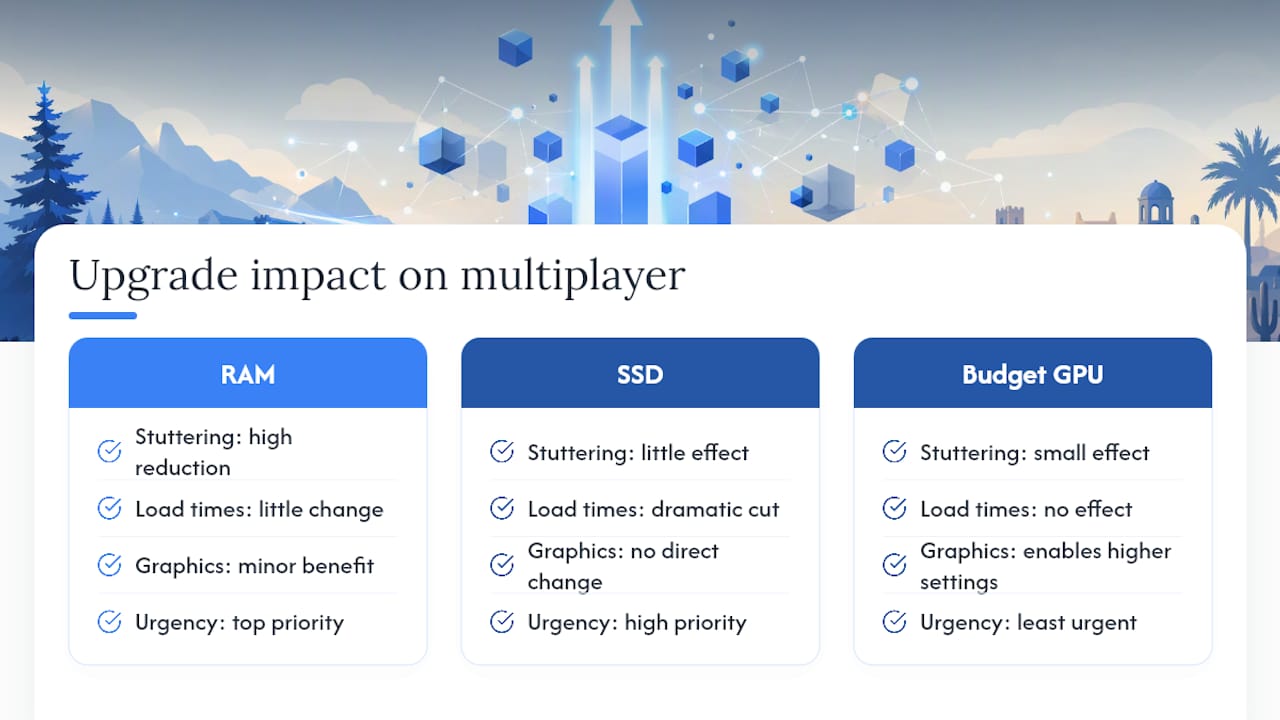 An SSD swap cuts loading and matchmaking wait times dramatically, even a budget SATA SSD over a mechanical hard drive. This matters more in multiplayer than singleplayer, since a slow load can leave you stuck outside a lobby your friends already started.
A used or budget GPU (GTX 1050 Ti class or similar) opens up more of this list at higher settings, though it's the upgrade with the least urgency if your current integrated graphics already handle the 2D titles fine.
On the software side, disabling full-screen optimisations and switching Windows to "high performance" power mode costs nothing and often recovers a few frames instantly. A wired Ethernet connection instead of Wi-Fi matters more for multiplayer specifically, since latency spikes hurt competitive titles like Rocket League far more than a slightly lower framerate does.
An SSD swap cuts loading and matchmaking wait times dramatically, even a budget SATA SSD over a mechanical hard drive. This matters more in multiplayer than singleplayer, since a slow load can leave you stuck outside a lobby your friends already started.
A used or budget GPU (GTX 1050 Ti class or similar) opens up more of this list at higher settings, though it's the upgrade with the least urgency if your current integrated graphics already handle the 2D titles fine.
On the software side, disabling full-screen optimisations and switching Windows to "high performance" power mode costs nothing and often recovers a few frames instantly. A wired Ethernet connection instead of Wi-Fi matters more for multiplayer specifically, since latency spikes hurt competitive titles like Rocket League far more than a slightly lower framerate does.
Linux and macOS users aren't left out either. Proton compatibility on Steam Deck and Linux distributions has made most titles on this list, including Left 4 Dead 2 and Terraria, run close to native Windows performance, while macOS support varies by title and is worth checking on each game's store page before buying.
A publisher's take on why accessibility should come first
Games that only run well on expensive hardware quietly exclude the friend who's still on a laptop from three years ago, and that's the person who ends up missing game night entirely. Accessible performance isn't a consolation prize for players with weaker rigs. It's what keeps a group actually playing together instead of splitting off. That's the whole reason a tool that helps groups quickly find games everyone can run, Pickthe, exists in the first place: matching people to games they can all play matters more than chasing the newest release.
> — PickThe
Let Pickthe find the game your whole group can actually run
Scrolling through Steam wishlists while your friends argue about specs wastes the one hour you all had free. Pickthe is the fix for the moment right after this list: instead of guessing whether your mate's old laptop can handle a pick, you create a board, everyone swipes, and the platform filters for cross-platform and hardware compatibility automatically.

The Discord integration means you can run the whole vote inside a chat you're already in, no separate app needed, and the veto system stops one bad pick from derailing the night. If your group spans PC, console, and wildly different hardware budgets, the crossplay compatibility checker shows exactly what everyone can join before you commit. Want something outside this list entirely? Browse MMO multiplayer games or start a board now and have tonight's game picked in minutes, not hours.
Sources
- Do you know of any games that you can play using just the integrated graphics?
- Best multiplayer games for low‑end PCs
- SKIRMISH on Steam
- Low Spec Games - Steam Curator