How to find crossplay games for your group in 2026
How to find crossplay games for your group in 2026

The fastest way to find crossplay games for a mixed-platform group is to run your platform combination through the Pickthe crossplay checker, then confirm the result against the official publisher support page. Cross-platform play has shifted from a bonus feature to a baseline expectation for major multiplayer titles, as GameSpot's 2026 roundup makes clear. For most groups, one of these six titles will get you into a session within minutes:
- Minecraft — PC, PS, Xbox, Switch, Mobile; native crossplay with a Microsoft account
- Fortnite — PC, PS, Xbox, Switch, Mobile; Epic account required, free to play
- Rocket League — PC, PS, Xbox, Switch; Epic account links all platforms, free to play
- Apex Legends — PC, PS, Xbox, Switch; EA account required, free to play
- Destiny 2 — PC, PS, Xbox; Bungie.net account links platforms, free base game
- Helldivers 2 — PC (Steam) and PS5; PSN account required on Steam, paid title
> Note: Crossplay support can change with patches or platform policy updates. Always verify via the publisher's support page or store listing before scheduling your session.
*Key takeaways
The fastest way to find cross-platform games your whole group can play is to filter by platform pair first, then verify with the publisher before anyone downloads anything.
| Point | Details |
| --- | --- |
| Use a platform-pair filter first | The Pickthe crossplay checker filters 6,000+ games by your exact platform combination instantly. |
| Verify with the publisher | Always confirm crossplay support on the official publisher support page before scheduling a session. |
| Account linking is mandatory | Most crossplay titles require a separate publisher account (Epic, EA, Bungie.net) to bridge platforms. |
| Top picks for any group | Minecraft, Fortnite, and Rocket League cover the widest platform range and are free or low cost. |
| Crossplay status can change | Check patch notes and publisher pages before each new session, not just when you first set up. |
*Table of Contents
- Where can you find and filter crossplay games quickly?
- How to search for crossplay on Steam, Epic, and console stores
- Top crossplay games for mixed-platform groups
- How do you confirm a game actually supports crossplay for your group?
- Setting up a crossplay session: step-by-step checklist
- How Pickthe helps your group find and agree on a crossplay game
- Pickthe makes crossplay discovery fast for any group
- Sources
Where can you find and filter crossplay games quickly?
The right resource depends on whether your group needs a quick title or a filtered search by platform pair. These are the most reliable places to start.
Steam Curator: Cross-Platform Play is a community-maintained curator page that flags Steam titles by supported platform pairs. It is a practical first stop for PC-centric groups, though it reflects Steam-side support only and may not capture console-storefront nuances. Epic Games Store cross-platform collection highlights PC titles with confirmed console crossplay. Publisher notes on each listing often clarify account-linking requirements, which saves a step later. Official publisher support pages (Bungie.net for Destiny 2, EA Help for Apex Legends, Mojang support for Minecraft) are the authoritative source for account-linking steps and any platform-specific restrictions. They are slower to browse but the most accurate. Editorial lists from GameSpot and Eneba are useful for category-based discovery, particularly when your group wants a genre recommendation rather than a specific title.| Resource | Database / scope | Platform filter | Update cadence |
| --- | --- | --- | --- |
| Steam Curator: Cross-Platform Play | Steam titles only | Partial (curator tags) | Community-maintained |
| Epic Games Store crossplay page | Epic PC titles | Limited | Publisher-updated |
| Publisher support pages | Per-game | No | Per patch/policy |
Pro Tip: When your group spans different storefronts (Steam vs Epic vs console), check account-linking requirements before you buy. Some titles require a separate publisher account to bridge platforms, and a missing account can block crossplay even when the game technically supports it. *How to search for crossplay on Steam, Epic, and console stores
Each storefront surfaces crossplay information differently. Here is a quick workflow for the most common ones.
Steam
1. Open the Steam Curator: Cross-Platform Play page and browse curated titles by platform tag.
2. Alternatively, use Steam's search with the Category 2: Online Multi-Player filter combined with the crossplay category tag. A filtered Steam search can return thousands of results, so narrowing by genre saves time.
3. On any game's store page, scroll to the Features section and look for the crossplay badge.
4. Check the Community Hub discussions or the game's FAQ tab for player-reported caveats, such as PC-vs-console matchmaking pools being separated.
5. Confirm with the Steam Help FAQ if you need account-linking steps for a specific title.
Epic Games Store
1. Visit the Epic cross-platform games collection and filter by genre.
2. Open the individual game page and read the publisher notes under Features for platform pair details.
3. Note whether an Epic account alone is sufficient or whether a separate publisher account (e.g. EA account for Apex Legends) is also needed.
Console stores (PlayStation, Xbox, Nintendo)
- PlayStation Store: Open the game's listing and scroll to Game Overview. Look for the crossplay icon or the phrase "Cross-Platform Play" in the features list. If absent, check the publisher's support page directly.
- Xbox / Microsoft Store: Game detail pages list supported features including crossplay. Xbox also shows whether a title supports Xbox Play Anywhere, which covers PC crossplay.
- Nintendo eShop: Crossplay information is less consistently displayed. Check the publisher's website or a third-party checker like CrossplayCheck for Switch-specific confirmation.
Top crossplay games for mixed-platform groups
These picks cover the most common group setups and use cases. Platform coverage is listed at a high level; always verify your exact storefront version before playing.
Party and casual play
Minecraft- Best for: Any group size, all ages, creative or survival sessions
- Platforms: PC, PS4/PS5, Xbox, Switch, Mobile
- How crossplay works: Link a Microsoft account across all versions; the Bedrock Edition supports full crossplay. Java Edition is PC-only.
- Caveats: Java and Bedrock are separate purchases; crossplay only works within Bedrock.
- Price: Paid (Bedrock Edition); free trial available
- Best for: Large parties, casual battle royale, zero cost barrier
- Platforms: PC, PS4/PS5, Xbox, Switch, Mobile (Android via Epic launcher)
- How crossplay works: Epic account links all platforms; friend invites work via Epic friend list
- Caveats: iOS version currently unavailable via App Store
- Price: Free to play
Battle royale and competitive
Apex Legends- Best for: Squads of three, fast-paced competitive play
- Platforms: PC (Steam/Origin), PS4/PS5, Xbox, Switch
- How crossplay works: EA account required; cross-platform friend invites via EA app
- Caveats: Switch version has reduced performance; cross-progression is supported
- Price: Free to play
- Best for: Co-op squads of up to four, high-intensity missions
- Platforms: PC (Steam) and PS5 only
- How crossplay works: PSN account required for Steam players; friend invites via PSN or Steam overlay
- Caveats: PC-only or Xbox players cannot join; PSN account requirement caused controversy at launch
- Price: Paid
Quick sessions and racing
Rocket League- Best for: Short competitive matches, groups of two to four
- Platforms: PC (Epic), PS4/PS5, Xbox, Switch
- How crossplay works: Epic account links all platforms; crossplay is on by default
- Caveats: No mobile version; cross-progression supported
- Price: Free to play
Long-play co-op
Destiny 2- Best for: Groups of three, long-form co-op and raids
- Platforms: PC (Steam), PS4/PS5, Xbox
- How crossplay works: Bungie.net account links platforms; friend invites via Bungie friend list
- Caveats: No Switch or mobile version; some legacy content requires paid expansions
- Price: Free base game; expansions paid
How do you confirm a game actually supports crossplay for your group?
Finding a title on a list is only half the job. Confirming it works for your exact platform pair takes a few extra minutes and saves a lot of frustration later.
Verification checklist:- Check the official publisher support page for the exact platform pairs supported (not all games support every combination).
- Confirm whether account linking is required and which accounts (Epic, EA, Bungie.net, Microsoft, PSN).
- Check whether cross-progression is supported if your group plays across multiple platforms over time.
- Look for platform-specific matchmaking options, such as console-preferred pools or input-based matching (controller vs keyboard/mouse).
- Search the game's patch notes or community hub for any recent changes to crossplay status.
- Multiple storefront versions: Some titles have separate Steam and Epic versions with different crossplay behaviour. Buying the wrong version can lock you out of crossplay with console players.
- Platform-exclusive servers: A small number of titles keep console and PC players in separate matchmaking pools even when crossplay is technically enabled.
- Controller vs keyboard/mouse policies: Some games separate input types in ranked modes, which can split your group.
- Regional restrictions: Crossplay occasionally has regional server limitations that affect who can join whose lobby.
Setting up a crossplay session: step-by-step checklist
Getting everyone into the same lobby is where crossplay theory meets reality. Follow this sequence and you will avoid most of the common blockers.
1. Confirm the platform pair is supported. Check the publisher support page or the Pickthe crossplay checker for your exact combination before anyone downloads anything.
2. Agree on the storefront version. Decide which version each player buys or downloads. For example, Minecraft Bedrock on PC vs Java are not compatible; Rocket League is Epic-only on PC.
3. Create and link required accounts. Each player creates the necessary publisher account (EA, Epic, Bungie.net, Microsoft, PSN) and links it to their platform account before launch day.
4. Add friends via in-game IDs. Use the game's cross-platform friend system rather than platform-native friend lists, which often do not carry across storefronts.
5. Check crossplay toggles. Some games (Apex Legends, Rocket League) have an in-game crossplay on/off toggle. Confirm it is enabled for all players.
6. Create the party and test voice chat. One player creates the party and sends invites. Test voice chat separately, as platform-native voice (PS party chat, Xbox party chat) does not carry to PC players.
Troubleshooting quick fixes:- Invite not arriving: Check whether the recipient has crossplay enabled in settings, and confirm friend IDs are entered correctly (they are case-sensitive in some games).
- Mismatched game versions: All players must be on the same update. Console updates sometimes lag behind PC patches by a day or two.
- DLC locks: Some content is platform-exclusive or storefront-exclusive and can prevent joining a session that uses that content.
- NAT/port issues: If a player cannot connect, a strict NAT type is the most likely cause. Switching to a mobile hotspot temporarily can confirm whether it is a network issue.
How Pickthe helps your group find and agree on a crossplay game
The real friction for most groups is not finding a crossplay game — it is finding one that works for every platform in the group and that everyone actually wants to play. That is the problem Pickthe is built to solve.

The Pickthe crossplay checker lets your group input their platforms and instantly filters a database of over 6,000 games to show only titles that support that exact combination. No manual searching across five different store pages.
From there, the group voting and swiping features let everyone weigh in on the shortlist. Each player swipes through compatible titles, the veto system removes anything someone strongly dislikes, and the result is a game the whole group has actively chosen rather than one person's pick that others tolerate.
- Discord integration means you can run the voting session directly inside your server without switching apps.
- Real-time results show the group's preferences as they come in, so there is no waiting around.
- Streamer Mode lets viewers vote on what to play next via a shareable link, with live results in OBS.
- The database updates continuously, so recently added crossplay support shows up without you having to check manually.
The honest reality of crossplay in 2026
Cross-platform play has genuinely matured. The research task has shifted from "does this game support crossplay at all?" to "does it support my exact platform pair, and what do I need to link?" That is a meaningful improvement, but it also means the details matter more than they used to.
The biggest thing most guides understate is the account-linking layer. A game can be fully crossplay-enabled and still block two players from joining the same lobby because one of them skipped the publisher account setup. Helldivers 2's PSN requirement on Steam is the most visible recent example, but it is not unusual. Treating account linking as a separate, mandatory step rather than an afterthought is what separates a smooth session from a frustrating one.
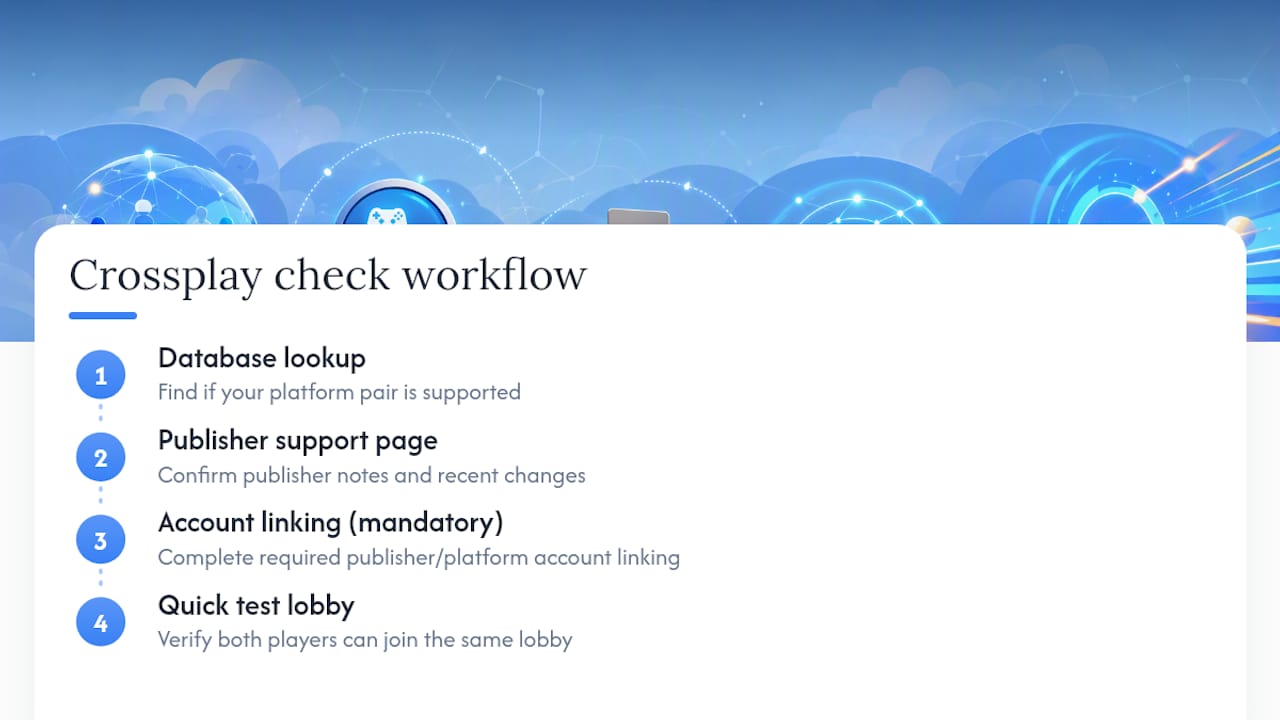
The other thing worth saying plainly: no single list or database is always current. Crossplay status changes with patches, platform policy shifts, and publisher decisions. The workflow that actually works is database lookup, then publisher support page, then a quick test lobby. That sequence takes five minutes and prevents the kind of disappointment that comes from scheduling a session around a game that no longer supports your platform pair.
*
Pickthe makes crossplay discovery fast for any group
Finding a crossplay game your whole group can actually play together is faster with Pickthe than with any manual search. The crossplay checker filters over 6,000 titles by your exact platform combination in seconds, and the group voting app turns the shortlist into a decision without the usual debate. There are no paywalls blocking the core features, and an ad-free subscription is available if your group prefers a cleaner experience.

Browse the full crossplay games list or run your platform combination through the checker now at Pickthe.
*Sources
Crossplay information goes stale quickly, so check the page last-updated date and any recent patch notes before relying on a list.
- 35 Best Cross-Platform Games To Play With Friends In 2026 - GameSpot
- 29 Best Cross-Platform Games to Enjoy in 2026 | Eneba Hub
- Steam Curator: Cross-Platform Play
- Cross-Platform Games | Download The Best Crossplay PC ...