Yes, Switch and Xbox crossplay works: the games that let you play together
Yes, Switch and Xbox crossplay works: the games that let you play together

Switch and Xbox players can absolutely game together, and more titles support it than most people realise. You'll need the right game, a linked account or two, and occasionally a bit of patience with invite systems, but the core answer is yes.
Here's your fastest route into a mixed-platform session tonight:
- Minecraft — full crossplay via a Microsoft account
- Fortnite — full crossplay, Epic account required
- Rocket League — full crossplay, Epic account linking
- Among Us — full crossplay, cross-progression varies
- Overwatch 2 — full crossplay, Battle.net account needed
- Apex Legends — full crossplay, EA account linking
- Dauntless — full crossplay across most platforms
- Paladins — full crossplay, some regional caveats
Microsoft's own developer guidance treats cross-network play as something each studio has to build in deliberately. That's why voice chat, cross-progression, and even DLC access can behave differently from one title to the next, even when the multiplayer lobby itself works fine.
Key Takeaways
Crossplay between Switch and Xbox works reliably across most major live-service titles, but publisher account linking and platform-specific policy quirks determine how smooth the experience actually is.
| Point | Details |
| --- | --- |
| Crossplay is title-specific | Developers, not platforms, decide whether a game supports Xbox Switch multiplayer. |
| Publisher accounts bridge platforms | Epic, Battle.net, and Microsoft accounts usually carry your identity across consoles. |
| Voice chat isn't guaranteed | Some titles restrict or disable cross-platform voice for policy reasons; Discord is a reliable fallback. |
| Updates cause most failures | Mismatched game versions are the single biggest cause of failed crossplay invites. |
| Use a compatibility checker | Tools like Pickthe's checker filter instantly to games your specific group can play together. |
Table of Contents
- Switch Xbox crossplay games worth installing first
- How does crossplay actually work between Switch and Xbox?
- Setting up multiplayer between Switch and Xbox
- Why can't my Switch friend join my Xbox lobby?
- How Pickthe helps mixed Switch and Xbox groups pick a game fast
- Ready to stop scrolling forum threads for crossplay answers?
- Where to verify crossplay details yourself
- What most crossplay guides get wrong
- Frequently asked questions about Switch and Xbox crossplay
- Sources
Switch Xbox crossplay games worth installing first
Not every "crossplay" label means the same thing in practice. Some titles hand you a seamless, one-account experience. Others make you juggle a publisher account on top of your console login. Here's what actually matters for each of the biggest names.
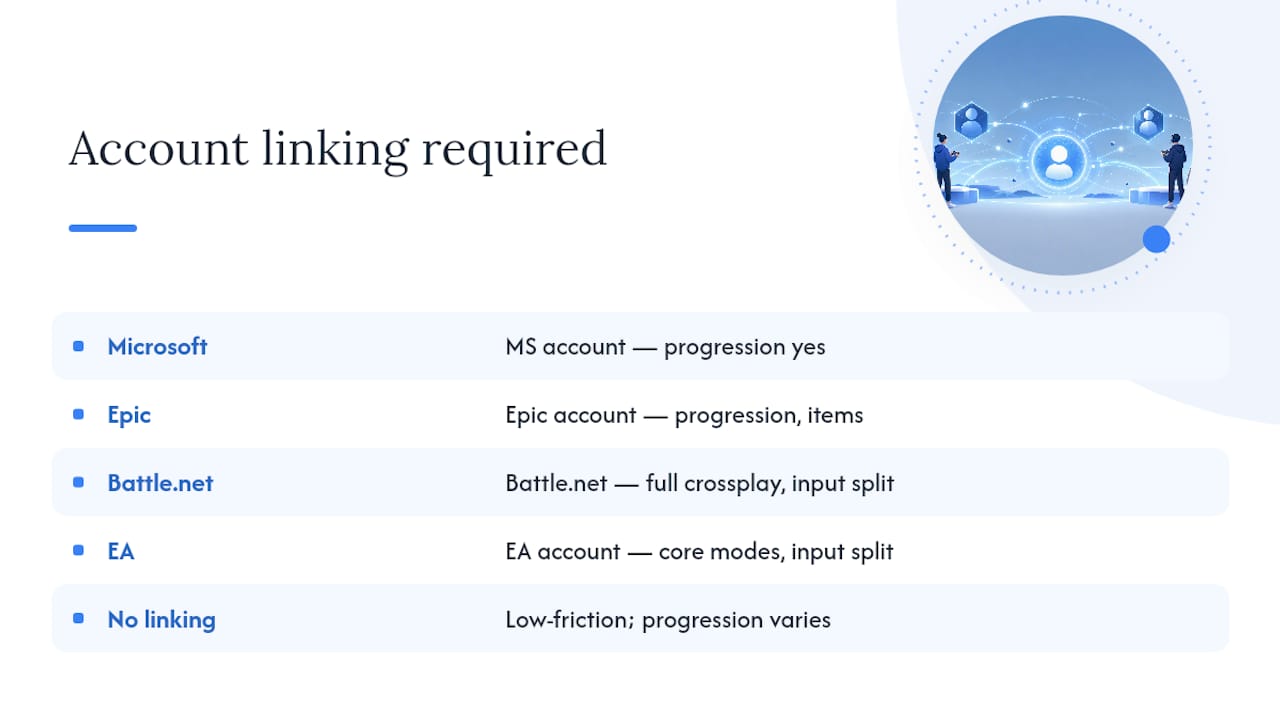 Minecraft remains the cleanest example of Xbox cross-platform games done right. Sign in with a Microsoft account on both Switch and Xbox, and you're in the same Realm or server within minutes. Cross-progression works because your purchases and worlds are tied to that Microsoft identity, not the console.
Fortnite requires an Epic Games account, which functions as the cross-platform identity layer that ties your Switch and Xbox profiles together, according to Windows Central's crossplay tracking. Skins, the Battle Pass, and V-Bucks all carry over. Voice chat has occasionally been restricted between specific platform pairs, so check in-game settings if your squad can't hear each other.
Minecraft remains the cleanest example of Xbox cross-platform games done right. Sign in with a Microsoft account on both Switch and Xbox, and you're in the same Realm or server within minutes. Cross-progression works because your purchases and worlds are tied to that Microsoft identity, not the console.
Fortnite requires an Epic Games account, which functions as the cross-platform identity layer that ties your Switch and Xbox profiles together, according to Windows Central's crossplay tracking. Skins, the Battle Pass, and V-Bucks all carry over. Voice chat has occasionally been restricted between specific platform pairs, so check in-game settings if your squad can't hear each other.
 Rocket League switched to fully free-to-play years ago and crossplay has been rock solid since. Link your Epic account once, and matchmaking pools Switch and Xbox players together automatically. Cross-progression for items and Rocket Pass tiers works through that same Epic identity.
Among Us supports crossplay lobbies between Switch and Xbox without much fuss, though cross-progression for cosmetic unlocks isn't guaranteed to sync perfectly between platforms. It's a low-friction pick for casual groups who don't want to fiddle with third-party logins.
Overwatch 2 needs a Battle.net account bridging your console identity. Full crossplay is standard, but competitive play groups you with same-input players by default unless you manually opt into cross-input queuing.
Apex Legends links through an EA account. Crossplay covers all core modes, though ranked play separates controller and mouse-and-keyboard inputs for fairness, a detail Digital Trends flags in its own crossplay breakdown.
Dauntless offers full crossplay with minimal setup, making it a solid pick if your group wants co-op monster hunting without account gymnastics.
Paladins supports crossplay broadly, though some regional server splits can affect matchmaking speed for Switch players specifically.
Rocket League switched to fully free-to-play years ago and crossplay has been rock solid since. Link your Epic account once, and matchmaking pools Switch and Xbox players together automatically. Cross-progression for items and Rocket Pass tiers works through that same Epic identity.
Among Us supports crossplay lobbies between Switch and Xbox without much fuss, though cross-progression for cosmetic unlocks isn't guaranteed to sync perfectly between platforms. It's a low-friction pick for casual groups who don't want to fiddle with third-party logins.
Overwatch 2 needs a Battle.net account bridging your console identity. Full crossplay is standard, but competitive play groups you with same-input players by default unless you manually opt into cross-input queuing.
Apex Legends links through an EA account. Crossplay covers all core modes, though ranked play separates controller and mouse-and-keyboard inputs for fairness, a detail Digital Trends flags in its own crossplay breakdown.
Dauntless offers full crossplay with minimal setup, making it a solid pick if your group wants co-op monster hunting without account gymnastics.
Paladins supports crossplay broadly, though some regional server splits can affect matchmaking speed for Switch players specifically.
If you want a faster way to check any of these against your own group's exact platform mix, Pickthe's crossplay compatibility checker filters straight to Xbox and Switch combinations.
How does crossplay actually work between Switch and Xbox?
Crossplay isn't a console feature you switch on. It's something each developer builds, game by game, using tools Microsoft provides but doesn't mandate.
> Cross-network play requires developers to handle cross-network identity, matchmaking, and privacy restrictions at the title level, according to Microsoft's own XR-007 developer guidance. The platform supplies the plumbing; the studio decides whether to use it.
That's why two games from the same publisher can behave completely differently. One might offer full account roaming, cross-progression, and shared voice chat. Another might only let you play matches together while keeping DLC, cosmetics, and even friend lists locked to each platform. XR-007 also confirms that store-managed entitlements, including DLC, often don't roam across platforms even when multiplayer does.
Voice chat is usually the first casualty of platform policy differences. Console makers each have their own safety and moderation requirements, so some studios route cross-platform voice through dedicated servers or disable it entirely rather than deal with mismatched systems. Xbox leadership has publicly reaffirmed its commitment to keeping major multiplayer titles multiplatform, which is reassuring if you're worried crossplay support might quietly disappear.
Setting up multiplayer between Switch and Xbox
Getting a Switch player and an Xbox player into the same lobby takes a handful of steps, but skip one and you'll be stuck troubleshooting instead of playing.
1. Prepare your accounts first. You'll need a Nintendo Account, a Microsoft/Xbox account, and depending on the game, a publisher account like Epic, Battle.net, or a Mojang-linked Microsoft login.
2. Update the game on both consoles. Crossplay frequently breaks between mismatched versions, so check for pending updates before anything else.
3. Sign in and link accounts. Open the game's account settings and connect your publisher identity if the title requires one.
4. Add friends using in-game or publisher IDs, not console friend codes, since those rarely bridge platforms.
5. Create or join a crossplay lobby and confirm cross-platform play is toggled on in the settings menu, as some titles default it to off.
Nintendo Switch Online is required for most Switch multiplayer, crossplay included, while Xbox Live Gold or Game Pass Ultimate is needed for many Xbox online modes, though some crossplay titles (Fortnite, Rocket League) don't require a paid Xbox subscription at all.
Pro Tip: Match your game versions and regions before anything else. A one-patch difference between platforms is the single most common reason a "crossplay" lobby refuses to connect two friends.Why can't my Switch friend join my Xbox lobby?
Most connection failures trace back to one of a handful of usual suspects, and they're worth checking in order before assuming the game is broken.
- Outdated game version — crossplay handshakes often fail silently between mismatched patches.
- Privacy settings blocking invites — both consoles have separate privacy controls that can quietly block cross-network communication.
- Wrong friend system — console friend lists rarely work across platforms; use in-game or publisher friend codes instead.
- Session or invite limits — Microsoft's own multiplayer invite documentation notes that invite and join-in-progress features can be limited by how a title's session configuration is set up, which is often the silent cause behind a stuck invite.
- Voice chat not connecting — if in-game voice fails, test a party call through Discord as a workaround while you troubleshoot.
Run through these before assuming crossplay is broken. Nine times out of ten it's a settings toggle, not a hardware limitation.
How Pickthe helps mixed Switch and Xbox groups pick a game fast
Knowing which Switch Xbox game compatibility exists is only half the problem. The other half is getting your actual group to agree on one. Pickthe's crossplay compatibility checker filters its database straight down to titles both platforms can join together, so you're not cross-referencing three different lists by hand.
The workflow is simple: create a board, filter to Xbox and Switch, then everyone swipes and votes on the options that show up. A veto system stops one stubborn friend from forcing a game nobody else wants, and Discord integration means the whole vote can happen inside your existing voice channel.
- Crossplay compatibility checker filters directly to Xbox↔Switch pairs
- Curated, regularly updated crossplay lists across thousands of titles
- Real-time swiping and voting so groups decide in minutes, not arguments
- Discord bot integration for voting without leaving your server
| Feature | What it does for mixed-platform groups |
| --- | --- |
| Compatibility checker | Filters the full database to Xbox and Switch matches only |
| Group voting | Lets everyone swipe and rank options simultaneously |
| Veto system | Removes games nobody wants without a lengthy debate |
| Discord integration | Runs the whole vote inside your existing chat |
Ready to stop scrolling forum threads for crossplay answers?
Checking whether "can you crossplay Xbox" with your specific friend group shouldn't take longer than actually playing the game. Pickthe's browse multiplayer games directory covers PC, PlayStation, Xbox, and Switch titles in one searchable database, and the crossplay compatibility checker does the platform-matching work for you instead of you digging through publisher support pages one game at a time.
If your group already knows it wants something specific, browsing by genre works too. Whether that's action multiplayer games or something more laid-back, filtering by genre after confirming crossplay compatibility narrows things down fast. It's free, ad-supported, and built specifically for the moment your group can't agree on what to play.
Where to verify crossplay details yourself
For the most current picture, check Microsoft's XR-007 cross-network policy for developer requirements, Nintendo's official crossplay tag page for publisher-confirmed Switch titles, and Windows Central's crossplay roundup for ongoing Xbox-specific updates.
What most crossplay guides get wrong
Most crossplay round-ups treat compatibility as a fixed list you memorise once and never revisit. That's the wrong mental model. Crossplay capabilities Xbox and Switch titles offer today can change with a single patch, a publisher policy shift, or a quiet feature removal nobody announces properly.
The bigger blind spot is that guides obsess over "does this game support crossplay" while glossing over the actual friction point: getting a specific group of friends, on specific platforms, to agree on which of those games to actually launch. Compatibility is necessary but not sufficient. We'd argue the setup steps and account-linking hassle matter less than most articles imply, because once you've done it once for a title like Fortnite or Rocket League, it sticks.
What we think readers should prioritise first isn't memorising which eight games work. It's building a habit of checking compatibility before suggesting a game to the group, rather than after everyone's already downloaded something that turns out to be Xbox-only.
Frequently asked questions about Switch and Xbox crossplay
Can you crossplay Xbox with Nintendo Switch on Fortnite?Yes. Fortnite supports full crossplay between Switch and Xbox using a linked Epic Games account, with progression, purchases, and the Battle Pass carrying across both platforms.
Do you need Xbox Live Gold for crossplay games?It depends on the title. Free-to-play crossplay games like Fortnite and Rocket League don't require Xbox Live Gold, but many other online multiplayer titles do need Game Pass Ultimate or Xbox Live Gold for online play generally.
Why won't my Switch friend show up in my Xbox friends list?Console friend lists don't sync across platforms. Use the game's in-game friend system or a publisher ID (Epic, Battle.net) instead, since that's the identity layer crossplay titles actually rely on.
Does cross-progression work the same as crossplay?No. Crossplay means you can play together in the same match; cross-progression means your saves, cosmetics, and purchases follow you across platforms. A game can offer one without the other.
Is voice chat available when playing crossplay between Switch and Xbox?Not always. Some titles restrict cross-platform voice chat for policy or safety reasons. If in-game voice doesn't work, a Discord call is the most reliable workaround for staying in touch mid-match.
Sources
- List of every cross-platform & cross-play Xbox games | Windows Central
- All cross-platform games (PS5, Xbox Series X, PS4 ...)