Is Minecraft crossplay across PC, consoles and mobile?
Is Minecraft crossplay across PC, consoles and mobile?
Yes, Minecraft supports crossplay, but only on Bedrock Edition. Java Edition doesn't natively crossplay with anything outside PC. Bedrock is the version that unites consoles, mobile and Windows, and you'll need a free Microsoft account signed in on every device to make it work.
Here's who can actually play together:
- Console to console (Xbox, PlayStation, Switch)
- Console to mobile (iOS, Android)
- Windows Bedrock to console or mobile
Key Takeaways
Minecraft's crossplay works exclusively through Bedrock Edition, which unifies consoles, mobile and Windows under one Microsoft account, while Java Edition stays limited to PC alone.
| Point | Details |
| --- | --- |
| Bedrock enables crossplay | Consoles, mobile and Windows all play together through the Bedrock codebase. |
| Java stays PC-only | Java Edition doesn't natively join Bedrock worlds without a third-party bridge. |
| Microsoft account is essential | Every Bedrock device needs the same Microsoft account signed in to sync friends and purchases. |
| GeyserMC is a workaround, not a fix | It bridges Java servers to Bedrock players but brings combat quirks and no official support. |
| Match games beyond Minecraft with Pickthe | Pickthe's crossplay compatibility checker helps mixed-platform groups find what else to play together. |
Table of Contents
- Is Minecraft crossplay compatible between every edition?
- Which platforms work with Bedrock crossplay?
- Why doesn't Java Edition crossplay, and does GeyserMC fix it?
- How do you set up crossplay step by step?
- Why can't you connect, and how do you fix it?
- What transfers between platforms, and what gets left behind?
- Planning a game night with mixed platforms?
- Frequently asked questions
- Sources
Is Minecraft crossplay compatible between every edition?
Crossplay means playing the same world with friends regardless of what device they're using. It sounds simple, but Minecraft actually ships as two separate games under one name.
- Codebase: Bedrock and Java are built on entirely different foundations
- Target platforms: Bedrock covers consoles and mobile, Java covers PC only
- Mod support: Java has deep modding, Bedrock has none of it
Pick Bedrock if your group spans devices. Pick Java if you're all on PC and want mods.
Which platforms work with Bedrock crossplay?
Bedrock Edition runs on a genuinely long list of devices, and nearly all of them can join the same world, as explained in this detailed Blog - Nexly Connect article about platform compatibility. The current lineup includes Windows 10/11, Xbox Series X|S and Xbox One, PlayStation 4 and PlayStation 5, Nintendo Switch, iOS, Android, and select VR headsets. That's the whole point of what Mojang originally called the Better Together update, which folded console, mobile and Windows versions into one shared ecosystem.
Getting in isn't quite plug-and-play, though. You'll need:
- A Microsoft account signed in on every device, since this is what carries your friends list, purchases and identity across platforms
- The same game version on all devices, since even a minor update mismatch will block a join attempt
- An active platform online subscription where the console requires one for multiplayer, separate from anything Minecraft itself charges
- Friends added by Xbox or Microsoft gamertag, which works the same whether that friend is on a Switch or a phone
Once everyone's signed in, there are several ways to actually get into the same game. You can send a direct invite through the in-game friends list, join someone already playing, connect to a shared Realm, hop onto a featured server from the in-game server list, or use LAN play if every device sits on the same Wi-Fi network.
Pro Tip: Buy a skin or map from the Minecraft Marketplace on your Xbox, and it'll show up automatically when you sign into the same Microsoft account on your phone or Switch. Realms worlds sync the same way, so you can leave a base on console and pick up building on mobile without moving a single file.
Why doesn't Java Edition crossplay, and does GeyserMC fix it?
Java runs on its own codebase built for Windows, macOS and Linux, full stop. Mojang never extended it to consoles or mobile, so Bedrock supports crossplay across a wide range of devices while Java stays PC-only by design, not by accident.
That's where GeyserMC comes in. It's a third-party server plugin that translates network packets between Bedrock and Java, letting Bedrock players connect to a Java server without owning Java themselves. It works, but it's built and maintained by the community, not Mojang, and it comes with real trade-offs:
- Combat and movement feel slightly different between the two editions, so PvP can feel off
- Java mods and plugins often don't behave correctly through the bridge
- Server hosts need to install Geyser plus a companion plugin (usually Floodgate) and troubleshoot it themselves
- Mojang offers zero official support if something breaks
If you're hosting a server and want to check the setup properly, the GeyserMC documentation is the place to start.
How do you set up crossplay step by step?
1. Confirm everyone in your group is on Bedrock Edition, not Java
2. Sign into a Microsoft account on every device
3. Update the game to the latest version on all devices before you start
4. Add each other as friends using your Xbox or Microsoft gamertag
5. Pick a hosting method: direct invite, a shared Realm, or a featured server
Before you jump in, run through a quick settings check in-game: make sure online multiplayer is switched on in your privacy settings, check your friends list permissions allow invites, and confirm cross-platform play itself hasn't been toggled off in the account settings menu.
A couple of platform quirks worth knowing: PlayStation players sign in with their PSN account alongside Microsoft, and Switch players need Nintendo Switch Online active for multiplayer, not just a Microsoft sign-in. Both are easy to miss the first time.
Why can't you connect, and how do you fix it?
Most crossplay failures come down to a short list of usual suspects:
- Edition mismatch: one of you is on Java, the other on Bedrock
- Version mismatch: a device hasn't updated yet
- Not signed into a Microsoft account, which blocks Bedrock multiplayer entirely
- Missing platform subscription, common on Switch or PlayStation
- NAT or firewall blocking, usually on direct-connect or self-hosted servers
- Wrong server type for what you're trying to do
Fixes are straightforward once you know which one's biting: update everyone's game, sign back in, check your subscription is live, and if NAT is the culprit, either forward the right ports or sidestep the whole issue by hosting on a Realm instead. Realms, dedicated servers and LAN each handle crossplay differently. Realms and featured servers, as the official multiplayer requirements page notes, are built for exactly this kind of mixed-device group, while LAN only works if everyone's on the same network in the same room.
What transfers between platforms, and what gets left behind?
Your Microsoft account carries more than people expect, but not everything.
- Transfers: Marketplace purchases, skins, and Realms-linked worlds, all synced through your Microsoft account
- Doesn't transfer: Java mods, most community modpacks, and server plugins built for Java, none of which exist on Bedrock
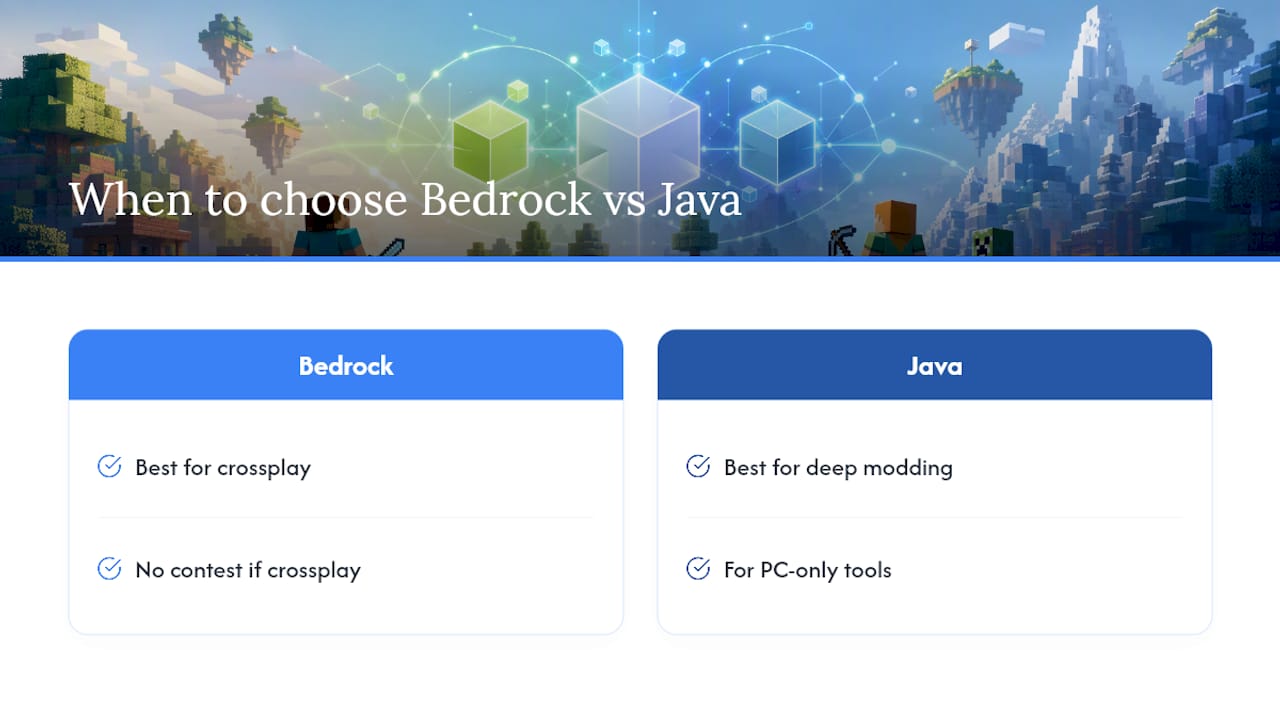
When to choose Bedrock versus Java
If crossplay is the priority, choose Bedrock, no contest. If deep modding and PC-only tools matter more to your group, Java still wins.
Planning a game night with mixed platforms?
Working out whether Minecraft crossplay will actually work for your group is one thing. Working out what else your group can all play together is a different puzzle entirely, and it's the one Pickthe was built to solve. Once you've sorted platforms, our crossplay compatibility checker shows you which other titles your specific mix of consoles, PC and mobile can run together, before anyone spends money finding out the hard way.

Pickthe works alongside a Minecraft session rather than instead of one. Set up a board, have everyone swipe through options, and let real-time voting settle what you play next once the Bedrock world gets old. If your group is split between platforms and you're not sure what else fits everyone, browse crossplay-ready games and see what turns up.
Frequently asked questions
Is Minecraft crossplay between Xbox and PlayStation?Yes. Both run Bedrock Edition, so once you're signed into a Microsoft account on each console, you can invite each other and play in the same world.
Is Minecraft Bedrock crossplay with mobile devices?Yes. iOS and Android both use Bedrock, so they crossplay with Windows, Xbox, PlayStation and Switch under the same Microsoft account system.
Can you play Minecraft crossplay if one friend has Java and another has Bedrock?Not natively. You'd need a workaround like GeyserMC on a self-hosted server, which comes with gameplay quirks and no official Mojang support.
Do you need Xbox Live or PlayStation Plus for Minecraft crossplay?Some consoles require an active online subscription for multiplayer generally, separate from anything Minecraft charges, so check your platform's requirements before assuming you're covered.
Does buying Minecraft once cover both Bedrock and Java?No. They're sold and licensed separately in most cases, so check your storefront before assuming a Bedrock purchase unlocks Java, or vice versa.
Sources
- GeyserMC download page
- Better Together FAQ | Minecraft
- Requirements to play Minecraft multiplayer games | Minecraft Help