Ready to Run Discord Game Night Ideas: Exact Setup, Player Counts
Ready to Run Discord Game Night Ideas: Exact Setup, Player Counts
Run a browser party game, a five-minute social-deduction round, and one creative contest, and you have a night that works for almost any server. Gartic Phone or Skribbl.io breaks the ice, Undercover fills the gaps between bigger events, and Jackbox gives you a proper centrepiece. Pair the lineup with a dedicated voice channel and a Discord Event, and you'll cut the usual "so what are we playing" chaos down to nothing.
*> TL;DR:
>
> - Setting up dedicated voice and text channels, along with scheduling a Discord Event at least 24 hours in advance, reduces logistical chaos and improves participation.
> - Browser and social deduction games like Gartic Phone, Skribbl.io, and Undercover are ideal short activities, with player counts and round lengths specifically suited for quick, repeatable play.
> - Using bots or Discord Activities for game hosting keeps everything inside the server, minimizing friction and ensuring leaderboards and progress are preserved across sessions.
> - Structuring the night into short activity blocks of 30 to 45 minutes with assigned roles helps maintain pacing and keeps interactions lively, increasing overall attendance and enjoyment.
> - Allowing members to vote quickly on the next game through a polling tool streamlines decision-making, avoiding debate and keeping the event moving smoothly.
*Table of Contents
- Quick setup checklist for a low-friction Discord game night
- Party and browser games: ready-to-run ideas with exact setup notes
- Creative competitions and community showcases
- Trivia, knowledge and debate formats that scale
- Bots and Discord Activities that remove the friction entirely
- Hosting, moderation and pacing tips that keep people coming back
- Quick reference: which idea fits tonight's group
- What actually raises attendance, in our experience
- Let your group vote on tonight's game in under two minutes
- Sources
Quick setup checklist for a low-friction Discord game night
Most game nights don't fail because the games were wrong. They fail because nobody could find the room, hear the host, or work out whose turn it was. Fix the plumbing first and the fun takes care of itself.
Start with a dedicated voice channel and a linked text channel sitting right beside it. The text channel becomes your control room: invite links, room codes, and a running scoreboard all live there so nobody has to scroll back through general chat hunting for a link posted twenty minutes ago.
Scheduling matters more than most moderators give it credit for. A Discord Event with a reminder notification does the job of a dozen "starting soon!!" pings, and it shows up in members' own calendars rather than relying on them checking a channel at the right moment.
The practical checklist for the night itself:
- Create the game-night voice channel and pin a linked text channel for links, codes and scores.
- Set up the Discord Event at least 24 hours ahead, with a reminder set for 30 minutes before start.
- Post the join link or room code five minutes before kickoff, not at the exact start time.
- Test screen share and audio yourself before anyone else joins. Nothing kills momentum faster than five minutes of "can you hear me now."
- Turn on push-to-talk for anything voice-heavy. Open mics with six or more people turn into a wall of background noise fast.
- Assign one helper to run the scoreboard and a separate person to handle moderation. Doing both yourself while also hosting is how good nights fall apart.
- Pin the room codes and join links in the text channel so latecomers can catch up without asking in chat.
This structure lines up with what most practical setup guides for Discord game nights recommend: a dedicated channel, push-to-talk, scheduled events, and scorekeeping kept visible in text rather than shouted over voice.
Pro Tip: Build a reusable scoreboard template once (a pinned message or a simple embed) and copy it for every session. Rebuilding your setup from scratch every week is the single biggest time sink moderators report, and it's entirely avoidable.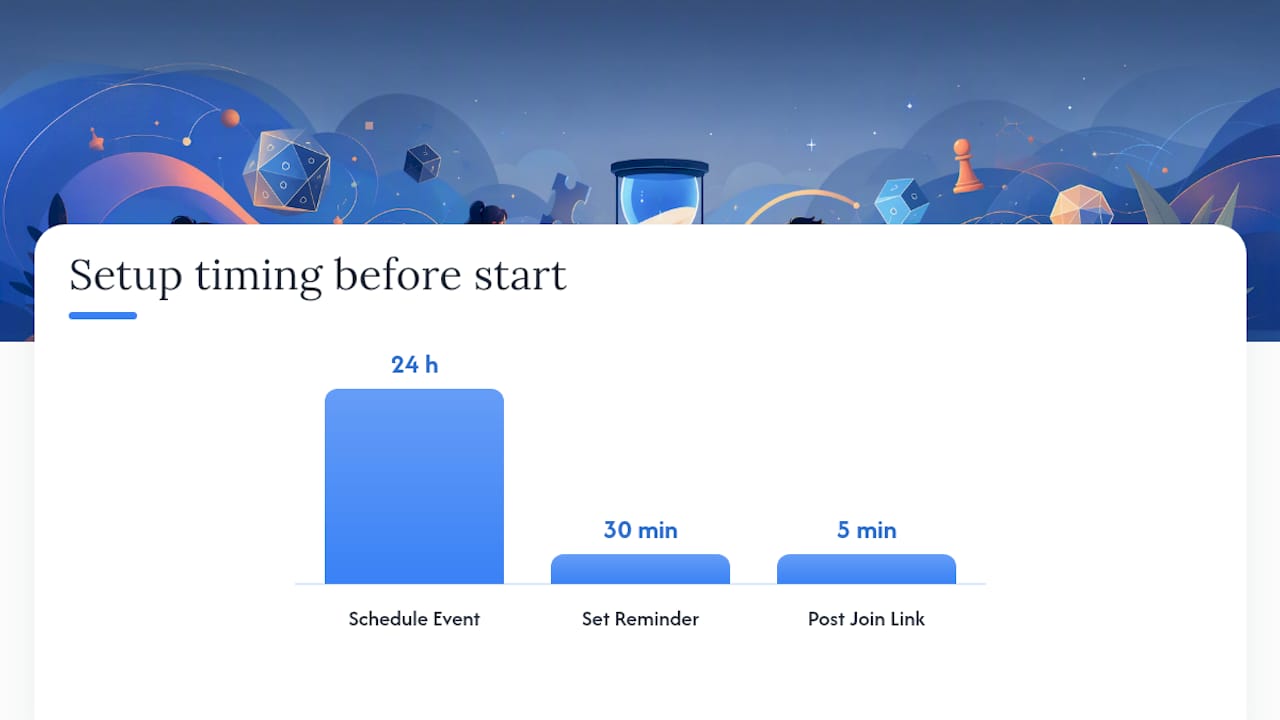
Party and browser games: ready-to-run ideas with exact setup notes
These are the games that actually get chosen when a server needs something tonight, not next week. Each one below comes with the player counts and round lengths that make it work, not just a name to Google.
Gartic Phone is the natural opener. It's a browser-based drawing telephone game: someone writes a prompt, the next person draws it, the next person guesses what the drawing shows, and the chain of misinterpretation is where the laughs come from. Ideal group size sits between four and twelve players, and a full round runs around ten minutes, short enough to squeeze in three or four before people's attention drifts. Setup is a single shared link, no accounts, and the host just needs to create a private room and drop the URL into your text channel. Skribbl.io does a similar job with more control. You create a private room, set a custom word list if you want to keep things server-specific (inside jokes, show references, whatever your community runs on), and adjust drawing time per round. It comfortably handles three to ten players and works well as a rotating activity between bigger events because rounds are quick and nobody has to sit out for long. Jackbox is the heavyweight of the list, and for good reason. One person hosts using a Party Pack they own, shares their screen with audio, and everyone else joins on their own device at jackbox.tv using a room code. Typical groups run three to eight players depending on the specific game inside the pack, and because everyone plays from their phone or a second screen, it works even when half your server is watching over a shaky laptop camera. The trade-off is that someone needs to actually own the Party Pack, which is the one piece of friction in an otherwise smooth setup. BombParty and other word-battle formats reward fast reflexes over creativity. Players race to type a word containing a given set of letters before a timer runs out, and losing a life for each miss keeps the pressure on. Lobbies fill quickly, rounds move at a clip, and it's one of the better options when you want energy up rather than a slow, thoughtful pace. Keep an eye on scoring; most versions track it automatically, so your job is mostly making sure everyone understands the rules before the clock starts. Undercover, a social-deduction word game, is the best short filler on this list. Everyone gets a secret word except one "undercover" player, who gets a related but different word, and the group has to work out who's faking it through a few rounds of description and voting. It works best with five to eight players, and matches typically wrap in three to five minutes, which makes it perfect for slotting between longer events without losing momentum.> The numbers that matter: Undercover's sweet spot is a small group of players with rounds lasting a few minutes, and games like it are ideal short-form fillers because they need almost no setup and produce genuinely shareable moments.
This mix of quick browser games and short social-deduction rounds gives you the pacing most successful game nights rely on: short, repeatable rounds for the social stuff, and one bigger centrepiece like Jackbox to anchor the evening.
Creative competitions and community showcases
Not every night needs to be about winning fastest or guessing correctly. Creative contests bring out members who'd never touch a trivia leaderboard but will happily spend twenty minutes on a meme.
Running one well comes down to three things: how you collect entries, how you judge them, and how fast the whole thing wraps up.
1. Set up submissions in a dedicated thread. Ask members to post attachments directly rather than linking off-platform, so everything stays visible in one place and nobody has to dig through DMs to find an entry.
2. Use a simple judging rubric, not a vague vibe check. Three categories work well: creativity, effort, and relevance to the theme. Score out of five each and total it, or skip the maths entirely and let reactions decide.
3. Run meme tournaments as a bracket. Pair entries head to head, post each matchup as a poll, and give each round a fixed timebox (fifteen minutes is usually enough). Brackets keep momentum going because there's always a next round to look forward to.
4. Try a collaborative "finish my art" challenge. One member starts a drawing or a short story, posts it, and the next person continues it. It removes the pressure of a blank canvas and tends to pull in people who'd never enter a solo contest.
5. Automate the voting. Discord's native poll feature or straightforward reaction voting (🏆 for the winner) means you're not manually tallying anything, and results update in real time for everyone watching.
Prizes don't need to be elaborate. A custom role, a pinned "Hall of Fame" post, or first pick of the next game night theme all work as well as anything you'd have to pay for. The goal isn't the prize, it's the excuse to make something and show it off.
Trivia, knowledge and debate formats that scale
Trivia is the format most moderators reach for first, and it scales from a five-person late-night group to a fifty-person community event without much extra work, provided you set it up properly.
Kahoot! and pop-culture quizzes are the simplest entry point. The host shares their screen, runs through questions at a steady pace, and keeps rounds snappy, ten to fifteen questions rather than fifty, so energy stays high and nobody checks out halfway through. Wiki races and GeoGuessr-style challenges work well for a smaller, sharper crowd. Set a fixed time limit per round (two minutes is usually plenty) and decide your tiebreak rule before you start, not after two people finish at the exact same second. Closest-guess-wins is the cleanest fallback for GeoGuessr; fastest-completion-time works for Wiki races. Codenames turns your server into two competing teams. Split players into private team voice or text channels so each side can strategise without the other overhealing, then run the main game in the shared channel. It's one of the better options for a server that wants something more tactical than reflex-based.A few extra formats worth keeping in your back pocket:
- Hotseat rapid-fire rounds, where one player answers as many questions as possible in sixty seconds while a helper keeps score in text.
- Bracketed trivia tournaments, where pairs face off and the loser is eliminated, tracked in a pinned scoreboard message rather than shouted over voice.
- Themed rounds tied to your server's own interests, whether that's a specific game universe, a show fandom, or inside jokes only your regulars will get.
Keeping score in the text channel rather than relying on memory or voice call-outs avoids the arguments that inevitably crop up when two people remember the tally differently.
Bots and Discord Activities that remove the friction entirely
Every extra tab, login screen, or external link between "let's play something" and actually playing loses you a few people. Discord's own Activities panel and a handful of purpose-built bots solve that by keeping the whole game inside the app.
Discord Activities launch directly from a voice channel through the Activities panel, no installs and no external links required. They're the best fit when you want something quick and low-commitment, since anyone in the voice channel can join with a single click.For bots, a few stand out for game night specifically:
- Mini runs multiple party games through slash commands, including UNO, Connect 4, and trivia-style rounds, and its version of UNO supports up to 25 players without any setup beyond the command itself.
- PartyGameBot handles classic party formats like Spyfall, Truth or Dare, and Who Am I? using simple commands such as
/spyfall create, with no external accounts needed to play. - Guess The Drawing and similar bots bring a Skribbl.io style experience directly into a text channel, useful if you want to skip the browser link entirely.
The advantage of running games through bots is real: everything stays inside one server, leaderboards and XP systems persist between sessions, and there's no risk of someone losing a link in a busy channel. The downside is that most bots cap player counts somewhere between eight and twenty five depending on the game, and heavy use during peak hours can occasionally hit rate limits, so it's worth testing a bot with a small group before rolling it out to your whole server.
Pro Tip: If part of your community has patchy internet, favour turn-based or text-based activities over anything reflex-heavy. A laggy drawing game is mildly annoying; a laggy reflex game is unplayable, and that's usually the moment casual members quietly stop showing up.Hosting, moderation and pacing tips that keep people coming back
The games matter less than the rhythm of the night. A well-paced two-hour session with average games beats a brilliant game that drags on for four hours with no structure.
1. Structure the night in blocks. A short warm-up (Gartic Phone or a quick Undercover round), two main activities, and a cooldown period where people just chat tends to outperform one long, unbroken session.
2. Rotate activities every 30 to 45 minutes. Attention drops off a cliff past that mark, even for games people genuinely enjoy.
3. Split the workload across roles. One host runs the games, one scoreboard keeper tracks points in text, and one rules enforcer handles disputes and disruptive behaviour so the host never has to stop the action to play referee.
4. Use channel permissions to manage access. A "game night" role that unlocks the relevant voice and text channels means late joiners can self-serve without pinging a moderator for access.
5. Handle dropouts fast and without drama. If someone disconnects mid-round, keep playing and let them rejoin at the next natural break rather than pausing the whole group.
6. Reward regulars lightly. A recurring weekly slot, a small role, or first pick on next week's theme turns first-timers into people who show up on purpose.
None of this is about running a tighter ship for its own sake. Industry practice around online communities consistently points to connection over competition as the thing that actually keeps people around, and structure is what makes that connection possible instead of accidental.
Quick reference: which idea fits tonight's group
Effort ratings here reflect setup time, not how fun the game turns out to be. A "high effort" escape-room style event still fits comfortably in a single evening once you've built the puzzle structure once, and you can reuse it with a fresh theme next month.
What actually raises attendance, in our experience
Reducing friction between "let's play something" and actually playing is the single biggest lever moderators have, and it's the one most consistently ignored. Every extra click, every "wait, what's the link again," every five-minute stall while someone finds a Party Pack code, costs you attendees who quietly close the tab and don't come back next week.
That's the exact problem PickThe.Games set out to solve, though not through better bots or slicker channel setups. Our database covers more than 6,000 games, and the voting and veto system exists because the argument over what to play often eats more time than the game itself. Discord integration means that decision can happen inside the same server you're already using for game night, rather than in a separate app nobody remembers to open.
If you're still working out your rotation, our guide on running a game night on Discord goes deeper into scheduling and role structure than we've covered here. For community management beyond game night specifically, this player-focused guide to community best practices is worth a read too.
> — PickThe
Let your group vote on tonight's game in under two minutes
There are tools available to quickly settle "what are we playing" without a single argument in chat. Instead of pinging five people and waiting for replies, create a board, drop it in your Discord server, and let everyone swipe through options in real time. Whoever gets the most votes wins, and the veto system stops one loud opinion from derailing the whole group.

It works well as a companion to everything above: run Gartic Phone or Jackbox as your planned activity, then open a board for the "what's next" slot instead of letting the group stall out debating it. If your server mixes platforms, the crossplay checker tells you instantly who can actually join a given multiplayer title before anyone wastes ten minutes installing something half the group can't run.
Browse the best party games list for fresh options to load onto your next board, or use the game voting app directly during your next session and see how much faster the night gets moving.
Sources
25 Discord event ideas that actually workBest online games to play on Discord
Undercover, the word game for Discord
Mini, a Discord bot for party games PartyGameBot on GitHubdiscord-together, Discord Activities on GitHub
How to pick a game for game nightResearch note on community and play