The best PC and Xbox crossplay games in 2026
The best PC and Xbox crossplay games in 2026

If your group is split between PC and Xbox, these are the titles that actually let you play together right now: Fortnite, Minecraft (Bedrock), Rocket League, Apex Legends, Call of Duty (Warzone / Modern Warfare), and Halo Infinite are the strongest starting points for most groups. Each supports full PC to Xbox crossplay with no platform-specific paywall to unlock it.
Here are the top picks at a glance, with a quick reason for each:
- Fortnite — Free, zero barriers, and your whole group can squad up regardless of storefront.
- Minecraft (Bedrock Edition) — The go-to for creative and survival co-op; Java Edition does not crossplay with Xbox.
- Rocket League — Free-to-play, fast matches, and unified matchmaking across PC and Xbox.
- Apex Legends — Solid squad shooter with crossplay on by default; cross-progression requires account linking.
- Call of Duty (Warzone / Modern Warfare) — The franchise's crossplay is broad and works across Battle.net and Microsoft Store on PC.
- Halo Infinite — Free multiplayer, Xbox Game Pass, and full PC↔Xbox crossplay with no extra steps.
- Overwatch 2 — Free-to-play hero shooter with full crossplay and a Battle.net account requirement on PC.
- Sea of Thieves — Co-op piracy at its best; available on Steam and Microsoft Store with full Xbox crossplay.
The comparison table below covers platforms, cross-save, price, and key notes for ten of the most popular PC and Xbox crossplay games so you can scan the details before committing.
*Key takeaways
The single most important thing to know: crossplay between PC and Xbox works across dozens of titles in 2026, but the storefront your PC player uses and whether they have linked the required developer account determines whether it actually connects.
| Point | Details |
|---|---|
| Check the PC storefront first | Steam, Epic, Microsoft Store, and Battle.net each have different crossplay flows; confirm your PC player's storefront before the session. |
| Bedrock Edition only for Minecraft | Java Edition does not crossplay with Xbox; everyone needs Bedrock Edition for PC↔Xbox sessions. |
| Developer account linking is often required | Apex Legends (EA), Destiny 2 (Bungie), and Call of Duty (Activision) all need account linking before crossplay works. |
| Privacy settings block more invites than NAT | The Xbox network "play with people outside Xbox Live" setting is the most common silent blocker; check it at account.xbox.com. |
| Pickthe finds a game your whole group can join | The Crossplay Compatibility Checker at Pickthe filters by platform so your group only sees games that actually work for everyone. |
*Table of Contents
- Which PC and Xbox crossplay games work across every storefront?
- Detailed notes on every major PC↔Xbox crossplay title
- How does PC to Xbox crossplay actually work?
- How to set up crossplay between your PC and an Xbox
- Common problems with PC↔Xbox crossplay and how to fix them
- How we verified crossplay support for this list
- Why crossplay lists matter more than most players realise
- Stop guessing and let your group pick a crossplay game together
- Sources
Which PC and Xbox crossplay games work across every storefront?
The table below covers ten of the most-played titles as of June 2026. Crossplay status was verified against official store pages, developer support documentation, and the Microsoft Store's cross-platform multiplayer catalogue. See the methodology section for full verification details.
> Last checked: June 2026. Crossplay status can change with updates; always confirm on the game's official store page or developer support site before purchasing.
Xbox Game Pass contains many titles that support crossplay in varying degrees, making it a practical way to trial several of these games before buying. *Detailed notes on every major PC↔Xbox crossplay title
Not every game on this list behaves the same way. Storefront, account requirements, and the scope of crossplay vary more than most roundups admit. Here is what your group actually needs to know for each title.
Fortnite is the simplest crossplay experience on this list. Your group needs Epic Games accounts, and the game handles the rest. There is no Steam version, so PC players must use the Epic Games Store launcher. Cross-progression is full, meaning your skins and V-Bucks carry across devices. Minecraft (Bedrock Edition) is the version that matters for PC↔Xbox crossplay. The Microsoft Store or the standalone Minecraft launcher on PC connects directly to Xbox players. Java Edition, which many PC players own, runs on a completely separate network and cannot join Bedrock servers or Xbox sessions. If your group mixes Java and Bedrock owners, you will need everyone on Bedrock. A Microsoft account is required for both. Rocket League left Steam in 2020 when Epic Games acquired Psyonix. PC players now use the Epic Games Store, and an Epic account ties cross-progression. Matchmaking pools are unified, so ranked play is shared across PC and Xbox. Apex Legends has crossplay enabled by default between PC and Xbox. Cross-progression, however, is partial: an EA account links some data, but full progression unification between platforms has been a gradual rollout. Check the EA App or Steam version on PC; both support Xbox crossplay. The game is available on Steam and the EA App. Call of Duty (Warzone and Modern Warfare) uses an Activision account to tie cross-progression across Battle.net (PC) and Xbox. Warzone is free; the premium Modern Warfare titles require a purchase. Call of Duty: Black Ops 7, the franchise's 2025 entry, follows the same account structure and supports full PC↔Xbox crossplay. Halo Infinite is available on Steam and the Microsoft Store on PC, and both versions crossplay with Xbox. The multiplayer mode is free; the campaign requires a purchase or an active Game Pass subscription. A Microsoft account handles social features and cross-progression.
Overwatch 2 requires a Battle.net account on PC and has no Steam release. Crossplay with Xbox is full, and your Battle.net account carries all progression. Voice chat works cross-platform through the in-game system.
Sea of Thieves is one of the cleaner crossplay experiences: both the Steam and Microsoft Store versions on PC connect to the same Xbox player pool. A Microsoft account is required. The game is available on Game Pass, which makes it easy for groups to try without an upfront cost.
Destiny 2 uses Bungie's own account system to enable cross-progression and crossplay. The PC version is Steam-only. Crossplay is full across PC and Xbox, but expansions are sold separately and must be owned on each account to access that content together.
Diablo IV requires a Battle.net account and supports full crossplay and cross-progression across PC and Xbox. Co-op sessions work across platforms without any additional steps beyond account linking.
Warframe is a free-to-play co-op looter-shooter available on Steam and the Microsoft Store on PC. Crossplay between PC and Xbox is supported, though cross-progression has been a phased rollout; check the official Warframe site for the current status of your platform pairing.
No Man's Sky supports crossplay between PC (Steam and Microsoft Store) and Xbox. Cross-save is available via a Hello Games account. The shared universe means your group can explore and build together regardless of platform.
Borderlands 3 has crossplay between PC and Xbox, but the scope depends on the storefront. The Steam version and the Epic Games Store version have had separate matchmaking pools at various points; check the current 2K Games support page for the latest status. Cross-progression is not available between all storefronts.
Borderlands 4, released in 2025, supports full crossplay between PC and Xbox from launch, with cross-progression tied to a 2K account. It is the cleaner option for groups who want the Borderlands experience without storefront headaches.
Rainbow Six Siege supports crossplay between PC and Xbox, but with caveats. Ranked modes have historically restricted crossplay between PC and console due to input device fairness concerns. Casual modes are more permissive. Check the current Ubisoft Connect settings, as this has changed with updates.
Dead by Daylight supports full crossplay between PC (Steam) and Xbox. Cross-progression is available via a Behaviour account. The game is available on Game Pass, making it easy to get your group in without everyone buying it outright.
Helldivers 2 supports crossplay between PC (Steam) and PlayStation, but Xbox support is not currently available. If your group includes Xbox players, this one does not work for PC↔Xbox sessions.
THE FINALS is a free-to-play competitive shooter available on Steam and Xbox with full crossplay. No account linking beyond the in-game Embark Studios account is required.
Marvel Rivals supports crossplay between PC and Xbox. The game uses its own NetEase account system. Available on Steam and the Microsoft Store on PC.
Chivalry 2 supports crossplay between PC (Steam and Epic Games Store) and Xbox. No additional account linking is required beyond the platform accounts.
Split Fiction is a co-op-only title from Hazelight Studios. It supports crossplay between PC (Steam and EA App) and Xbox, and includes a Friend's Pass so only one player in a pair needs to own the game.
FragPunk is a free-to-play tactical shooter available on Steam and Xbox with full crossplay. A NetEase account is used for progression.
Fall Guys / Fall Guys: Ultimate Knockout is free-to-play and supports full crossplay between PC (Epic Games Store) and Xbox. An Epic account is required. The game was rebranded and relaunched under Epic after the original Steam version was retired.
Aragami (the original) supports co-op between PC (Steam) and does not officially support Xbox crossplay. Aragami 2 has broader platform support; check the official Lince Works site for current crossplay status.
Back 4 Blood supports crossplay between PC (Steam, Epic Games Store, and Microsoft Store) and Xbox. Cross-progression is not available across all storefronts. The game is on Game Pass.
Roblox supports crossplay between PC and Xbox natively. A Roblox account handles cross-progression and social features. The platform is free, with in-game purchases using Robux.
Fall Guys and Fall Guys: Ultimate Knockout refer to the same game post-relaunch. The original Steam version was sunset; the current free-to-play version on Epic is the one with active crossplay support.
Pro Tip: Before your group commits to a game, check whether everyone owns the same edition. Borderlands 3 and a handful of others have had edition-specific crossplay restrictions where the base game and a Game of the Year edition could not always crossplay freely.
*
Halo Infinite is available on Steam and the Microsoft Store on PC, and both versions crossplay with Xbox. The multiplayer mode is free; the campaign requires a purchase or an active Game Pass subscription. A Microsoft account handles social features and cross-progression.
Overwatch 2 requires a Battle.net account on PC and has no Steam release. Crossplay with Xbox is full, and your Battle.net account carries all progression. Voice chat works cross-platform through the in-game system.
Sea of Thieves is one of the cleaner crossplay experiences: both the Steam and Microsoft Store versions on PC connect to the same Xbox player pool. A Microsoft account is required. The game is available on Game Pass, which makes it easy for groups to try without an upfront cost.
Destiny 2 uses Bungie's own account system to enable cross-progression and crossplay. The PC version is Steam-only. Crossplay is full across PC and Xbox, but expansions are sold separately and must be owned on each account to access that content together.
Diablo IV requires a Battle.net account and supports full crossplay and cross-progression across PC and Xbox. Co-op sessions work across platforms without any additional steps beyond account linking.
Warframe is a free-to-play co-op looter-shooter available on Steam and the Microsoft Store on PC. Crossplay between PC and Xbox is supported, though cross-progression has been a phased rollout; check the official Warframe site for the current status of your platform pairing.
No Man's Sky supports crossplay between PC (Steam and Microsoft Store) and Xbox. Cross-save is available via a Hello Games account. The shared universe means your group can explore and build together regardless of platform.
Borderlands 3 has crossplay between PC and Xbox, but the scope depends on the storefront. The Steam version and the Epic Games Store version have had separate matchmaking pools at various points; check the current 2K Games support page for the latest status. Cross-progression is not available between all storefronts.
Borderlands 4, released in 2025, supports full crossplay between PC and Xbox from launch, with cross-progression tied to a 2K account. It is the cleaner option for groups who want the Borderlands experience without storefront headaches.
Rainbow Six Siege supports crossplay between PC and Xbox, but with caveats. Ranked modes have historically restricted crossplay between PC and console due to input device fairness concerns. Casual modes are more permissive. Check the current Ubisoft Connect settings, as this has changed with updates.
Dead by Daylight supports full crossplay between PC (Steam) and Xbox. Cross-progression is available via a Behaviour account. The game is available on Game Pass, making it easy to get your group in without everyone buying it outright.
Helldivers 2 supports crossplay between PC (Steam) and PlayStation, but Xbox support is not currently available. If your group includes Xbox players, this one does not work for PC↔Xbox sessions.
THE FINALS is a free-to-play competitive shooter available on Steam and Xbox with full crossplay. No account linking beyond the in-game Embark Studios account is required.
Marvel Rivals supports crossplay between PC and Xbox. The game uses its own NetEase account system. Available on Steam and the Microsoft Store on PC.
Chivalry 2 supports crossplay between PC (Steam and Epic Games Store) and Xbox. No additional account linking is required beyond the platform accounts.
Split Fiction is a co-op-only title from Hazelight Studios. It supports crossplay between PC (Steam and EA App) and Xbox, and includes a Friend's Pass so only one player in a pair needs to own the game.
FragPunk is a free-to-play tactical shooter available on Steam and Xbox with full crossplay. A NetEase account is used for progression.
Fall Guys / Fall Guys: Ultimate Knockout is free-to-play and supports full crossplay between PC (Epic Games Store) and Xbox. An Epic account is required. The game was rebranded and relaunched under Epic after the original Steam version was retired.
Aragami (the original) supports co-op between PC (Steam) and does not officially support Xbox crossplay. Aragami 2 has broader platform support; check the official Lince Works site for current crossplay status.
Back 4 Blood supports crossplay between PC (Steam, Epic Games Store, and Microsoft Store) and Xbox. Cross-progression is not available across all storefronts. The game is on Game Pass.
Roblox supports crossplay between PC and Xbox natively. A Roblox account handles cross-progression and social features. The platform is free, with in-game purchases using Robux.
Fall Guys and Fall Guys: Ultimate Knockout refer to the same game post-relaunch. The original Steam version was sunset; the current free-to-play version on Epic is the one with active crossplay support.
Pro Tip: Before your group commits to a game, check whether everyone owns the same edition. Borderlands 3 and a handful of others have had edition-specific crossplay restrictions where the base game and a Game of the Year edition could not always crossplay freely.
*
How does PC to Xbox crossplay actually work?
Understanding the mechanics saves your group a lot of frustration on game night. There are two distinct concepts worth separating: Xbox Play Anywhere and crossplay.
Xbox Play Anywhere is a Microsoft programme that gives you a single purchase usable on both Xbox and Windows, with synced cloud saves and achievements. It is a purchasing and progression benefit, not a multiplayer feature. You can own a Play Anywhere title on Xbox and play it on PC without buying it twice, but that alone does not mean you can play with someone on a different platform. Crossplay is the separate feature that lets players on different platforms share the same multiplayer sessions. A game can support crossplay without being a Play Anywhere title, and vice versa.On PC, Xbox network features (friends lists, invites, party chat) are mediated through the Xbox app or Xbox Game Bar when a title integrates Xbox services. For those features to work, you need to be signed into your Microsoft account on PC and have Game Bar enabled. Some titles, particularly those on Steam, use their own social layer (Steam friends) alongside or instead of Xbox network features, which can create confusion when sending cross-platform invites.
Microsoft's PC Xbox requirements include specific certification testing for cross-network play, which means any title that ships with Xbox network crossplay has passed a defined policy check. That is a useful trust signal: if a game lists Xbox network crossplay on its store page, it has been tested against those requirements.
Storefront differences matter more than most players expect:
- Microsoft Store on PC titles typically integrate Xbox network features natively, making friend invites and party setup straightforward.
- Steam titles that support Xbox crossplay usually require you to sign into an Xbox or developer account within the game itself, rather than through Steam's own social system.
- Epic Games Store titles (Fortnite, Rocket League) use Epic's own social layer; Xbox crossplay works, but the invite flow goes through Epic friends, not Xbox friends.
- Battle.net titles (Overwatch 2, Diablo IV, Call of Duty) use Activision or Blizzard accounts as the crossplay identity layer.
How to set up crossplay between your PC and an Xbox
Follow these steps the first time your group tries to connect across platforms.
1. Confirm the storefront and edition. Check that everyone owns the same game and, where relevant, the same edition. Note which PC storefront the PC player is using (Steam, Epic, Microsoft Store, Battle.net).
2. Sign into your Microsoft account on PC. Open the Xbox app or Xbox Game Bar (Win + G) and sign in. This is required for Xbox network social features even if the game is on Steam.
3. Link any required developer account. For games like Apex Legends (EA account), Destiny 2 (Bungie account), or Call of Duty (Activision account), link the account before launching the game. Most games prompt you on first launch.
4. Enable crossplay in the game's settings. Most titles have crossplay on by default, but check the multiplayer or social settings menu to confirm. Rainbow Six Siege and a few others have per-mode crossplay toggles.
5. Add your friends using the correct platform ID. On Xbox network-integrated titles, search by Gamertag. On Epic titles, use Epic display names. On Battle.net titles, use the BattleTag.
6. Send or accept a party invite. Use the in-game party system rather than the platform overlay where possible; this avoids invite routing issues between storefronts.
7. Check voice chat settings. Cross-platform voice chat works in most titles through the in-game system. Xbox Game Bar party chat does not extend to non-Xbox-network players, so use the game's own voice chat for mixed groups.
Before your first session, run through this quick checklist:
- Game installed and updated to the latest version on both devices.
- Microsoft account signed in on PC (Xbox app or Game Bar).
- Developer account linked if the game requires it.
- Privacy settings on Xbox network set to allow crossplay (check at account.xbox.com).
- Crossplay toggle confirmed as enabled in the game's settings.
- Both players have added each other using the correct platform identifier.
Common problems with PC↔Xbox crossplay and how to fix them
Most crossplay issues fall into a small number of categories. Here is what to check first.
You cannot see your friend in-game or send an invite- Confirm both players have crossplay enabled in the game's settings.
- Check Xbox network privacy settings at account.xbox.com (see the Pro Tip above).
- Verify you are searching by the correct identifier: Gamertag for Xbox network titles, Epic display name for Epic titles, BattleTag for Battle.net titles.
- On Steam titles, confirm the PC player is signed into their Xbox or developer account within the game, not just Steam.
- NAT type mismatches can block invite delivery. On Xbox, check Settings > General > Network Settings and aim for Open NAT. On PC, check your router's UPnP settings.
- Some routers block UDP traffic on the ports games use. Consult the game's official support page for the specific ports to open.
- Check the game's server status page; invite failures during outages are common and resolve on their own.
- Xbox Game Bar party chat only works between Xbox network users; it does not extend to Steam or Epic players. Use the game's built-in voice chat instead.
- Check that the game's voice chat is set to "All" or "Cross-platform" rather than "Platform only" in the audio or social settings.
- Discord is a reliable fallback for cross-platform voice when in-game chat fails.
- Some games have separate matchmaking pools by input device (controller vs keyboard and mouse). Rainbow Six Siege is the most notable example. Check the game's crossplay settings for an input-device toggle.
- Storefront-specific pools exist in a small number of titles. If you and your friend are on different PC storefronts for the same game, check the developer's support page for known restrictions.
1. Confirm the developer account is linked on both platforms (EA account, Bungie account, Activision account, etc.).
2. Log out and back in on both devices after linking.
3. Check the game's official support page; some cross-progression features require a one-time migration step.
Xbox Support's cross-network play guidance covers sign-in and party troubleshooting in detail and is worth bookmarking for persistent issues. *How we verified crossplay support for this list
Every game on this list was checked against at least two of the following sources before being included:
- The game's official listing on the Microsoft Store, filtered for cross-platform multiplayer capability.
- The developer's own support or FAQ page (EA Help, Bungie Help, Activision Support, etc.).
- The game's Steam store page, where crossplay status is listed under "Features".
- The Wikipedia cross-platform play list, used as a cross-reference only and always verified against an official source.
- Digital Trends' cross-platform games round-up, used as an editorial cross-check for scope and progression notes.
> Last checked: June 2026. Crossplay status changes with game updates, platform policy changes, and storefront agreements. We recommend checking the game's official store page or developer support site before purchasing, particularly for titles where storefront-specific caveats apply (Borderlands 3, Rainbow Six Siege, Aragami).
A known limitation: some storefronts do not explicitly label crossplay status on the game's page, and developer support pages are not always updated promptly after changes. For the most reliable current status, the Microsoft Store's cross-platform multiplayer filter and the game's own in-game settings are the most authoritative checks.
*Why crossplay lists matter more than most players realise
Here is an honest observation from the team at Pickthe: the biggest friction in group gaming is not finding a good game. It is finding a good game that everyone can actually join. Crossplay lists solve half of that problem, but they often oversimplify it.
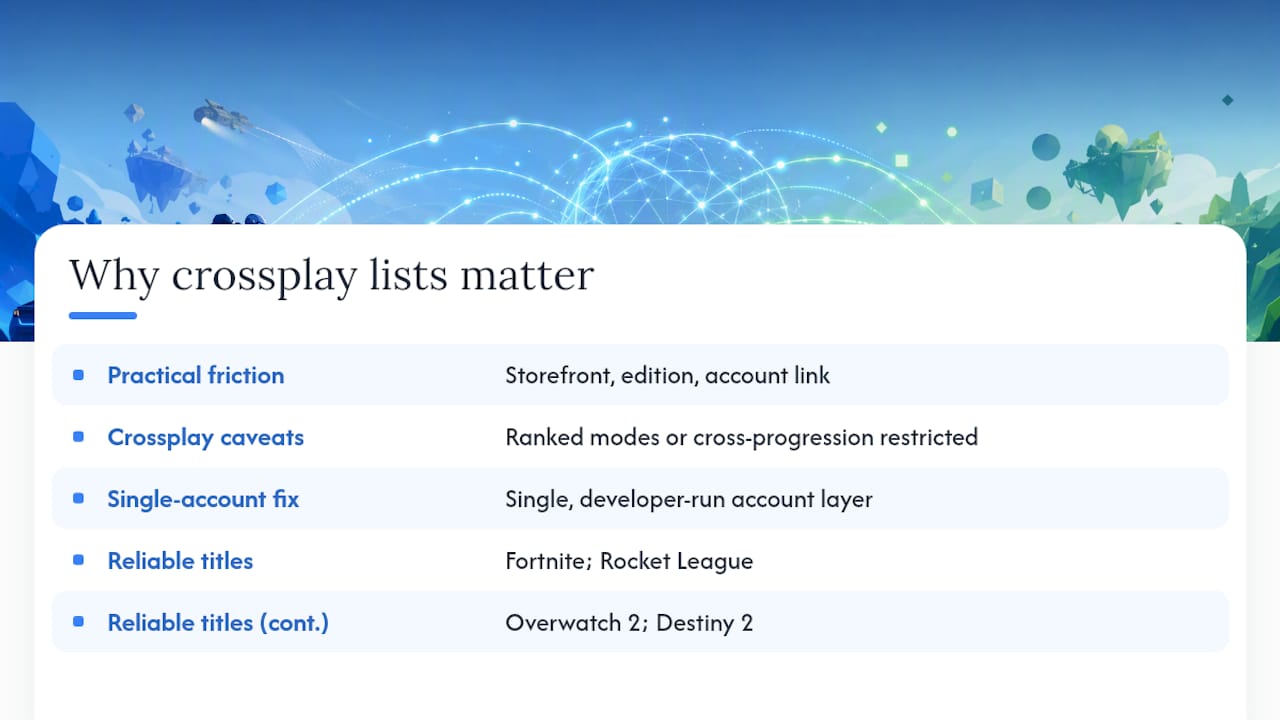
The phrase "supports crossplay" covers a huge range of actual experiences. A game might crossplay between PC and Xbox but restrict ranked modes to same-platform matchmaking. It might support crossplay but not cross-progression, meaning your Xbox friend's 200-hour character cannot join your Steam session at the same level. It might list crossplay on its store page but require a third-party account link that half your group will not have set up.
What this means practically: a crossplay list is a starting point, not a guarantee. The storefront your PC player uses matters. The edition they own matters. Whether they have linked the right developer account matters. A game that works perfectly for one group can be a wall of error messages for another, purely because of those variables.
The titles that consistently avoid these problems are the ones with a single, developer-run account layer: Fortnite (Epic), Rocket League (Epic), Overwatch 2 (Battle.net), and Destiny 2 (Bungie). These games route all crossplay identity through one account system, which removes the storefront ambiguity. If your group wants the path of least resistance, start there.
Microsoft's push toward PC-first development for next-gen Xbox titles is genuinely good news for crossplay. When PC and Xbox are treated as the same development target from day one, crossplay is not bolted on later; it is native. Newer titles like Borderlands 4 and THE FINALS reflect that shift. Older titles with complicated storefront histories (Borderlands 3, Rainbow Six Siege) are the ones worth double-checking before your group commits.
*
Stop guessing and let your group pick a crossplay game together
Knowing which games support PC↔Xbox crossplay is one thing. Getting your whole group to agree on one is another. Pickthe solves exactly that: your group creates a board, everyone swipes through games, and the Crossplay Compatibility Checker filters the list to only show titles that work for every platform in your group.

No more back-and-forth in the group chat. The voting board, veto system, and Discord bot integration mean the decision takes minutes rather than an evening. Streamer Mode lets your audience vote in real time via a shareable link with live OBS leaderboard support. Over 6,000 games in the database, continuously updated, and free to use. Head to Pickthe's PC↔Xbox crossplay hub to browse the full list and start a vote with your group now.
*Sources
When you need the most current information, go straight to the primary sources:
- Xbox Play Anywhere (Microsoft developer resources)
- Microsoft says you should build next-gen Xbox games by building them for PC (The Verge)
- All cross-platform games (Digital Trends)
- The Complete Xbox Game Pass Crossplay List: Every Game (Gamerant)
- Cross-network play on Windows devices and Xbox consoles (Xbox Support)
- List of video games that support cross-platform play (Wikipedia)
For any specific game, the developer's own support site (EA Help, Bungie Help, Activision Support, Ubisoft Connect support) is the most reliable place to check current crossplay and cross-progression status, particularly after major updates.