Top 3 joingame.net Alternatives 2026
Top 3 joingame.net Alternatives 2026

Finding multiplayer game selection software that works across platforms without complicated setup or paywalls frustrates many groups of friends. Many tools either limit group voting features, hide compatibility, or force subscription barriers that exclude some members. You can match one of three substitutes to your group’s gaming needs, platform mix, and preference for casual or organised play.
Table of Contents
PickThe.Games

At a Glance
PickThe.Games reports a database of over 6,000 games. The vendor advertises that group selection can take just a few minutes. The site uses swipeable boards so friends register preferences quickly and each person gets equal input.
Core Features
PickThe.Games matches groups around multiplayer titles while checking platform compatibility and crossplay support. It offers a four‑option voting system — yes, maybe, no, and ban — plus a veto mechanism to remove unsuitable picks. Invitations work by link or Discord bot, and the platform supports Twitch streams and several Discord connection methods including slash commands, embedded activity, and OAuth or one‑time codes.
Key Differentiator
Real‑time group voting that surfaces platform support inside chat and on stream is the standout feature. Voting happens where your group already talks, so compatibility conflicts appear before you launch a match. That integrated approach reduces back‑and‑forth about whether everyone can actually join.
Pros
PickThe.Games helps your group find multiplayer titles that are playable across different consoles and PC platforms. The crossplay tracking is presented clearly during votes so you see compatibility at a glance. Discord integration keeps the selection inside chat with slash commands and an embedded activity, while Twitch support lets streamers involve viewers during a live pick. Setup is fast, with boards ready in minutes, and the vendor advertises no paywalled features so all members can participate without subscription barriers.
Cons
- Relies on community and developer reports for platform support and crossplay, so you may encounter occasional inaccuracies.
Who It's For
This suits groups of friends planning multiplayer nights across Xbox, PlayStation, and PC who use Discord or Twitch. Your group benefits if you want a democratic, low‑drama selection method rather than long message threads. Streamers who want audience input during a session will also find the voting and Twitch hooks useful.
Unique Value Proposition
The swiping board plus a veto system forces preference into a clear shortlist while keeping choice democratic inside Discord or a Twitch stream. That workflow turns chat noise into a ranked set of playable options you can act on. Because the site claims no paywalls, everyone in your group can vote without gating participation.
Real World Use Case
Your group has players on Xbox, PlayStation, and PC and needs one game everyone can join. You create a board, invite friends via a Discord bot or link, and each person swipes and votes. The board highlights crossplay support and the winner is obvious, so you launch play without platform arguments.
Website: https://pickthe.gamesroll.gg

At a Glance
Join a board game with a single shareable link and play in your phone browser or on desktop. Roll.gg emphasises quick, casual sessions for groups of friends without downloads or accounts. It targets social game nights rather than competitive league play.
Core Features
The site offers browser and mobile compatibility so members can join sessions without installing software. Sessions start from a shared link and games favour familiar board formats aimed at casual groups. The experience runs anywhere with internet access, keeping each session portable.
Key Differentiator
The clearest difference is the simple link based join flow that removes installs and setup. That approach suits quick social rounds where you want everyone playing in minutes. Compared with Pickthe, Roll.gg serves a narrower need by focusing on direct play rather than group preference matching.
Pros
Joining is friction free thanks to shareable links that any group member can open on a phone or desktop. Games require no downloads and no account creation for casual participants, which lowers the barrier to join. The mobile friendly design keeps sessions portable, so a party can move from chat to play within minutes. The vendor lists free access, which makes trying a session risk free for casual groups. The simple entry reduces coordination friction for rotating groups.
Cons
- Limited public information about the catalogue makes it hard to judge game variety.
- No clear details on scoring, moderation tools, or advanced multiplayer options for organised groups.
- Third party reviews suggest occasional stability problems, which may interrupt sessions for groups.
- Limited social features such as persistent profiles or friends lists reduce long term community building.
When It May Not Fit
Large organised clubs or tournament groups will need features that Roll.gg does not advertise. If you require detailed scoring, lobby moderation, or cross platform matchmaking, this service may fall short. Reliability concerns from independent reviews make it a poor match for sessions where downtime is unacceptable.
Who It's For
Friends who want a simple, casual game night with minimal setup will find Roll.gg useful. Casual gamers who prefer phone or browser play over installs will appreciate the portability. It is not aimed at organised communities that need retention tools or advanced matchmaking.
Real World Use Case
A group of friends split across cities use a shared link to start a board game on their phones. No one signs up and the session runs inside the browser, keeping the night casual and fast. If a game crashes, the group can resend the link or swap to another title quickly.
Website: https://roll.gg##
At a Glance
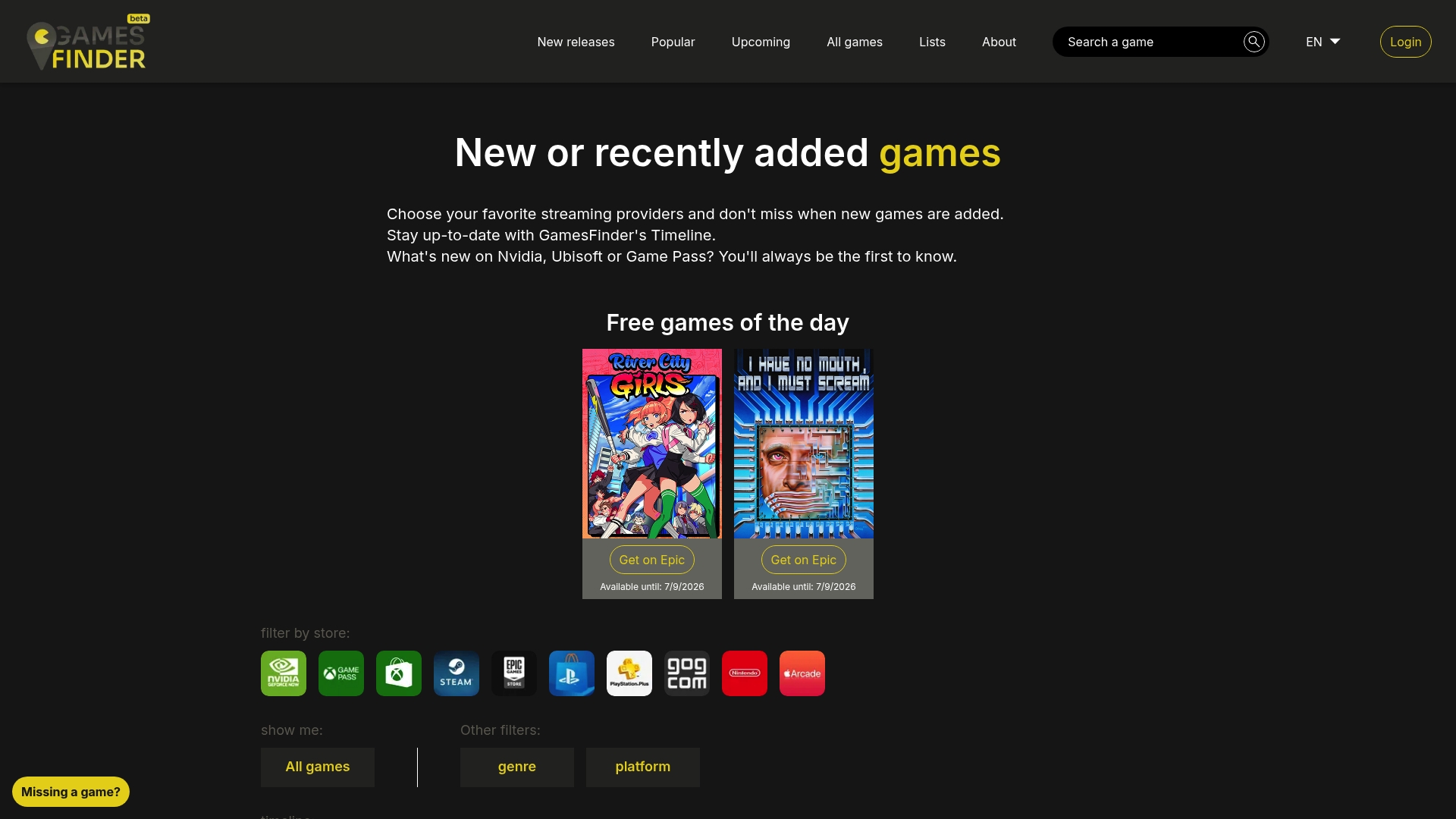
Aggregates release and store availability information from several major storefronts into one searchable view. The site highlights free daily games and lists recent additions in a timeline. This makes it quick to spot newly discounted or newly released titles across Steam, Epic Games, and PlayStation Store.
Core Features
GamesFinder lets you filter game lists by store, genre, and platform so you can find matches that suit your group. The timeline shows recent game additions and updates, and a dedicated feed highlights free games of the day. The site links directly to the originating stores rather than offering downloads itself.
Key Differentiator
GamesFinder’s strength is its consolidated view of store availability and release timing, which reduces the time you spend checking multiple storefronts. That single-portal approach helps you compare where a title is available and whether any store is running a promotion. For groups deciding where to buy a game, this aggregation is the most useful feature.
Pros
The site keeps you informed about new and upcoming releases across several major stores, helping your group spot deals before they disappear. Filtering by store and platform makes personalised searches faster when you need to know if everyone in the group can play the same title. The timeline and daily free games feed save you from visiting multiple storefronts and hunting through release notes.
Cons
- Limited to informational content; it does not sell or host games directly.
- Relies on external store links for purchases, so you must complete transactions on the original storefront.
- May miss niche or indie store releases because it focuses on major digital storefronts.
When It May Not Fit
If your priority is arranging what your group will play together rather than where to buy it, this site is too narrow. When you need in-app voting, party planning, or crossplay compatibility checks, this does not provide those collaborative tools. If you want a community hub with threads and shared boards, this service does not offer that functionality.
Who It's For
Gamers who want a quick overview of where new releases and promotions live across major stores will find this helpful. Your group will benefit when someone needs to know which storefront has the best price or which platform offers a free promotion. It suits players who already know how they will buy games and simply need up to date availability information.
Real World Use Case
Your group has agreed to buy a cooperative game but one friend prefers PlayStation and another prefers PC. You open GamesFinder, filter by platform and store, and see which storefront currently lists the game and whether any discounts apply. You then share the originating store link so the group can complete purchases on their preferred platform.
Website: https://gamesfinder.ggComparison of alternatives
Cross-platform compatibility planning during game selection significantly benefits from specialised tools. Determining the suitability of existing platforms, aligning group preferences, and ensuring setup are aspects for decision making.
Integration With Communication Platforms
PickThe.Games delivers integrated voting for group decisions directly within Discord and Twitch environments. This positioning streamlines multiplayer selections by combining choice and compatibility. By contrast, Roll.gg focuses purely on direct play, lacking the community participation element inherent to PickThe.Games. GamesFinder.gg specialises in aggregating store data, providing insights useful for purchases but outside Discord integration.
Ease of Setup
Roll.gg simplifies game nights by enabling sessions with just a browser link, no downloads required. This design supports casual and lightweight setups, ideal for groups with transient members. However, PickThe.Games extends effort into creating a universal compatibility matrix, making initial setup deliberate yet rewarding for intricate planning. GamesFinder.gg retains the search-oriented interface but lacks direct gameplay utility.
Best fit
- Groups needing integrated voting for compatibility checks across platforms will prefer PickThe.Games for its transparent and streamlined multiplayer planning.
- Casual players preferring quick, no-account browser games will find Roll.gg beneficial thanks to its focus on simplicity.
- Communities seeking price comparisons, promotions, and storefront availability should consider GamesFinder.gg for efficient game discovery.
Our pick
PickThe.Games optimises game planning workflows for groups prioritising platform-inclusive options. It bridges compatibility tracking with preference voting, effectively accommodating diverse gaming setups. Although Roll.gg excels in quick-start scenarios, PickThe.Games provides added depth for sustained group engagement, making it the recommended choice for those seeking crossplay support.
Explore the following platforms offering tools for organising multiplayer game sessions, highlighting features, compatibility, and ease of use.
| Product | Core Feature | Key Differentiator | Best For | Notable Limitation |
|----------------------|----------------------------------|-----------------------------|-----------------------------------------------|------------------------------------------------------------------|
| Pickthe | Swipeable preferences board | Real-time group voting | Groups across Xbox, PlayStation, and PC | May rely on community reports for crossplay accuracy. |
| Roll.gg | Browser-based casual play | One-click join via link | Casual groups preferring minimal setup | Limited moderation tools and occasional session stability issues.|
| GamesFinder.gg | Aggregated storefront data | Consolidated view of deals | Gamers checking multi-store promotions | Does not host or sell games directly; limited niche listings. |
Finding The Right Multiplayer Game Without the Hassle
Choosing a multiplayer game that suits everyone’s platform can quickly become a drawn-out chore. Many joingame.net alternatives overlook the key challenge of confirming cross-platform compatibility in real time while keeping everyone’s preferences equally valued. Your group needs a straightforward way to decide together without endless chats or platform debates.
Pickthe tackles this by letting your group create interactive game boards where each member swipes through over 6,000 titles, signalling yes, maybe, no, or even vetoing unsuitable options. Its clear presentation of platform support and Discord integration means your group gets a quick, democratic shortlist of playable games in minutes — no paywalls, no fuss.
Give your multiplayer planning a fresh start with Pickthe. Try creating a board and see how easily your group can unite around a game that everyone can join, whatever their device.
FAQ
#### How does Pickthe support group voting for multiplayer games?
Pickthe allows real-time group voting during game selection, making it easy for everyone to participate. The platform's four-option voting system and veto mechanism ensure that group members can make choices efficiently without confusion. This approach fosters democratic play selection and keeps discussions focused.
#### What is the difference between Pickthe and Roll.gg?
Roll.gg offers a simple link-based join flow that allows friends to hop into games without installs or setup. While this feature is excellent for quick social rounds, Pickthe excels by providing crossplay support and integrated voting mechanisms to streamline multiplayer game selection for different platforms. Each tool fits distinct gaming scenarios, so your choice will depend on your group's needs.
#### Can I use Pickthe if my group plays on different platforms?
Yes, Pickthe is designed to help groups with players across various consoles and PCs. The platform checks for crossplay support, ensuring everyone can participate in selected games. This functionality sets Pickthe apart, making it ideal for groups seeking multiplayer titles that are playable together.
#### What features make Pickthe a better choice for multiplayer gaming compared to its competitors?
Pickthe’s standout feature is its real-time voting within Discord or Twitch, which surfaces platform compatibility insights immediately. This integration allows groups to see which games everyone can play before starting a match, eliminating the common issue of platform conflicts.
#### How quickly can I set up a game session using Pickthe?
Setting up a game session with Pickthe is quick and user-friendly, typically taking just a few minutes. The site generates boards for group selection fast, allowing friends to register preferences and vote swiftly without unnecessary delays.