Democratic game picking for multiplayer groups
Democratic game picking for multiplayer groups

Democratic game picking for multiplayer groups is the process of selecting multiplayer games through fair, inclusive voting that accounts for everyone's devices and preferences. Getting your group to agree on what to play sounds simple. In practice, it turns into a debate about who owns what, which platforms support crossplay, and whose turn it is to choose. The real problem is scattered information. Consolidating platform, ownership, and crossplay data before anyone casts a vote prevents the decision loops that kill game night momentum. Tools like Pickthe are built specifically to solve this, combining a database of over 6,100 games with real-time group voting and crossplay filtering.
How to prepare your group for democratic game picking
Good preparation is the difference between a five-minute decision and a forty-minute argument. The first step is knowing which platforms everyone in your group uses. PC, PlayStation 5, Xbox Series X, and Nintendo Switch all have different crossplay relationships, and crossplay works per platform pair, meaning PC and Xbox may connect fine while PC and PS5 do not for the same title. Assuming everyone can play together without checking is the most common mistake groups make.
Once you know each person's platform, check crossplay compatibility before collecting preferences. There is no point voting on a game that half your group cannot access. Use Pickthe's crossplay compatibility checker to filter your options down to games that actually work across your specific combination of platforms. This single step removes the most frustrating part of multiplayer game selection.

After filtering for compatibility, gather a rough sense of what genres your group is in the mood for. A quick show of hands or a group chat message asking "co-op or competitive tonight?" takes thirty seconds and narrows the field considerably. You do not need a formal survey. You just need enough information to make the voting pool relevant.
| Platform combination | Crossplay generally available | Notes |
| --- | --- | --- |
| PC and Xbox | Yes | Most titles support this pairing |
| PC and PS5 | Varies by title | Check per game before voting |
| Xbox and PS5 | Varies by title | Improving but not universal |
| PC, Xbox, and PS5 | Rare | Only a handful of major titles |
| Nintendo Switch and others | Limited | Switch crossplay is the least common |
Pro Tip: If your group has mixed subscriptions such as Xbox Game Pass or PlayStation Plus, note which games each person already owns or can access. This prevents voting for a game that requires a purchase nobody wants to make on the night.What democratic methods work best for group game voting?
Traditional polling is the default for most groups, but it carries a real flaw. When one person suggests a game out loud and others nod along, that is not a vote. That is social pressure. Polling suffers from bandwagon effects because people can see how others are voting and adjust their own preferences accordingly. The result is a choice that reflects the loudest voice, not the group's genuine preference.
Swiping-based voting solves this directly. Each player votes privately and independently, and results are only revealed after everyone has finished. Swiping votes are hidden until final tabulation, which removes the bandwagon effect entirely. Pickthe uses this mechanic, letting each group member swipe yes, no, maybe, or ban on each game before results are tallied into a ranked list.
For groups that reach a genuine stalemate, a digital spinning wheel adds a fair, transparent resolution. Digital wheels can spin up to six options simultaneously and support elimination modes, making them a practical tiebreaker rather than a gimmick. Use one only after your democratic vote has narrowed the field to two or three equally popular options.
Here is a quick comparison of the three main methods:
| Method | Fairness | Ease of use | Best group size |
| --- | --- | --- | --- |
| Open polling | Low (social bias risk) | Very easy | Any |
| Swiping-based voting | High (private votes) | Easy with a tool | 3–20 players |
| Random digital wheel | Neutral | Very easy | Any (tiebreaker only) |
Key advantages of swiping-based voting over open polling:
- Votes are private, so no one feels pressured to follow the group
- Results reflect genuine preferences rather than social dynamics
- Crossplay and platform filters apply automatically before voting begins
- A ban option lets players veto games they genuinely cannot or will not play
- Ranked results show the group's second and third choices, useful if the top pick falls through
How to tailor game choice for different group sizes
Group size changes everything about which games work and how you should run the selection process. Small groups of three to six players have the luxury of nuance. You can vote on games with complex rules, longer play times, and higher skill ceilings because everyone stays engaged throughout. Collaborative game picking for these groups can afford to be more detailed.
Large groups of ten or more need a completely different approach. The priority shifts to games where everyone participates at the same time with minimal downtime between turns. Popular large-group games include Codenames, Wavelength, and Telestrations, all of which scale well and keep players active rather than waiting. These titles work because they split players into teams or run simultaneously, so nobody sits idle.
Structuring your game night in stages also helps large groups stay energised. A warm-up, main event, and high-energy shift keeps momentum building rather than fading. A game like Wavelength or Just One works well as a warm-up. Codenames suits the main event. Something faster and louder, such as Jackbox Party Pack titles, works as a high-energy closer.
For mixed-experience or mixed-age groups, prioritise games with:
- Simple rules that can be explained in under two minutes
- No prior gaming knowledge required to participate
- Team formats that pair experienced players with newcomers
- Short rounds so less engaged players do not feel trapped
- A party game format that rewards creativity or social reading over reflexes
Step-by-step guide to using a digital platform for group game selection
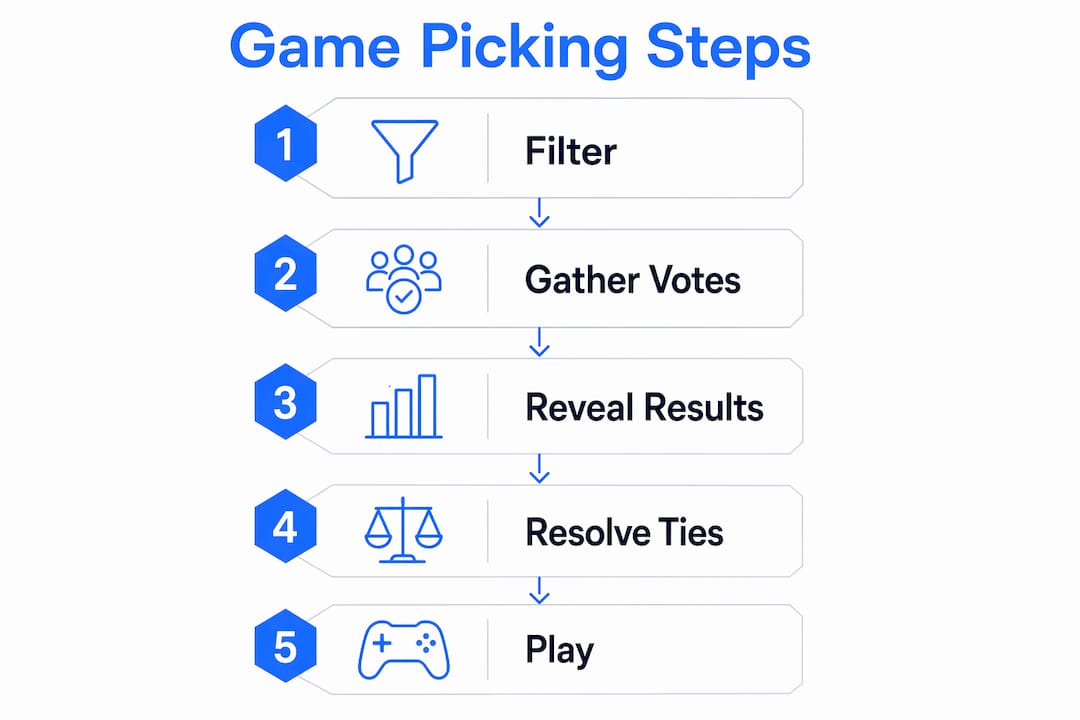
Running a structured session with a digital tool takes the guesswork out of collaborative game picking. Here is how to do it with Pickthe:
1. Create a game board. Open Pickthe and start a new group session. Give it a name your group will recognise, such as "Friday Night Games."
2. Set your platform profiles. Each player selects their gaming platform. Pickthe uses this to filter the game pool automatically, so only compatible titles appear in the vote.
3. Invite your group. Share the session link via Discord, a group chat, or directly in a voice call. Players join without needing an account.
4. Swipe through games. Each player votes yes, no, maybe, or ban on each game. Pickthe tracks over 6,100 games with cover art, descriptions, platform availability, and multiplayer type displayed for each one.
5. Review ranked results. Once everyone has voted, Pickthe generates a ranked list based on group matches. Games with the most yes votes and fewest bans appear at the top.
6. Make the final call. Use the ranked list to pick your game. If the top result does not suit the mood, your second and third choices are right there.
7. Integrate with Discord. Pickthe connects with Discord, so you can run the entire session inside your existing voice chat without switching apps.
The crossplay filtering happens automatically at step two. Filtering by crossplay before voting ensures your group never votes enthusiastically for a game that only two of you can actually play together.
How to troubleshoot common problems in group game selection
Even with a fair system in place, things go wrong. The most common issue is a top-ranked game that still does not feel right once you look at it closely. Maybe the session length is wrong for the time you have, or one player has already played it to death. In that case, move straight to your second-ranked result. The ranked list exists precisely for this situation.
Stalemates happen when two or three games tie at the top. Do not restart the entire vote. Instead, run a quick elimination round with only the tied games, or use a digital spinning wheel to pick between them. This keeps the process fair and avoids the session collapsing into another open debate.
Late joiners and absent voters are a real disruption. The cleanest solution is to set a voting deadline before the session starts. Anyone who has not voted by the deadline simply does not contribute to that round. This sounds harsh, but it protects the group's time and keeps things moving.
Encouraging honest preferences is harder than it sounds. Some players default to agreeing with whatever the group seems to want.
- Remind everyone that votes are private before the session starts
- Emphasise that a ban vote is not rude, it is useful information
- Rotate who sets the initial game pool so no one person dominates the options
- Keep the voting pool to a manageable size, around ten to fifteen games, so players engage rather than click through carelessly
Key takeaways
Democratic game picking works best when crossplay compatibility is filtered before voting, not after, removing unplayable options from the pool entirely.
| Point | Details |
| --- | --- |
| Filter before voting | Check crossplay compatibility per platform pair before the vote begins to avoid unplayable top picks. |
| Use private voting | Swiping-based methods produce more honest results than open polls by removing social pressure. |
| Match method to group size | Large groups need simultaneous-play games like Codenames or Wavelength to maintain energy. |
| Structure your game night | A warm-up, main event, and high-energy closer keeps groups of ten or more engaged throughout. |
| Use ranked results | A ranked list of group matches means a stalemate never kills the session. |
What I have learned from running group game nights
The biggest mistake I see groups make is treating game selection as an afterthought. They spend forty minutes debating in a group chat, someone eventually caves, and the game they pick turns out to be incompatible with two players' platforms. The whole night starts on a sour note before anyone has loaded a title.
The shift that actually changes things is separating compatibility from preference. You cannot vote fairly on a game your group cannot play. Once you filter for crossplay first, the vote becomes genuinely useful rather than a source of conflict. Pickthe does this automatically, and that single feature is what makes it worth using over a generic poll.
I have also found that the ban mechanic is underused. Groups treat it as aggressive, but it is the most honest signal a player can send. A ban on a game that one person genuinely dislikes saves the whole group from a miserable session. Normalise using it.
Finally, do not underestimate mood. The best game for your group on a Tuesday night with four tired people is not the same as the best game for a Saturday with eight people who are ready to compete. Build that context into your voting session by asking one quick question about energy levels before anyone swipes. It takes ten seconds and it makes the results far more relevant.
> — Pickthe
How Pickthe makes group game selection simple
Picking a game your whole group can actually play together should not take longer than the game itself.

Pickthe is a free group game voting app that filters over 6,100 titles by platform and crossplay compatibility before your group votes. Each player swipes yes, no, maybe, or ban privately, and the platform generates a ranked list of matches in minutes. There are no paywalls and no account required to join a session. If your group uses Discord, Pickthe integrates directly so you can run the whole process inside your voice chat. Whether you are after party multiplayer games, action titles, or something more relaxed, Pickthe narrows the field to what your group can genuinely play together. Visit pickthe.games to start your first session tonight.
FAQ
What is democratic game picking for multiplayer groups?
Democratic game picking is the process of selecting a multiplayer game through fair, private voting that accounts for each player's platform and preferences. It replaces open debate with a structured method that gives everyone equal input.
Why does crossplay matter before voting on a game?
Crossplay works per platform pair, so PC and Xbox may connect for one game while PC and PS5 do not. Filtering by crossplay before voting ensures your group only votes on games everyone can actually access and play together.
How does swiping-based voting reduce bias?
Swiping votes are hidden until all players have finished, which prevents bandwagon effects. Each player votes independently without seeing others' choices, producing results that reflect genuine group preferences rather than social pressure.
What games work best for large groups of ten or more?
Games like Codenames, Wavelength, and Telestrations scale well for large groups because they allow simultaneous participation and keep downtime low. A structured session with a warm-up, main event, and high-energy closer maintains momentum throughout the night.
What should I do when the top-voted game does not suit the group?
Move to the second or third result in your ranked list. If two games tie, run a quick elimination vote or use a digital spinning wheel to resolve the stalemate fairly without restarting the entire session.