Call of Duty crossplay: your complete 2026 setup guide
Call of Duty crossplay: your complete 2026 setup guide
Yes, Call of Duty supports crossplay. Every current mainline title, including Black Ops 6, Modern Warfare II, Modern Warfare III, Vanguard, and Warzone, lets you squad up across PlayStation, Xbox, and PC when you log in with the same Activision account. That single account is the key to the whole system. Before you do anything else, sign in to your Activision account at Activision.com, link your platform, and confirm your Activision ID.
A few quick exceptions worth knowing upfront:
- Warzone Mobile runs on separate servers and only matches mobile players against other mobile players, so you cannot squad up with console or PC friends there.
- PlayStation 4 and Xbox One players should check Activision's platform update page, as Warzone support on those older consoles has been phased down.
- Cross-progression is tied to your Activision account, not your platform account, so linking correctly matters from day one.
Key takeaways
Call of Duty crossplay works across PlayStation, Xbox, and PC on all current mainline titles when every player is signed into a linked Activision account.
| Point | Details |
| --- | --- |
| Activision account is required | Link your platform at Activision.com before your first cross-platform session or friend invites will not work. |
| Warzone Mobile is separate | Mobile players match only with other mobile players; cross-progression via Activision account still applies. |
| Console crossplay toggle | PlayStation and Xbox players can disable crossplay in system privacy settings; PC clients generally cannot. |
| Older consoles are affected | Warzone support on PS4 and Xbox One has been phased down; current-gen or PC is needed for the full ecosystem. |
| Pickthe speeds up group coordination | Use the crossplay compatibility checker at pickthe.games to confirm which CoD title your whole group can play together. |
*Table of Contents
- Which Call of Duty games support crossplay right now?
- How does Call of Duty crossplay actually work?
- How do you enable or disable crossplay in Call of Duty?
- What does cross-progression cover and how do you protect it?
- Matchmaking tradeoffs and what RICOCHET does for crossplay
- Quick fixes for common crossplay problems
- How Pickthe helps your group organise mixed-platform Call of Duty sessions
- How do crossplay matchmaking settings let you filter by platform?
- How to join cross-platform parties and manage voice chat
- Do region restrictions or latency affect your crossplay experience?
- How crossplay affects ranked play, leaderboards, and competitive modes
- The honest truth about running mixed-platform squads
- Your group deserves a faster way to pick a Call of Duty title
- Sources
Which Call of Duty games support crossplay right now?
Most of the current Call of Duty library supports full crossplay across PlayStation, Xbox, and PC. Here is a clear breakdown:
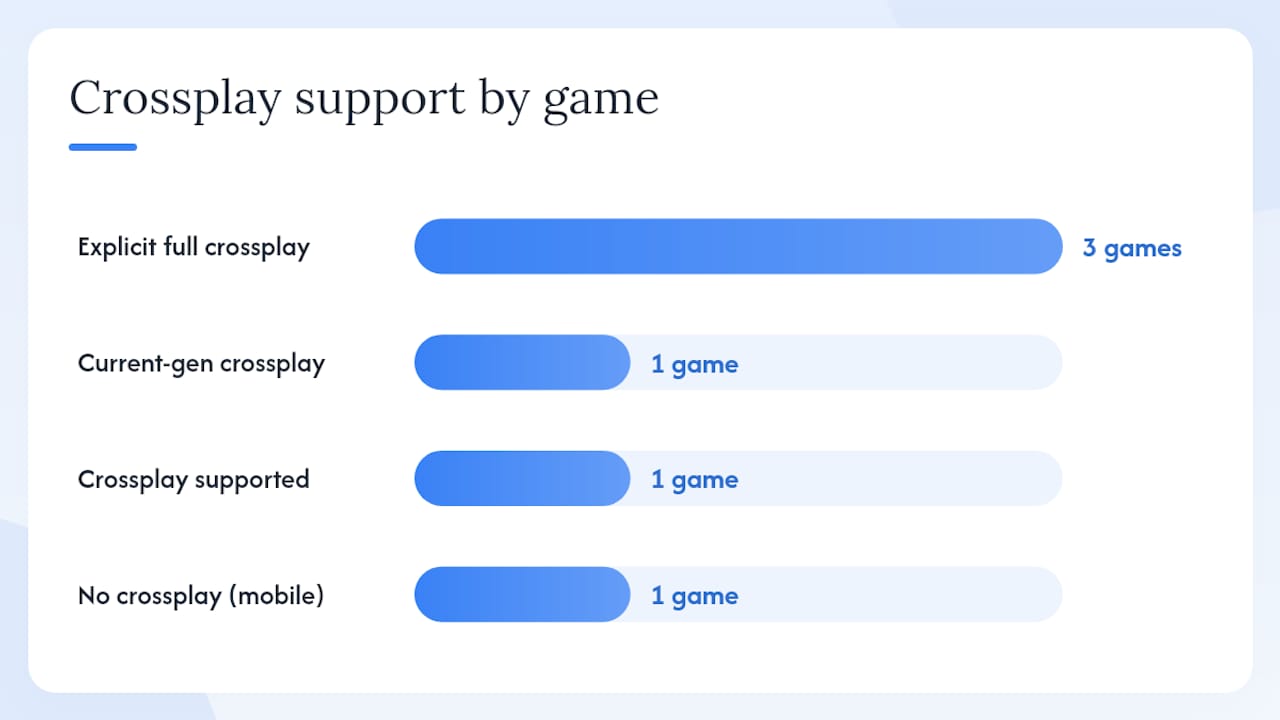
- Call of Duty: Black Ops 6 — full crossplay across PS4, PS5, Xbox One, Xbox Series X/S, and PC (Battle.net and Microsoft Store); crossplay on by default.
- Call of Duty: Warzone — crossplay-capable across all current-gen platforms; RICOCHET Anti-Cheat active.
- Call of Duty: Modern Warfare III — full crossplay across PS4/PS5, Xbox, and PC.
- Call of Duty: Modern Warfare II — full crossplay across the same platform set.
- Call of Duty: Vanguard — crossplay supported across PlayStation, Xbox, and PC.
- Warzone Mobile — cross-progression via Activision account only; no crossplay with console or PC players.
> Important: Warzone on PlayStation 4 and Xbox One is being wound down. If your group has members on older-gen hardware, they may find certain modes or updates unavailable. Upgrading to current-gen or PC is the only way to stay in the full crossplay ecosystem going forward.
A couple of platform-specific notes: if your group plays on PC, the build you use matters slightly. Steam, Battle.net, and the Microsoft Store all support crossplay, but some account-linking steps differ between clients. Cross-progression coverage also varies by title, so always verify that all platforms are linked to the same Activision account before assuming your progress will carry over.
*
How does Call of Duty crossplay actually work?
Your Activision account is the universal identity layer that makes cross-platform play possible. Without it linked to your platform, crossplay and cross-progression simply do not function.
Here is the step-by-step flow to get everything connected, as outlined by PC Gamer's Warzone crossplay guide:
1. Go to Activision.com and create an account, or sign in if you already have one.
2. Navigate to Account Linking and connect your PlayStation Network, Xbox Live, Steam, or Battle.net account.
3. Find your Activision ID in your account profile. It follows the format PlayerName#1234567.
4. Share that ID with friends. They add you via the in-game Friends menu using your Activision ID, not your PSN or Xbox gamertag.
5. Once added, you can invite each other to parties and join the same lobby regardless of platform.
A few things to keep in mind about platform linking:
- Each platform account can only be linked to one Activision account at a time.
- If you have accidentally created two separate Activision accounts and linked different platforms to each, your progression will not transfer between them. You will need to contact Activision Support to resolve a duplicate account situation.
- Steam and Battle.net are treated as separate PC clients. Link both if you play across them.
- The in-game crossplay settings are authoritative for matchmaking preferences, but your Activision account link is what actually enables cross-platform friend invites.
How do you enable or disable crossplay in Call of Duty?
Crossplay is on by default across all supported titles, so most players do not need to change anything. If you want to toggle it, the process depends on your platform.
PlayStation (PS4 / PS5):- Go to Settings > Users and Accounts > Privacy > View and Customise Your Privacy Settings.
- Set Cross-Platform Play to Allowed.
- You can also toggle crossplay inside the game under Settings > Account & Network > Crossplay.
- Open the Xbox Guide > Settings > Account > Privacy & Online Safety > Xbox Privacy > View Details & Customise > Communication & Multiplayer.
- Set You can play with people outside of Xbox Live to Allow.
- Then confirm the in-game toggle under Settings > Account & Network > Crossplay.
- On PC, Activision's Black Ops 6 support page confirms that most PC clients do not permit disabling crossplay. The in-game toggle may be greyed out or absent entirely.
For ranked playlists, some titles restrict crossplay options to maintain competitive integrity. You may find the toggle unavailable in ranked modes even when it works in unranked play.
*What does cross-progression cover and how do you protect it?
Cross-progression means your rank, Battle Pass tiers, XP, and most unlocked content follow you across platforms, provided they are all linked to the same Activision account. According to Activision's Modern Warfare support documentation, the following typically transfer:
- Operator rank and XP
- Battle Pass progress and tier unlocks
- Weapon blueprints and operator skins earned through gameplay
- Challenges and campaign completions
A few things that may not transfer cleanly:
- COD Points purchased on one platform's store (these are often platform-tied)
- Some platform-exclusive cosmetic bundles
- Content purchased before linking your accounts
The setup checklist is simple: link your new platform before your first session, confirm the link shows in your Activision account dashboard, and check that your in-game rank matches what you had on your previous platform. If it does not, contact Activision Support before playing further, as additional play on the wrong account can complicate recovery.
*Matchmaking tradeoffs and what RICOCHET does for crossplay
Crossplay expands your matchmaking pool, which generally means faster queue times and more varied lobbies. That is the upside. The tradeoffs are real, though, and worth understanding before you decide whether to leave it on.
- Mouse and keyboard precision: PC players using mouse and keyboard have a different input profile to controller players. Many console players perceive this as a disadvantage in close-range gunfights.
- Frame rate and refresh rate differences: High-end PC setups can run at significantly higher frame rates than consoles, which can affect reaction-time windows in fast-paced modes.
- Queue times when crossplay is off: Disabling crossplay shrinks your matchmaking pool to console-only players. Radio Times confirms that many players make this trade deliberately to avoid perceived PC advantages, accepting longer waits in exchange.
- Ranked modes: Some competitive playlists handle crossplay differently, and the toggle may be restricted to protect leaderboard integrity.
Quick fixes for common crossplay problems
Most crossplay issues come down to one of four root causes: an unlinked account, the wrong Activision ID, console privacy settings blocking cross-network play, or a NAT/network issue. Here is how to work through them.
1. Account not linked: Go to Activision.com, sign in, and check the Account Linking section. If your platform is not listed, add it. If it shows as linked to a different account, you have a duplicate account issue and need to contact Activision Support.
2. Wrong Activision ID: Double-check the ID format is PlayerName#1234567, including the hash and numbers. A single digit wrong means the invite goes nowhere.
3. Console privacy blocking crossplay: On PlayStation, go to Settings > Privacy and set Cross-Platform Play to Allowed. On Xbox, navigate to Privacy & Online Safety > Communication & Multiplayer and allow play with people outside Xbox Live. Xbox system privacy settings take precedence over in-game toggles, so this is the first place to check.
4. NAT issues: A strict NAT type prevents connections to players on other networks. Restart your router, check your console's network settings, and if possible, set your console to a DMZ or configure UPnP on your router.
Other common blockers:
- Seasonal updates sometimes temporarily break crossplay invites. If everything looks correct but invites still fail, check Activision's server status page.
- Restarting both the game client and the console or PC clears most session-level glitches.
- If a friend appears offline despite being in a lobby, they may have their Activision account set to appear offline. Ask them to check their online status in the Activision app or in-game social menu.
How Pickthe helps your group organise mixed-platform Call of Duty sessions
Getting five friends on different platforms into the same Call of Duty lobby is one thing. Agreeing on which mode, which title, and whether everyone's platform actually supports it is another problem entirely. That is where Pickthe's crossplay compatibility checker comes in.
The workflow is straightforward:
- Each player in your group enters their platform.
- Pickthe checks its database of over 6,000 games and surfaces which titles everyone can actually play together.
- The group swipes or votes on options in real time, with a veto system so no one gets outvoted into a game they cannot run.
- The result can be shared directly to Discord or displayed via OBS for streamer communities.
Two practical use cases: a squad of friends split across PS5, Xbox Series X, and PC can confirm that Black Ops 6 works for everyone, then vote on whether to run Warzone or multiplayer. For streamers, the Streamer Mode lets a community vote on which Call of Duty title to watch, with a live leaderboard in OBS. Check the Call of Duty page on Pickthe for a quick platform compatibility overview, or browse crossplay-friendly titles if your group wants alternatives on nights when not everyone can join a CoD session.
*How do crossplay matchmaking settings let you filter by platform?
Most current Call of Duty titles give you some control over which platforms you match with, though the granularity varies. In Black Ops 6 and Warzone, the primary toggle is a binary: crossplay on or off. When crossplay is on, you enter a shared pool of PlayStation, Xbox, and PC players. When it is off on console, you match only with other console players.
There is no native in-game filter that lets you select "console only" or "PC only" as a specific preference while keeping crossplay technically enabled. The closest equivalent is disabling crossplay on a console, which effectively creates a console-only pool. PC players cannot replicate this because the crossplay toggle is unavailable to them.
Input-based matchmaking is a related but separate system. Some titles attempt to group controller players together regardless of platform, which partially addresses the mouse-and-keyboard concern without requiring you to disable crossplay entirely. Whether this is active in a given playlist depends on the title and the current season's settings, so it is worth checking the in-game settings menu for an input-based matchmaking option if you are on a controller and finding lobbies unbalanced.
*How to join cross-platform parties and manage voice chat
Joining a cross-platform party starts with your Activision ID. Once you and your friends have added each other via Activision IDs, the invite process is the same regardless of platform.
From the in-game Social or Friends tab, find the player you want to invite and select Invite to Party. They will receive the invite on their platform and can accept to join your lobby. The party leader's platform does not affect who can join.
Voice chat across platforms works through the in-game voice system by default, so you do not need a separate app to talk to friends on different hardware. That said, many groups prefer Discord for cross-platform voice because it is more reliable, offers better audio quality, and keeps the conversation going between matches. Cross-platform gaming tips for groups covers voice chat setup in more detail if your group is weighing options.
A few things to check if voice chat is not working in a cross-platform party:
- Confirm your in-game voice chat output is set to Party rather than Everyone or Disabled.
- On PlayStation, check that the system-level microphone permissions are not blocking the game.
- On Xbox, verify that your privacy settings allow voice communication with players outside Xbox Live.
- If one player cannot hear others, ask them to check their audio output device in the game's audio settings.
Do region restrictions or latency affect your crossplay experience?
Call of Duty uses regional matchmaking servers, so crossplay does not mean you will automatically be placed in lobbies with players from other continents. The game attempts to match you with players on nearby servers to keep latency manageable. For UK players, this typically means European servers, which keeps ping low for most sessions.
Where latency becomes a crossplay-specific issue is when your group spans regions. If you are in the UK and a squad member is in North America, one of you will be playing on a server that is geographically distant. The game will generally use the party leader's region as the server anchor, which means the player furthest from that server will experience higher ping.
There is no in-game region selector in most current Call of Duty titles. The matchmaking system chooses the server automatically. If your group consistently lands on high-latency servers, the most practical fix is to designate the player with the most central location as the party leader, which gives the matchmaking system the best chance of finding a low-latency server for the majority of the group.
*How crossplay affects ranked play, leaderboards, and competitive modes
Ranked modes in Call of Duty handle crossplay differently from casual playlists. In general, ranked play keeps crossplay enabled to maintain large enough pools for skill-based matchmaking to function. Shrinking the pool to console-only in a ranked context would make it harder to find matches at higher skill tiers, so the toggle is often restricted or removed in competitive playlists.
Leaderboards in Call of Duty are typically unified across platforms when crossplay is active. Your rank and placement reflect performance against the full cross-platform pool, not just your own platform's players. This means a top-ranked player on PlayStation is competing against the same pool as a top-ranked PC player, which is worth knowing if you are chasing leaderboard positions.
For players concerned about fairness in competitive modes, the input-based matchmaking system mentioned earlier is the main mitigation. It does not fully separate platforms, but it attempts to group similar input types together within the broader crossplay pool. RICOCHET's presence in ranked lobbies is also relevant here: kernel-level detection on PC reduces the cheating risk that makes some console players reluctant to engage with cross-platform competitive play.
*The honest truth about running mixed-platform squads
The Activision account requirement is not just a technical formality. It is the single point of failure for most crossplay problems your group will encounter. Get everyone to verify their account links before the session, not during it. Nothing kills momentum like spending 20 minutes troubleshooting a duplicate account while the rest of the squad is already in a lobby.
The other thing most guides understate is the voice chat decision. In-game voice works, but it is fragile across platforms. Discord is more consistent, and if your group is already using it, there is no reason to rely on the in-game system. Agree on the voice method before you start, pick a mode that everyone's platform supports, and share Activision IDs in the group chat in advance. Those three steps resolve the majority of mixed-platform session problems before they happen.
*Your group deserves a faster way to pick a Call of Duty title
Picking which Call of Duty mode to run when your squad is split across PS5, Xbox, and PC takes longer than it should. Pickthe's crossplay compatibility checker cuts that process down to under two minutes: enter your platforms, see which titles work for everyone, then swipe or vote to agree on the one you actually want to play.

The Discord bot means you can run the whole vote inside your server without switching apps. Streamer Mode adds a live OBS leaderboard so your community can vote on the next CoD session in real time. No paywall, no sign-up required for basic use. If your group wants to browse multiplayer games beyond Call of Duty for nights when not everyone can join, Pickthe's database of over 6,000 titles has you covered. Head to Pickthe and run your first group check now.
*Sources
- Crossplay in Call of Duty: Black Ops 6
- Call of Duty: Warzone Mobile — Wikipedia
- How crossplay works in Warzone — PC Gamer