Why game compatibility delays multiplayer sessions
Why game compatibility delays multiplayer sessions
Game compatibility is defined as the requirement for all players in a session to run identical game builds, matching network configurations, and compatible platform software before a connection can be established. This is the core reason why game compatibility delays multiplayer sessions. When any one of these factors falls out of alignment, the session either fails to start or drops mid-game. Version mismatches, Strict NAT settings, anti-cheat policies, and mod state differences are the four most common game compatibility factors causing delays in 2026. Understanding each one gives your group a clear path to fixing them.
Why game compatibility delays multiplayer sessions: version mismatches explained
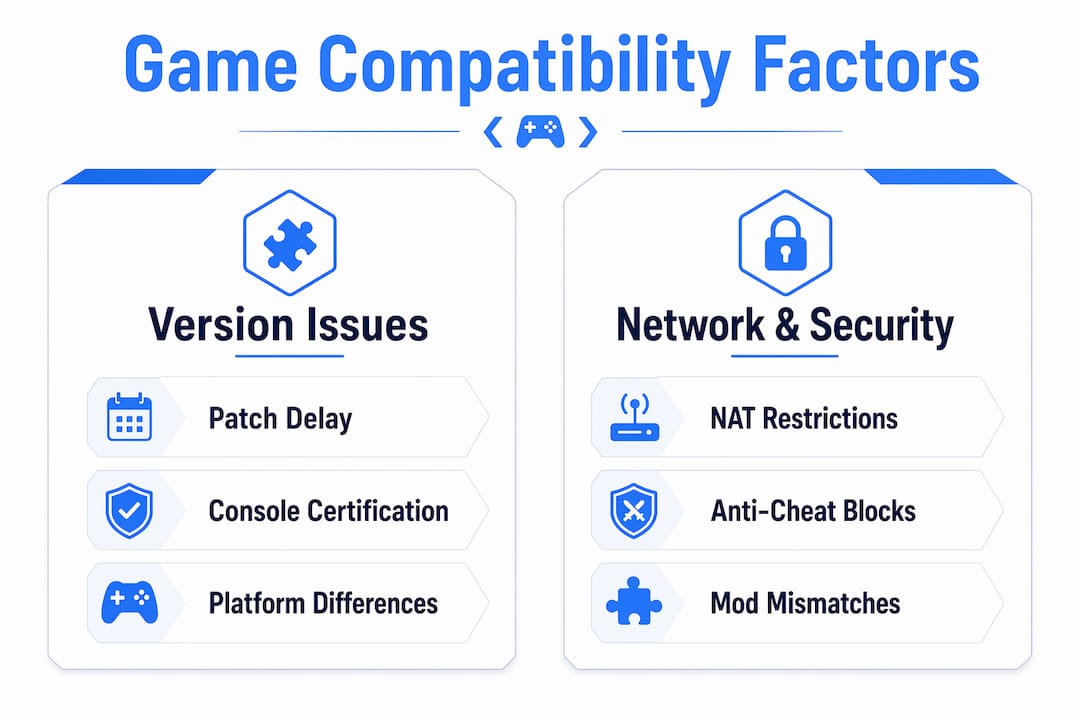
Version mismatch is the primary cause of multiplayer connection errors, requiring every player to run the same exact game build. Even a minor difference, such as one player on v10.0 and another on v10.1, is enough to block the session entirely. The game's netcode performs a build handshake at connection time, and any discrepancy causes an immediate rejection.The problem gets worse across platforms. Console certification delays mean PC and console players can run different game versions for days after a patch releases. Platform holders require developers to submit updates for review before they go live, and that process takes time. During that window, crossplay between PC and console is effectively broken.

| Platform type | Typical update deployment speed |
| --- | --- |
| PC (Steam, Epic) | Near-instant after developer release |
| Xbox (console) | 1–3 days for certification |
| PlayStation (console) | 2–5 days for certification |
| Nintendo Switch | 3–7 days for certification |
The table above shows why your PC friend can be on a newer patch while your console friends are still waiting. That gap is not a bug. It is a structural feature of how console storefronts operate.
 Pro Tip: If your group hits a version mismatch error, check whether your platform has a pending update queued. On PC, verify game files through your launcher. On console, force-check for updates manually rather than waiting for the automatic overnight cycle.
How does NAT type affect multiplayer session delays?
Strict NAT (Type 3) is one of the most common and least understood causes of multiplayer session delays. NAT, or Network Address Translation, controls how your router handles inbound connection requests from other players. Strict NAT blocks most incoming traffic, which means you cannot host sessions and struggle to join others.
The three NAT types behave very differently in practice:
- Open NAT (Type 1): Accepts all inbound connections. Hosting and joining sessions works without restriction.
- Moderate NAT (Type 2): Accepts most connections. Occasional issues with voice chat or peer-to-peer sessions.
- Strict NAT (Type 3): Blocks most inbound connections. Cannot host. Joining sessions is unreliable or impossible.
Specific ports compound the problem. Port 7777 is commonly used by multiplayer games for peer-to-peer traffic, and many home firewalls block it by default. Voice chat systems use separate ports, so even when you get into a session, your voice connection may fail independently.
Relay servers route traffic through an intermediary when direct connections fail, which increases latency and raises the risk of disconnection. Dedicated servers avoid this entirely, but peer-to-peer games have no fallback beyond the relay. That is why two players with Strict NAT on the same game often cannot connect at all, even when their versions match perfectly. Pro Tip: Log into your router's admin panel and enable UPnP (Universal Plug and Play) to let your console or PC negotiate open ports automatically. If UPnP is unavailable, manually forward the ports listed in your game's support documentation.Do anti-cheat systems block multiplayer on certain platforms?
Anti-cheat software is a significant and often overlooked source of multiplayer session delays, particularly on Linux-based systems and portable devices like the Steam Deck. Anti-cheat failures and DRM conflicts cause incompatibility on Linux-based systems, directly blocking multiplayer access even when the game itself runs fine in single-player mode.
Valve's Steam Deck compatibility ratings give a useful framework for understanding this:
| Rating | Meaning | Multiplayer impact |
| --- | --- | --- |
| Deck Verified | Full out-of-box compatibility | Multiplayer generally works as expected |
| Playable | Works with minor issues or workarounds | Multiplayer may have limitations |
| Unsupported | Does not meet compatibility standards | Multiplayer often blocked entirely |
Only around 25% of tested games carry the Deck Verified badge, which means the majority of the Steam catalogue carries some level of risk for multiplayer on SteamOS. That figure matters because it shows how narrow the safe zone actually is for portable PC gaming in a multiplayer context.
The deeper issue is that anti-cheat blocks on Proton and Linux are often a deliberate developer policy decision, not a pure technical limitation. Developers fear that the open nature of Linux makes it easier to manipulate anti-cheat processes, so they disable multiplayer access entirely on those platforms as a security measure. This affects large multiplayer pools, not just niche titles.
Compatibility badges like Deck Verified are also snapshots in time. A launcher update, a new anti-cheat version, or a codec change can cause a previously verified game to regress to Unsupported without warning. Community reports on sites like ProtonDB offer more current accuracy than official ratings alone. If your group includes a Steam Deck player, checking community feedback before your session saves everyone time.For more on Steam Deck multiplayer compatibility, Pickthe covers the specific challenges of Linux-based gaming in a crossplay group.
How to fix game compatibility issues before your session starts
Most multiplayer troubleshooting guides jump straight to reinstalling the game or resetting the router. That is almost always the wrong first step. Privacy or offline status settings block matchmaking and invite systems regardless of network or version compatibility. A player shown as "Offline" in their platform settings cannot receive session invites, full stop.
Work through this checklist before your session begins:
1. Confirm all players are on the same game version. Check the version number in the game's main menu or launcher. Do not assume an automatic update has run.
2. Set your platform status to Online. Check privacy settings on your console or PC client. Appearing offline blocks invites even when your network is fine.
3. Disable or uninstall conflicting mods. Mod state must be byte-for-byte identical across all players. Even a single mod in a different load order position causes silent lobby rejection.
4. Check your NAT type. Most consoles display this in network settings. Aim for Open or Moderate before attempting to host.
5. Verify your account is in good standing. Suspended or restricted accounts can lose access to multiplayer features without a clear error message.
Mod mismatches cause silent blocking of multiplayer lobbies, which players frequently misread as a network problem. This is particularly common in games like Total War: Warhammer 3, where mod-heavy communities run dozens of files simultaneously. The fix is straightforward: all players disable mods, test the connection, then re-enable mods one at a time.
Pro Tip: Before your next session, ask every player in your group to screenshot their game version number and send it to the group chat. It takes thirty seconds and eliminates the most common cause of failed connections.Players often over-engineer fixes like full router resets when a privacy status change or a pending update is the actual root cause. Methodical troubleshooting, starting with the simplest checks, resolves most issues in under five minutes.
Key takeaways
Game compatibility delays multiplayer sessions because all players must share identical game versions, compatible NAT settings, and matching mod states before a connection can succeed.
| Point | Details |
| --- | --- |
| Version matching is mandatory | Even a minor patch difference between players blocks the session at the connection handshake. |
| Console certification creates gaps | Platform certification can delay console updates by several days, breaking crossplay temporarily. |
| Strict NAT blocks connections | Type 3 NAT prevents hosting and makes joining sessions unreliable; enable UPnP or forward ports to fix it. |
| Anti-cheat is often policy, not tech | Multiplayer blocks on Linux and Proton are frequently deliberate developer decisions, not hardware failures. |
| Check simple settings first | Privacy status and mod load order cause more failed sessions than network hardware ever does. |
The part most guides skip entirely
After working with multiplayer compatibility issues across dozens of titles and hardware combinations, the pattern that stands out most is this: the technical problems are rarely the hardest part. The hardest part is the gap between how quickly PC platforms push updates and how slowly console certification processes move. Developers have limited control over that gap, and players have none. What you can control is how you respond to it.
The groups that have the smoothest sessions are the ones who treat compatibility as a pre-session ritual rather than a reactive problem. They check versions before they queue, they know their NAT type, and they have a shared understanding of which mods everyone is running. That takes maybe three minutes of coordination and eliminates the majority of delays.
Community forums and sites like ProtonDB are genuinely underused resources. Official compatibility ratings are published at a point in time and can go stale within weeks of a launcher or anti-cheat update. Real-time community reports catch regressions that official channels miss entirely. If your group includes players on non-standard hardware, those community sources are more reliable than the badge on the store page.
The other thing worth saying plainly: if a game blocks multiplayer on Linux as a policy decision, no amount of troubleshooting will fix it. Knowing that early saves your group hours of frustration. Check cross-platform compatibility before you commit to a title, not after everyone has downloaded it.
> — Pickthe
Finding multiplayer games that actually work for your group
Compatibility issues are far less painful when you choose games your whole group can run from the start. Pickthe maintains a catalogue of over 6,000 multiplayer titles, organised by genre and platform, so your group can filter by what everyone actually owns and plays.

The crossplay compatibility checker on Pickthe lets you input your group's platforms and see which games support cross-platform sessions without version mismatch risk. For groups who want a quick game night without the pre-session troubleshooting, browsing party multiplayer games or MMO multiplayer games gives you titles built for broad compatibility from the ground up. The real-time voting and veto system means your group agrees on a game in minutes, not hours.
FAQ
What causes game compatibility delays in multiplayer?
Game compatibility delays occur when players run different game versions, have mismatched mod states, or use incompatible network configurations such as Strict NAT. All players must share an identical game build for the session handshake to succeed.
How long do console certification delays last?
Console certification can take anywhere from one to seven days depending on the platform, during which PC and console players run different game versions. This temporarily breaks crossplay until all platforms complete their update cycle.
Does NAT type affect whether I can join a multiplayer session?
Strict NAT (Type 3) blocks most inbound connections, preventing you from hosting and making it unreliable to join sessions. Switching to Open or Moderate NAT by enabling UPnP or forwarding ports resolves the majority of connection failures caused by NAT restrictions.
Why does my game block multiplayer on Linux or Steam Deck?
Anti-cheat software on many titles blocks multiplayer on Linux-based systems, including SteamOS on the Steam Deck, as a deliberate developer policy to protect anti-cheat integrity. This is not always a technical limitation and cannot be bypassed through settings changes alone.
Can mods stop me from joining a multiplayer lobby?
Yes. Multiplayer games require byte-for-byte mod state identicality, meaning differences in which mods are active or their load order cause silent lobby rejection. All players should disable mods and test the connection before re-enabling them one at a time.